Previewing dynamic content in emails | Community
Skip to main content
Ellie_Boardman-
New Participant
April 25, 2016
Solved

Previewing dynamic content in emails

  • April 25, 2016
  • 1 reply
  • 1869 views

I've created dynamic content for an industry nurture campaign. I've gone to preview the email and the various segmented content from the main email dashboard home screen but it doesn't give me the option to select the relevant segment in preview mode. The only way I can seem to do this is by editing the email, then selecting preview. I just want to check that I've set all this up correctly and that being unable to preview the segments without editing is just a functionality issue.

I'm pretty sure it's fine but thought I'd double check as it seems a bit odd that you can't preview segmented content without being in edit mode?

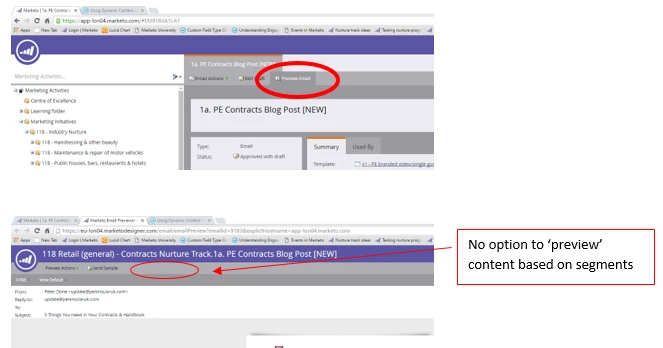
Accessing preview from email home screen (can't view dynamic content)
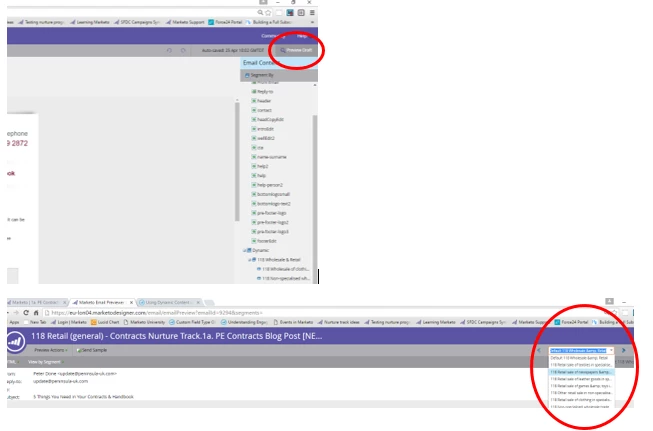
Accessing preview from edit mode (able to view dynamic content):
This post is no longer active and is closed to new replies. Need help? Start a new post to ask your question.
Best answer by Julz_James

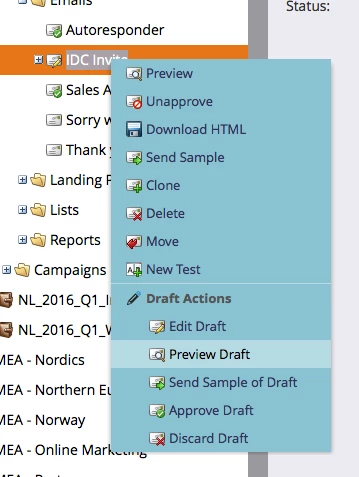
Thats because you need to 'Preview Draft' by right clicking on the email and choosing that option.

You won't see the segmentation until you approve the email and then when you click 'Preview Email' the segmented version will appear.

Thanks

Juli

1 reply

Julz_JamesAccepted solution
New Participant
April 25, 2016

Thats because you need to 'Preview Draft' by right clicking on the email and choosing that option.

You won't see the segmentation until you approve the email and then when you click 'Preview Email' the segmented version will appear.

Thanks

Juli

Ellie_Boardman-
New Participant
April 25, 2016

Great - thanks for clarifying, makes sense