Printing list of custom object fields through Velocity | Community
Skip to main content
Victor_Arieta
New Participant
July 1, 2021
Solved

Printing list of custom object fields through Velocity

  • July 1, 2021
  • 1 reply
  • 2471 views

Hi all, 

I'm trying to create a table where, for the first column, each row is filled with a particular custom object field(credit memo number3, which belongs to the creditmemo3 C.O).  I want to print all entries each contact has for the C.O. I'm using the below code:


<table border="0"> <tr> <td>Credit Memo Number </td> <td> Charity Name</td> </tr> #foreach ( $creditMemoNumber3 in $creditMemo3_cList ) <tr> <td> $creditMemoNumber3</td> <td> ${lead.Company} </td> #end </tr> </table>


 However, this is the output that I get for the first column. It correctly identified all entries of this field for the contact, but the output format is not what I wanted:
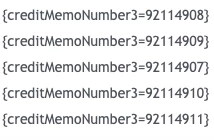
 

How can I only display the actual value of the field (in this case, just the numbers, not the name of the field and brackets)?

This post is no longer active and is closed to new replies. Need help? Start a new post to ask your question.
Best answer by SanfordWhiteman

In Velocity, your $customObjectList is a list of objects. (An ArrayList of LinkedHashMaps, technically.)


When you loop over the list with

#foreach( $loopVar in $customObjectList )

the loop variable $loopVar is set to a new object on each turn of the loop.


An object of course has keys and values. So if you just output $loopVar, that uses the standard stringified format for the entire current object

{key=value,key2=value2,key3=value3}

because you haven’t told it you want to output only the value for a certain key.


You want to output the key creditMemoNumber3, so that’s

${loopVar.creditMemoNumber3}


1 reply

SanfordWhiteman
SanfordWhitemanAccepted solution
New Participant
July 1, 2021

In Velocity, your $customObjectList is a list of objects. (An ArrayList of LinkedHashMaps, technically.)


When you loop over the list with

#foreach( $loopVar in $customObjectList )

the loop variable $loopVar is set to a new object on each turn of the loop.


An object of course has keys and values. So if you just output $loopVar, that uses the standard stringified format for the entire current object

{key=value,key2=value2,key3=value3}

because you haven’t told it you want to output only the value for a certain key.


You want to output the key creditMemoNumber3, so that’s

${loopVar.creditMemoNumber3}


Victor_Arieta
New Participant
July 2, 2021

Thank you so much!! This is a much more elegant solution (and possibly much more efficient) than what I tried to do, which was:


<table border="0"> <tr> <td width="175"><b>Credit Reference #</b< </td> <td><b> Charity Name</b></td> </tr> #set ( $ordernumber = 0 ) #foreach ( $creditMemoNumber3 in $creditMemo3_cList ) <tr> <td> ${creditMemo3_cList.get($ordernumber).creditMemoNumber3}</td> <td> ${lead.Company} </td> #set ( $ordernumber = $ordernumber+1 ) #end </tr> </table>