Quotation marks inserted in the sender name when using a token | Community
Skip to main content
New Participant
March 12, 2024
Solved

Quotation marks inserted in the sender name when using a token

  • March 12, 2024
  • 1 reply
  • 1103 views

Hello, 


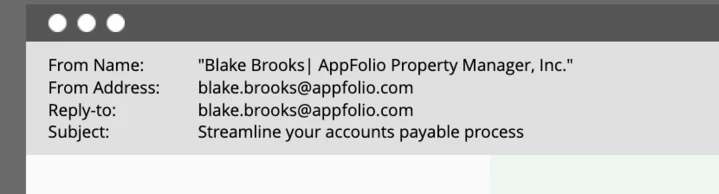
I have noticed when using a custom database token, in the preview in Marketo, quotation marks are inserted. When I go to create a draft there is no option to remove quotation marks. However, when I send a test to my inbox, the quotation marks disappear. 


Has anyone noticed this before? Are the quotation marks just to let the marketo user know that the sender is a token and therefore dynamic? I just want to ensure this won't hit a user's inbox with quotation marks. 


Thanks.

 

This post is no longer active and is closed to new replies. Need help? Start a new post to ask your question.
Best answer by SanfordWhiteman

First, to use the correct terminology (since it matters wrt which SMTP standard is used) that’s not the “sender name”. It’s the From: display-name.


Any From: display-name that contains a period must be quoted per the SMTP spec (RFC 5322).  And a display-name may be quoted in any case, even when it’s not required.


Most mail clients will hide the surrounding quotation marks when displaying the email, although they are still sent to the recipient.

1 reply

SanfordWhiteman
SanfordWhitemanAccepted solution
New Participant
March 12, 2024

First, to use the correct terminology (since it matters wrt which SMTP standard is used) that’s not the “sender name”. It’s the From: display-name.


Any From: display-name that contains a period must be quoted per the SMTP spec (RFC 5322).  And a display-name may be quoted in any case, even when it’s not required.


Most mail clients will hide the surrounding quotation marks when displaying the email, although they are still sent to the recipient.