Radio Buttons as a required field with custom validation
I'm using the script for a multipart form from this post:
I am using it to create a multi-part form that functions as a quiz with a contact panel at the end to be sent results. For the quiz part I have a single radio button group in each fieldset and make that radio button required through the javascript settings variable so users have to provide an answer before moving to the next question.
When I do that, I am getting a browser console error:
TypeError: Cannot read properties of null (reading 'parentNode')
when the code tries to apply the required field setting to the radio buttons. That has led to either the required behavior not being applied, or the formatting of the first choice changing when the required message is displayed.
In the browser tools, I see the error message element being inserted within the structure of the first radio button input element.
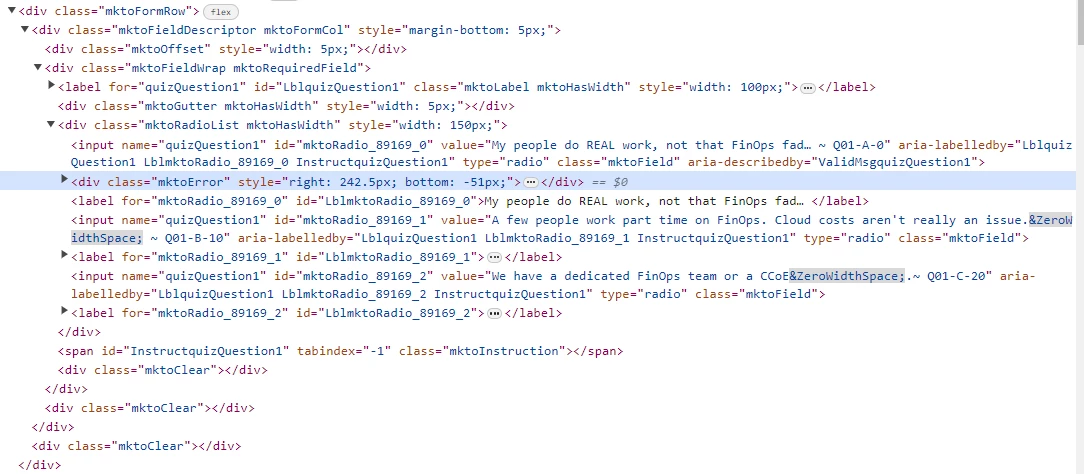
If I drag the error element in the inspector to a place outside of that input element (like the line above it), the radio buttons look and function as they should.
Rather than fumbling through the code, I am looking for some help to add a radio button group condition to the CodePen from @SanfordWhiteman to handle the validation cleanly.
MktoForms2 :: FSaaT v1.0.0 (FSaaT = Fieldset-at-a-Time).
