
Random Sample Failed | Community
Skip to main content
michellechopin
Community Manager
October 21, 2022
Question

Random Sample Failed

  • October 21, 2022
  • 1 reply
  • 4346 views

Hello Community!


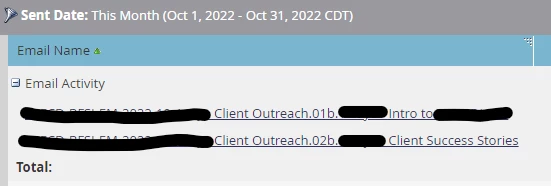
I'm working with one of our Program Managers to send out a multi-email campaign that has testing on every email going out (either subject line or whole email). The first two emails have gone out (one last week, one today) and when I run the report to see the two emails (and determine the winner), I only see that Version B has gone out to the Random Sample but no Default option (Version A):
 

Here's how I set up the Flow Step in the campaign (I do this regularly for multi-email campaigns and have done nothing different!), and I can't figure out why only the Random Sample sent out but not the Default:
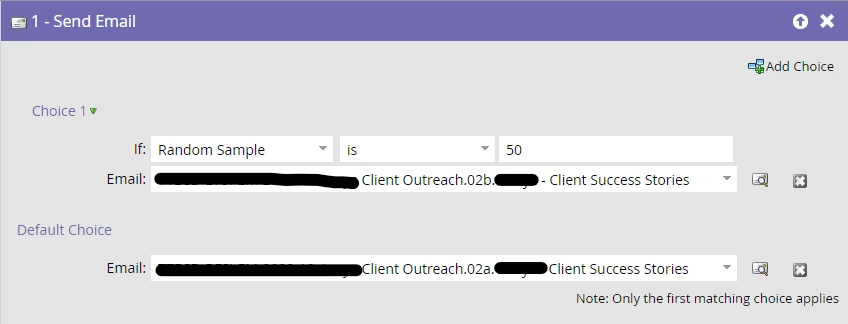
 

This is a new campaign in a new workspace but the leads it's going to were all uploaded to the related partition, so I don't think it's that. This is the first time I've had an issue using Random Sample so I'm at a loss as to what the issue is but I'm not able to provide testing results to my PM because the test hasn't worked as intended!


At worst, I can create individual email programs for each email test send, but I'd rather keep the program as clean as possible by using Batch Smart Campaigns to do these tests (the manual review of the test isn't a problem).


Any insight or suggestions are much appreciated 😊

Michelle

This post is no longer active and is closed to new replies. Need help? Start a new post to ask your question.

1 reply

Darshil_Shah1
Community Manager
October 21, 2022

It'd help if you could confirm a couple of items -


1. Do you see the send email activity for email 02a (the one in the default choice step) in the campaign's result?

2. Did all the leads receive the b version or just the 50% of the audience were sent the b version and the rest were not sent any of the versions?


michellechopin
Community Manager
October 21, 2022

Hey @darshil_shah1 ,


Always happy to give more insight!


  1. I see no send activity for Email 02a (or Email 01a) in the campaign results. Just the Send Email and Email Delivered details for Email 02b (and Email 01b)
  2. Only the 50% assigned by the random sample got an email; the other 50% got nothing


It's like the campaign completely ignored the Default step after it assigned the random sample - I've never seen that before, which is why this is entirely baffling to me!


Let me know if I can share anything else to help uncover this Friday mystery!

Michelle

Darshil_Shah1
Community Manager
October 22, 2022

@michellechopin, thank you for the details! 


This is really strange - as long as the campaign's flow step was set as per the snapshot that you have shared in your post, I can't think of a reason where-in the entire 50% of the random sample identified for the default choice wouldn't be sent out the email!


You could try creating a SL with the exact same criteria that you've got in your campaign, and include a filter in AND saying to only include people who are not member of the send email campaign. This should roughly give you the list of 50% of the people who were didn't flow through this campaign (until a lot of original audience got updated such that they don't qualify for the filter criteria now). Once you have the list of people in the SL, maybe you can just open the up a few of the leads and see if all's good with them (do they really still exist in the db, were they Marketable during the time of email send, etc).


Please let us know if you have any questions! We'd be happy to help as much as we can to get to the bottom of this.