Random Sample flow, Send Email | Community
Skip to main content
August 18, 2017
Solved

Random Sample flow, Send Email

  • August 18, 2017
  • 1 reply
  • 2516 views

I'm running an email campaign. Same email, same list, with a random sample like this:
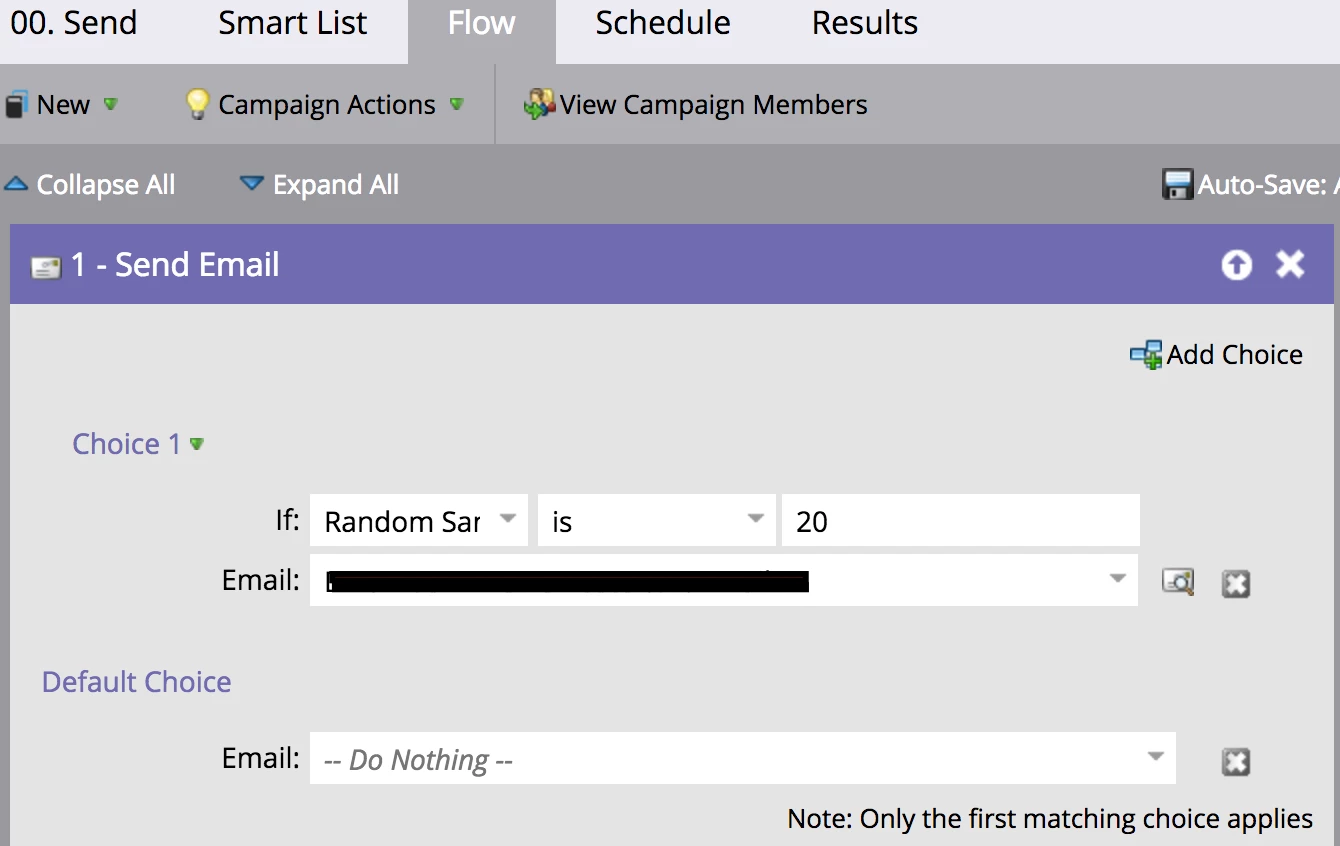
The idea is to have the same email sent to the list across 5 days, leveraging each lead only going through the flow once.

However, the 1st day sent out fine, but 2nd day didn't send and it's showing 0 people set to affect in "Schedule" tab.

I looked up Marketo Docs saying it will not work in nested Smart List, so I tried on Flow. This doesn't work too? link

Any suggestion is welcomed!

This post is no longer active and is closed to new replies. Need help? Start a new post to ask your question.
Best answer by Steven_Vanderb3

The Smart campaign sent the email to 20% of the leads, didn't do anything with the other 80%, and then was done doing everything it was told to do in the flow.  It wont stagger out sends over 5 days with the logic in the screenshot alone.  Especially since the campaign was set to a lead can only go through the Flow once.  Even though 80% of the leads did not get an email, they still technically went through the Flow, so they wouldn't qualify for subsequent runs of that campaign.

You may just want to break the qualified leads into five random lists first, then target each list individually over the 5 days.

1 reply

Steven_Vanderb3
Steven_Vanderb3Accepted solution
New Participant
August 18, 2017

The Smart campaign sent the email to 20% of the leads, didn't do anything with the other 80%, and then was done doing everything it was told to do in the flow.  It wont stagger out sends over 5 days with the logic in the screenshot alone.  Especially since the campaign was set to a lead can only go through the Flow once.  Even though 80% of the leads did not get an email, they still technically went through the Flow, so they wouldn't qualify for subsequent runs of that campaign.

You may just want to break the qualified leads into five random lists first, then target each list individually over the 5 days.

August 18, 2017

Thanks for your answer! I think I get why then.
Do I have to split it into 5 random lists...? is there another way to only run the campaign 1/5 of the list on each scheduled run?

My ultimate goal is to keep adding people to one list, then the campaign will pick up the list and run it through