
reCAPTCHA v3 Form Display Error | Community
Skip to main content
C_Blakeley
New Participant
July 14, 2023
Solved

reCAPTCHA v3 Form Display Error

  • July 14, 2023
  • 1 reply
  • 1456 views

I have created a new form and enabled reCAPTCHA v3. 

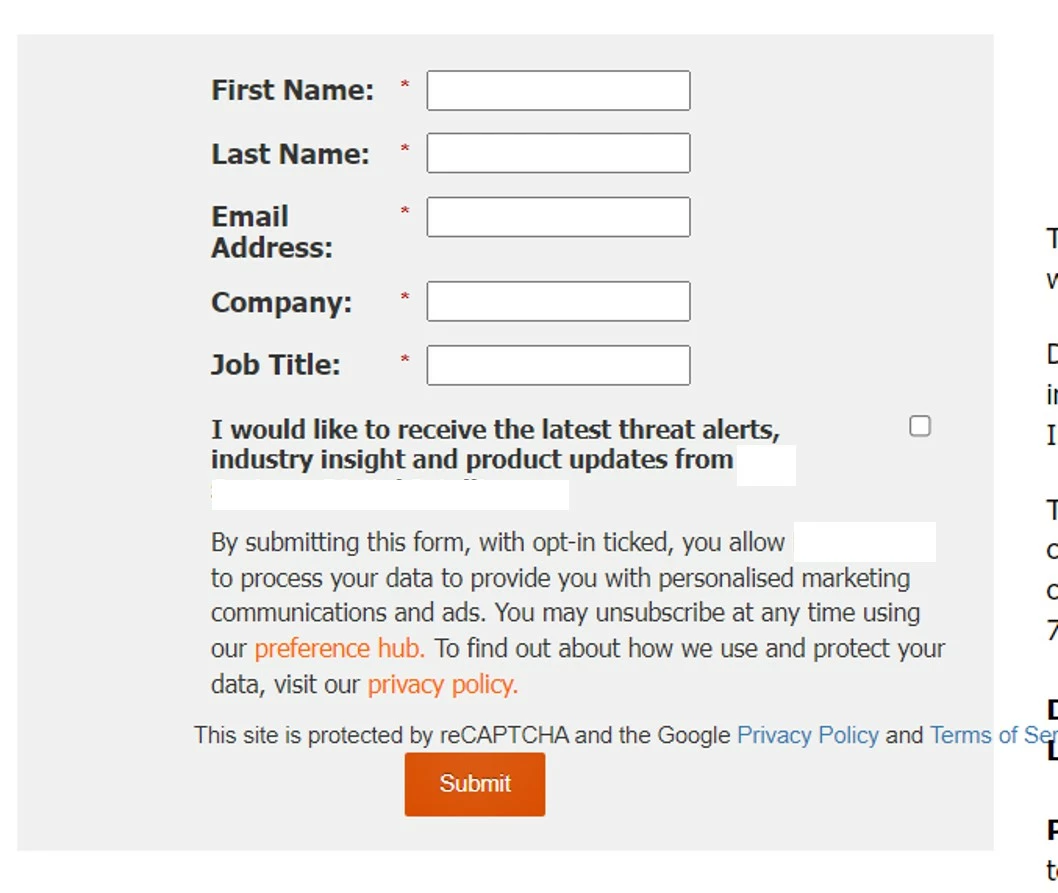
When I add the said form to a Marketo landing page, the reCAPTCHA display text spills over the edge of form. 

Please see attached image. 


Any help or guidance on how to fix this would be much appreciated. 

Thank you 
This post is no longer active and is closed to new replies. Need help? Start a new post to ask your question.
Best answer by jacklaushway1

Hi there,

Targeting the reCAPTCHA with CSS and adding a width: 100%; should force the element to match the same width of it's parent container (the Form). However, it would be easier to see a test page if you can provide it!

1 reply

jacklaushway1
jacklaushway1Accepted solution
New Participant
July 14, 2023

Hi there,

Targeting the reCAPTCHA with CSS and adding a width: 100%; should force the element to match the same width of it's parent container (the Form). However, it would be easier to see a test page if you can provide it!

C_Blakeley
New Participant
July 18, 2023

Thank you, very appreciate your response. 


Form is now displaying correctly 


Thanks again. 

CBlakeley