Record update during import, but not add new lead | Community
Skip to main content
Michael_Sogunro
New Participant
August 8, 2016
Solved

Record update during import, but not add new lead

  • August 8, 2016
  • 3 replies
  • 2604 views

Hello,

I have a file that I will be uploading into Marketo on a daily basis. Some of the records in this file will already be in Marketo. The records in the file that are also in Marketo, I want their data to be updated, but I do not want the records in the file that are not in Marketo to be added.

I looked at the import settings, and didn't see any selection that I could make to achieve this. Is it possible? 

Thanks in advance.

This post is no longer active and is closed to new replies. Need help? Start a new post to ask your question.
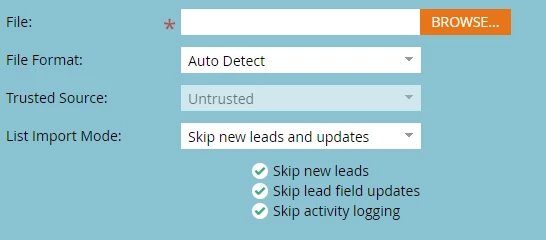
Best answer by Nicholas_Manojl

This is your answer - the "List Import Mode"

3 replies

New Participant
August 10, 2016

+1 for the answer added by @Nicholas Manojlovic

Nicholas_Manojl
Nicholas_ManojlAccepted solution
New Participant
August 10, 2016

This is your answer - the "List Import Mode"

New Participant
August 9, 2016

Hey Michael,

There might be an easier way to do this than my method, but it only takes about 2 minutes. Usually, I create a smart list with one filter, "Email Address is..." and copy and paste the email address column from your import spreadsheet. Then, export the smart list.

Use a vlookup in Excel (if you're already familiar with excel it should be pretty easy for you, and if not, I promise it's not that hard to pick up ) to see which leads are already in Marketo. Filter out those who aren't, and then import the filtered list.

It might take a while the first time, but I do this almost weekly and it really only takes two minutes each time. Hope this helps!

Rachel

Michael_Sogunro
New Participant
August 9, 2016

Thanks for the reply, Rachel. I was hoping to to avoid the exporting/importing fuss. I guess I will have to continue with this until a better option is available.

Thanks!

New Participant
August 9, 2016

Definitely a bummer. If you come up with a better way please let me know! Would love to avoid that here too