
Referral UTM not tracking? | Community
Skip to main content
BenCirillo
New Participant
April 28, 2021
Solved

Referral UTM not tracking?

  • April 28, 2021
  • 2 replies
  • 4352 views

I have a form set up with a hidden field to capture the utm_campaign on the referral link and write it to the Person Source. If its not present, it defaults to Gated Content. Here's how I have it set up: 
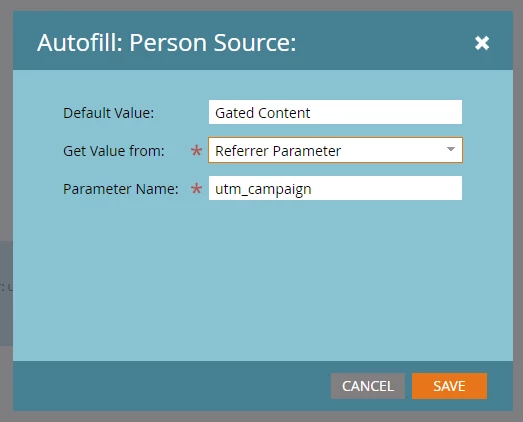
 

I'm trying to test it with some ads we're running. The ads point to this URL: https://www.plasticsurgery.org/cosmetic-procedures/liposuction?utm_source=Dynadmic&utm_medium=Video-Advertising&utm_campaign=Dynadmic-Liposuction-Q4-2021

On that page, there's a CTA that leads to a Marketo landing page at https://pages.plasticsurgery.org/LiposuctionHandbook.html 

I've been trying to test it by pasting the link above into an Incognito browser, clicking on the CTA, then creating a fake account. But when I check the program member record of the fake account, it shows the Person Source set to the default, Gated Content. 

I had this set up and let it run for a few days, and I did catch the UTM parameter of a completely different campaign in the list (this is the only thing currently running that sets Person Source.) So the field is capturing something, just not when I do it. 


Do I need to set this up differently, or is this just something that isn't going to be captured (or maybe it is - but no one from the ads is filling out the forms)? 

This post is no longer active and is closed to new replies. Need help? Start a new post to ask your question.

2 replies

SanfordWhiteman
SanfordWhitemanAccepted solution
New Participant
April 29, 2021
BenCirillo
New Participant
April 29, 2021

Ok, so this clears things up. We're not wrong, the internet is wrong. 

Talked it over with my team, and we're going to attempt to pass the info in a cookie to see if that works out. 

SanfordWhiteman
New Participant
April 28, 2021

You can't track Referrers like that anymore unless you have specifically configured the source site (your corporate site in this case) to pass full Referrer info.


When no specific policy is set, browsers now default to the Referrer Policy "strict-origin-when-cross-origin" which means that when you go from https://example.com?utm_whatever to https://pages.example.com the passed Referrer is stripped down to only https://example.com.


So you either need to:

  1. change your corp site's Referrer-Policy or
  2. have the corp site re-attach the original query string to all outbound links or
  3. because these two origins happen to share a parent private domain so can share a cookie, store the values in a cookie and pick them up on the LP