Hey Sheila, thanks again for setting up a new thread here. It looks like you've already gotten some feedback about what's causing the issue here so I've put together some CSS to help you solve the issue on your forms. I've attached a screenshot of what Im seeing on my end as well as a bit of code that you can drop into the end of your Custom CSS stylesheet on the form itself.
This spacing issue is actually something I see quite often when there's a set of custom CSS on a form. Many times, the spacing between the form fields is applied on the row (.mktoFormRow) or columns (.mktoFormCol) maybe b/c those are the most obvious choices when you're looking at the code. This approach however adds height to hidden fields (as you've seen here) b/c those are contained in both a row and a column before they are populated (or not) on the page.
The solution involves moving the spacing from the rows (margin-top: 24px) to the field wrappers (.mktoFieldWrap) b/c those will not be present on hidden fields until the field populates on the page (for the case of visibility rules). In this example, I've split the margin-top of 24px into a margin-top and margin-bottom of 12px to go around every field.
The other piece that was giving me some issues was the HTML text at the top of your fieldset that you were using for a label. I'd recommend moving that text (just text is ok, no html/css needed) into the "legend" (aka fieldset label) to better align that with the native fieldset element. There's a funky offset (margin-top -60px) on the checkbox field inside the fieldset to compensate for the "not so hidden legend element" so I've also adjusted that in the CSS below to help get this back to a "normal" state.
Here's a look at what Im seeing on my end in Chrome on a PC:
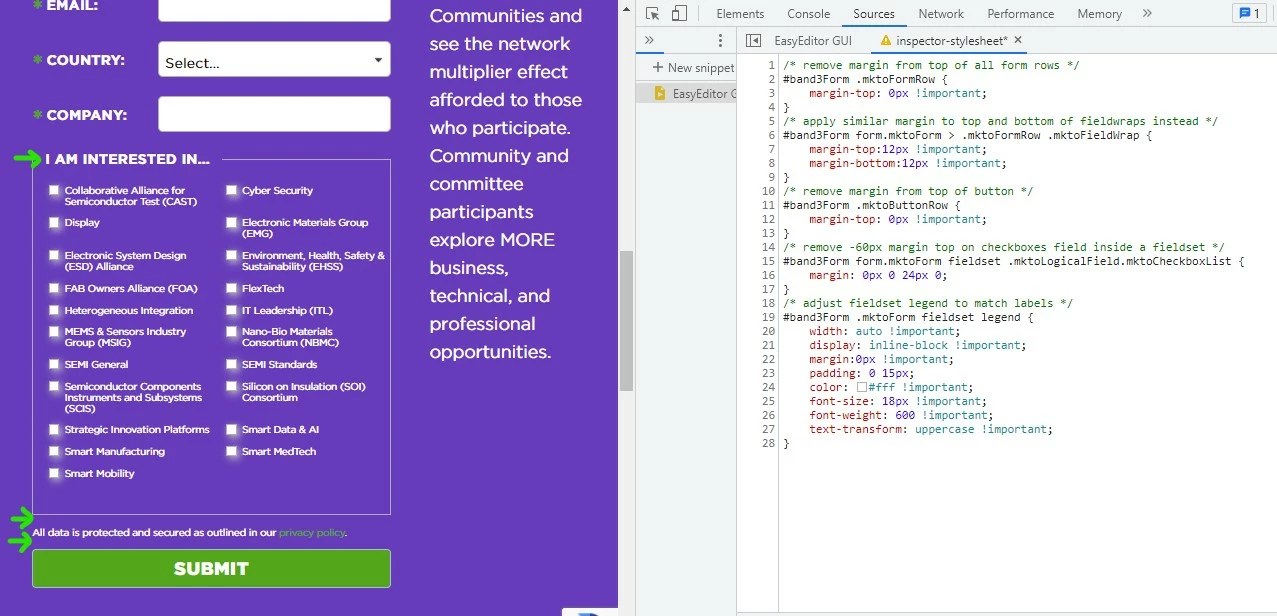
Here's the CSS I used in the inspector to create the preview here:
/* remove margin from top of all form rows */
#band3Form .mktoFormRow {
    margin-top: 0px !important;
}
/* apply similar margin to top and bottom of fieldwraps instead */
#band3Form form.mktoForm > .mktoFormRow .mktoFieldWrap {
    margin-top:12px !important;
    margin-bottom:12px !important;
}
/* remove margin from top of button */
#band3Form .mktoButtonRow {
    margin-top: 0px !important;
}
/* remove -60px margin top on checkboxes field inside a fieldset */
#band3Form form.mktoForm fieldset .mktoLogicalField.mktoCheckboxList {
    margin: 0px 0 24px 0;
}
/* adjust fieldset legend to match labels */
#band3Form .mktoForm fieldset legend {
    width: auto !important;
    display: inline-block !important;
    margin:0px !important;
    padding: 0 15px;
    color: #fff !important;
    font-size: 18px !important;
    font-weight: 600 !important;
    text-transform: uppercase !important;
}
Let me know if this just snaps right in for you or if you run into any issues with getting to a similar display.
Thanks again, and happy Friday 🙂
-Dave