Remove from Flow action | Community
Skip to main content
New Participant
July 10, 2023
Solved

Remove from Flow action

  • July 10, 2023
  • 3 replies
  • 3979 views

Hi All,


What is the specific purpose of the "Remove from flow" action?


I have implemented a campaign that involves sending batch communications and a reminder round. The client has provided a separate list of members who should be excluded from receiving the reminder -1 data. To accommodate this requirement, I have created a batch campaign that triggers the first communication. The data that is to be excluded is stored in a custom object. In the trigger campaign, I compare the data from the first communication with the data in the custom object to identify matching members. The intention is to exclude the matching members using the "Remove from flow" action and ensure that the remaining data is communicated through another mailer.


However, in this scenario, no emails are being sent to the remaining members after the "Remove from flow" step.


Below are the screenshots of steps that I followed in trigger campaign :


SL
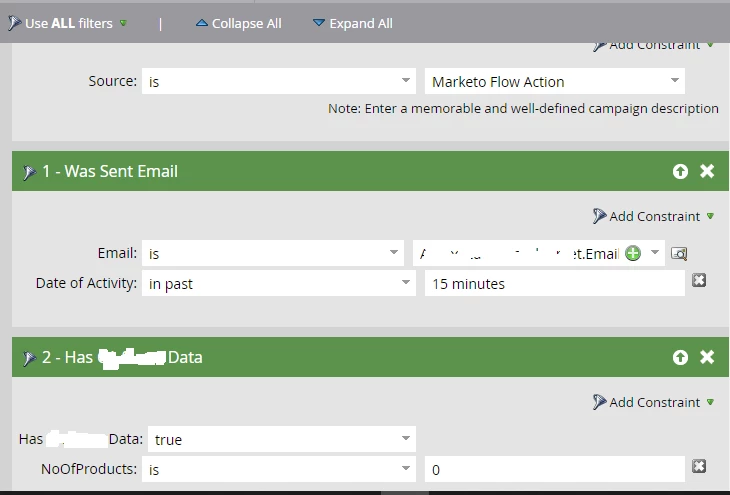
 

Flow
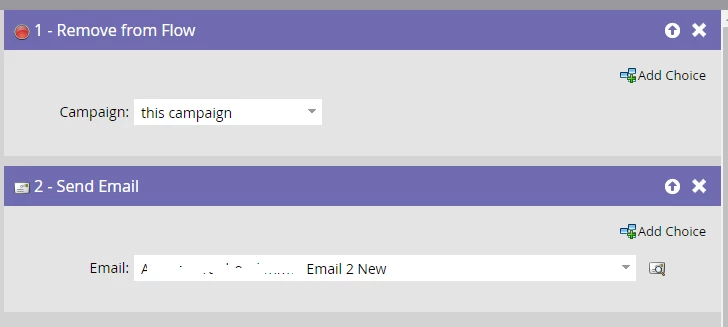
 

I'm wondering if I missed any steps or misunderstood how the "Remove from flow" action works.


Thanks.

This post is no longer active and is closed to new replies. Need help? Start a new post to ask your question.
Best answer by Darshil_Shah1

The “Remove from Flow this campaign flow step removes people in the campaign flow. You have the "Has CO" filter in the smart list itself, so anyone who qualifies for the campaign flow gets removed from it. Instead of this, you probably want a filter "Has CO" is False No of Products is 0 in your campaign's smart list so people who have at least 1 CO record with No of Products = 0 don't qualify for the campaign flow in the first place. It goes w/o saying that you'd not need "Remove from Flow" flow step in this case. I hope this is what you want right? Also, why are you storing people who should be excluded from the reminder email in the CO?


3 replies

Katja_Keesom
Community Manager
July 11, 2023

Questions can indeed be asked about the basic design of the process, but even with the CO data as they are, there are more practical ways to solve this. You could try and do it in a single smart campaign, but removing people from the current flow if they have a CO with some explicit constraints is going to be tricky to do. I would rather split it up into two smart campaigns, adding a wait step after sending the first email and then executing a second campaign. In that second campaign you can add the filter to specify which records should receive the reminder in the smart list and send that in the flow.

SanfordWhiteman
New Participant
July 10, 2023

What is the specific purpose of the "Remove from flow" action?

Expanding on Darshil’s response for anybody who’s lurking: as the name suggests, Remove from Flow stops people from executing Flow steps beyond the one they’re on right now.


The constraint Campaign=this campaign, with no additional choices, means all people are booted out of the current campaign immediately. It’s very rare that you would ever want this in production. It’s only useful when debugging, since you can stop other steps from executing without completely deleting them.


In contrast, the constraint Campaign=this campaign plus Add Choice is extremely useful for creating conditional logic. After people qualify for the campaign (and thus enter the flow), especially after a Wait step, they can achieve specific milestones/characteristics determining whether they should stay or go.


Finally, the constraint Campaign=<some other campaign> is critical to complex workflow, as it allows one campaign to forcibly take a person (typically one in the midst of a Wait step) out of another campaign.

Darshil_Shah1
Darshil_Shah1Accepted solution
Community Manager
July 10, 2023

The “Remove from Flow this campaign flow step removes people in the campaign flow. You have the "Has CO" filter in the smart list itself, so anyone who qualifies for the campaign flow gets removed from it. Instead of this, you probably want a filter "Has CO" is False No of Products is 0 in your campaign's smart list so people who have at least 1 CO record with No of Products = 0 don't qualify for the campaign flow in the first place. It goes w/o saying that you'd not need "Remove from Flow" flow step in this case. I hope this is what you want right? Also, why are you storing people who should be excluded from the reminder email in the CO?


New Participant
July 10, 2023

The campaign logic I'm referring to is specifically designed for a Manual Cart Abandonment campaign. The client will be providing us with data on a weekly basis, which we will store in a custom object. This data includes both new customers and customers who emptied their cart from the previous wave.

Darshil_Shah1
Community Manager
July 10, 2023

Got it- thank you for providing that information. I'm curious to know the condition when people should not be sent the "Email 2 New" (the one that you have in the Send Email flow step of the campaign). Do you want to exclude people who have at least one CO record with No of Products is 0 or something else?