Remove lead for non engagement from engagement program | Community
Skip to main content
Josh_Grant2
New Participant
September 26, 2016
Solved

Remove lead for non engagement from engagement program

  • September 26, 2016
  • 1 reply
  • 2186 views

   Hello,

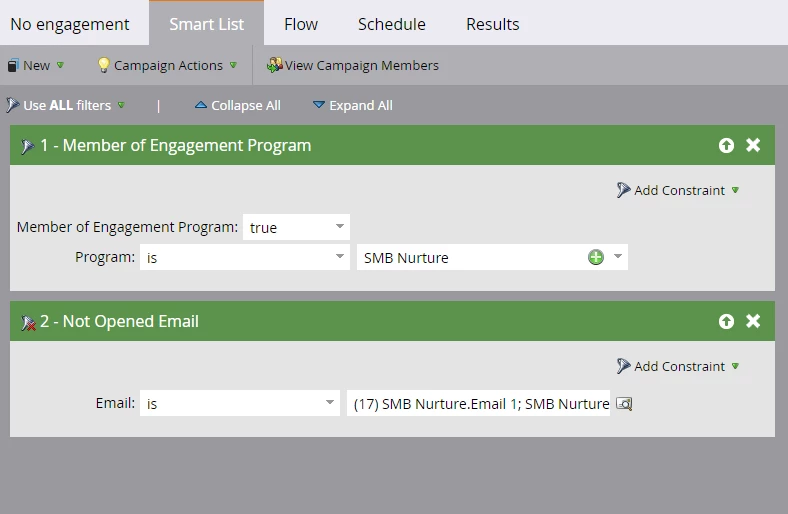
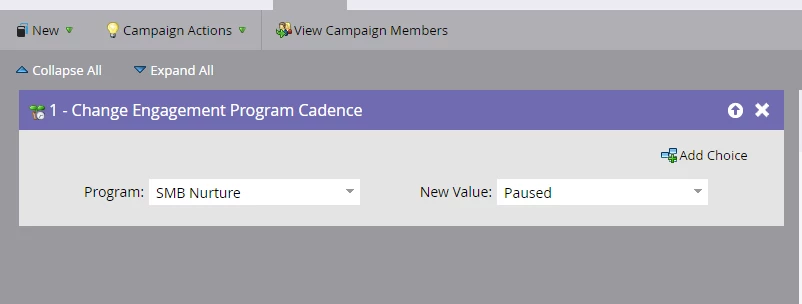
I just had a quick question about a smart campaign I have in place to remove a lead (or pause) from an engagement program based off of inactivity. My smart list and flow are below. My question is - if I add ALL the emails to the "not opened email" to this flow step as seen below, will this take everyone who hasn't opened all 17 or will it take anyone who hasn't opened 1 of the 17?
This post is no longer active and is closed to new replies. Need help? Start a new post to ask your question.
Best answer by Grégoire_Miche2

Hi Josh,

Opened email / Not opened email is very unreliable as it is based only on picture download. You will remove people who are engaged with your content and consider as engaged people who has just browsed through their emails...

I would strongly recommend NOT to remove people from streams based on this signal only.

Now, if you really want to do it, if you add all the 17 emails to the filter, it will take anyone who has not opened at least 1 of the emails, even if they have opened the 16 others.

If you want to remove any one who has not opened any of the 17 emails, create a smart list "opened email", with the 17 emails in the filter, then take any one who is not a member of this smart list.

-Greg

1 reply

Grégoire_Miche2
Grégoire_Miche2Accepted solution
New Participant
September 29, 2016

Hi Josh,

Opened email / Not opened email is very unreliable as it is based only on picture download. You will remove people who are engaged with your content and consider as engaged people who has just browsed through their emails...

I would strongly recommend NOT to remove people from streams based on this signal only.

Now, if you really want to do it, if you add all the 17 emails to the filter, it will take anyone who has not opened at least 1 of the emails, even if they have opened the 16 others.

If you want to remove any one who has not opened any of the 17 emails, create a smart list "opened email", with the 17 emails in the filter, then take any one who is not a member of this smart list.

-Greg

Josh_Grant2
New Participant
September 29, 2016

Great point! I will add all activity filters to this. (Opens, clicks, form fills).
