Removing a Step After a Date Has Passed | Community
Skip to main content
New Participant
November 29, 2017
Solved

Removing a Step After a Date Has Passed

  • November 29, 2017
  • 2 replies
  • 2520 views

I'm wondering if it is possible to remove a flow step after a specific date has passed. Here's my situation:

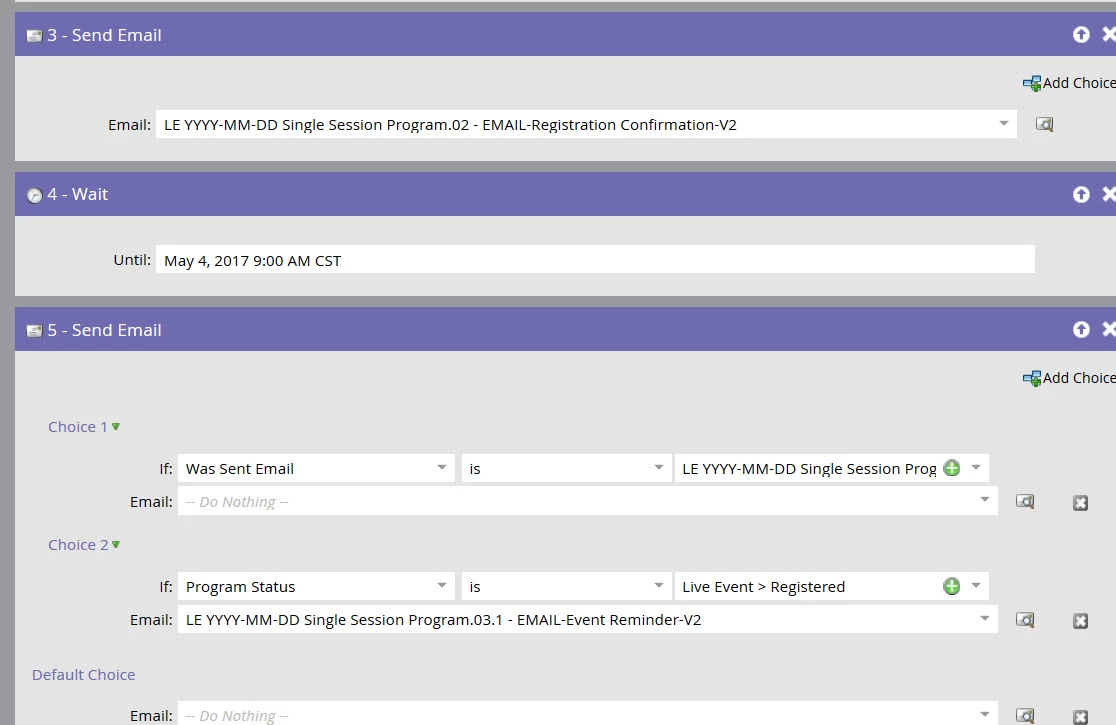
I have a smart campaign that triggers based off a person filling out a form/registering for an event. The flow sends them a confirmation email, then sends them a reminder email two days before the event. There is a wait step in between the two email send steps. The problem is that when people register two or less days prior to the event, they receive the confirmation and reminder emails back to back. I'd like to set up the reminder email to stop sending after the reminder email goes out to the majority of people, but I can't figure out a way to automate this without manually deleting the last step.

I added a screenshot of the steps below. In this example, once May 4 passes everyone who runs through the workflow gets both emails back to back, and I'd like a way to say after May 4, stop sending the reminder email.

Any ideas??
This post is no longer active and is closed to new replies. Need help? Start a new post to ask your question.
Best answer by Kevin_McMahon1

The easiest way to accomplish this is two separate smart campaigns:

Campaign 1: Registered - if fills out form (trigger), send confirmation email

Campaign 2: Send Reminder - if program status is "Registered" (filter), send reminder email. Just schedule this to run 2 days before the event.

Hope this helps!

2 replies

Kevin_McMahon1
Kevin_McMahon1Accepted solution
New Participant
November 29, 2017

The easiest way to accomplish this is two separate smart campaigns:

Campaign 1: Registered - if fills out form (trigger), send confirmation email

Campaign 2: Send Reminder - if program status is "Registered" (filter), send reminder email. Just schedule this to run 2 days before the event.

Hope this helps!

New Participant
November 29, 2017

Thanks Kevin! I agree, this is probably the simplest solution.

Trevor_Parsell
New Participant
November 29, 2017

Hey Katie,

You could use two separate smart campaigns to do this. One for those who register before May 4th and one for those who register on or after may 4th.

Smart Campaign 1

List

Flow

Smart Campaign 2

Smart List

Flow

Will this work for you?

Thanks!

Trevor