
Removing individual 'selected values' | Community
Skip to main content
Ellie_Boardman-
New Participant
May 6, 2016
Solved

Removing individual 'selected values'

  • May 6, 2016
  • 1 reply
  • 1342 views

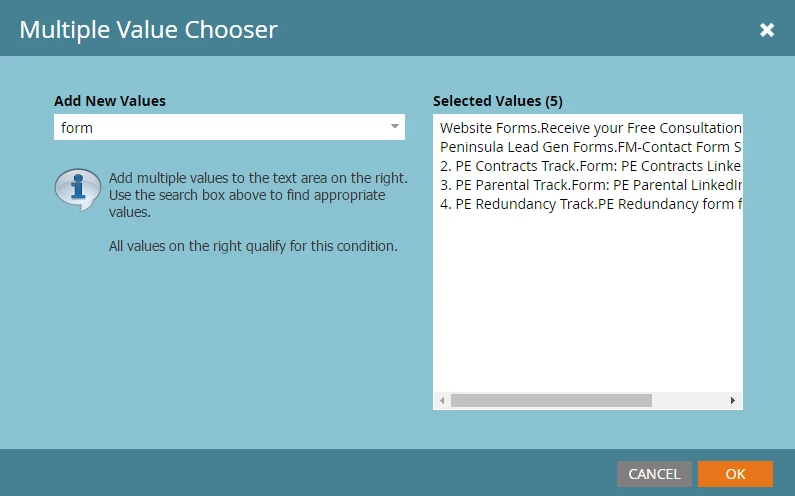
Possibly a very simple question - but is there a way to easily remove individual 'selected values' when you have multiple without having to start the filter again? Presuming there must be a way but I can't see how!

This post is no longer active and is closed to new replies. Need help? Start a new post to ask your question.
Best answer by Grégoire_Miche2

Yes, in this dialog box, just underline the value you want to remove and delete it

This dialog works a little as a very simple text editor. You can type, cut, paste, ...

-Greg

1 reply

Grégoire_Miche2
Grégoire_Miche2Accepted solution
New Participant
May 6, 2016

Yes, in this dialog box, just underline the value you want to remove and delete it

This dialog works a little as a very simple text editor. You can type, cut, paste, ...

-Greg

Ellie_Boardman-
New Participant
May 6, 2016

Perfect - thank you, knew there must be a simple solution!