Removing leads from flow 6 months before contract end date | Community
Skip to main content
New Participant
September 18, 2023
Solved

Removing leads from flow 6 months before contract end date

  • September 18, 2023
  • 2 replies
  • 3560 views

Hi,

I'm trying to create a smart campaign to do the following:

Add to flow when record becomes a new client

Send and email every 6 months

Remove lead from flow 6 months prior to the record's 'client end date'.

Repeat 10x


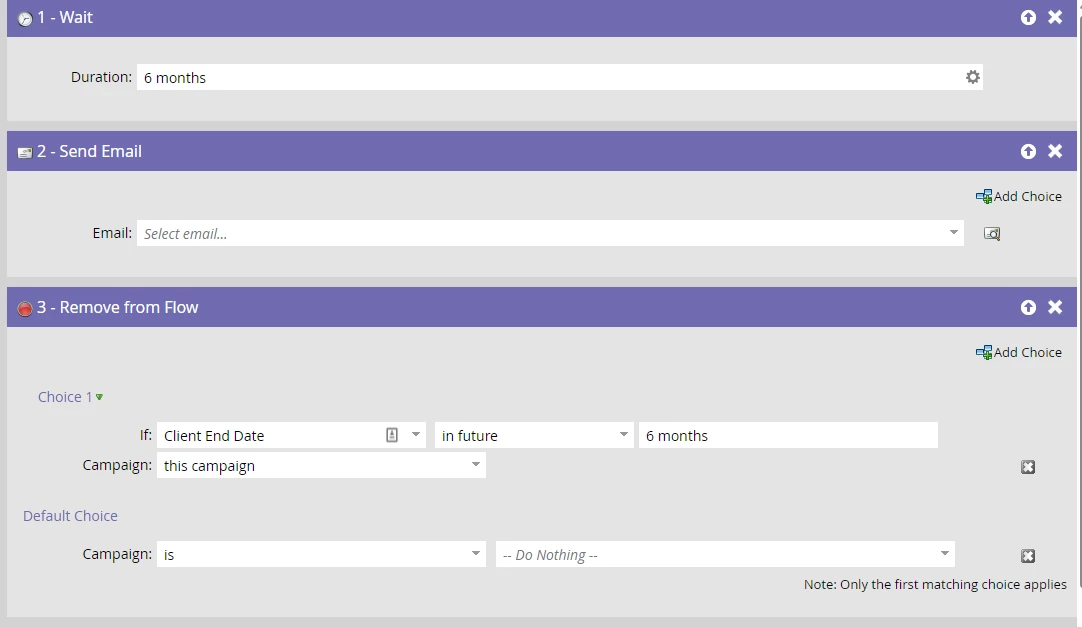
So far I have the following:



Not too sure how the middle step options work for date so I went with 'in future'.


Would the logic for Remove from Flow work like I am aiming for? If not, what should I be doing?


Cheers

Rob

This post is no longer active and is closed to new replies. Need help? Start a new post to ask your question.
Best answer by Darshil_Shah1

In future 6 months will qualify anyone whose "Client End Date" is non-empty and is any value in the range of today till 6 months from today. If their "Client End Date" is any date that is not in this timeframe (if it's in the future after 6 months or in the past), they'll not qualify. So, using this as a choice step condition in the Remove from Flow flow step would essentially remove people whose "Client End Date" is in the range of today till 6 months from today, and they'll not be sent further emails if there are any in the flow. As a side note, I think you should consider changing the order of flow steps to: Wait, Remove from Flow, and Send Email (and repeat the same order for rest of the emails). This will ensure that you do "Client End Date" check before sending the email and not after it. Also, if you're going to send different email assets, then you can also set up an engagement program for this- you could use the same entry and exit criteria for adding and removing people from the engagement program. This would eradicate the need to have a set of Wait and Remove from Flow flow steps in b/w the Send Email flow steps (other capabilities like Pause a Person's cadence, add more emails with ease, etc. also come out-of-the-box with the engagement program).

2 replies

SanfordWhiteman
New Participant
September 18, 2023

This approach will work (if you repeat the Wait-Send-Remove another 9 times).


But I’d be unlikely to do it this way because I detest having Wait steps lingering around for months, let alone years. Too hard to troubleshoot when things get wacky.


Instead, I’d use a counter (Score fields can also be counters for any purpose) and a Date field indicating their Next Send Date. Each time you send, set Next Client Nurture Send Date to {{system.date}} + 1 year.  


This allows you to use a batch campaign, which is much easier to control & audit. Send to everybody whose Next Client Nurture Send Date is today and whose counter is < 10.


Katja_Keesom
Community Manager
September 18, 2023

Totally agree with the alternative approach. If you have multi-purpose PMCF fields set up where one is a date field I would actually opt to use this, rather than set up a dedicated field on the person for just this campaign.

Darshil_Shah1
Darshil_Shah1Accepted solution
Community Manager
September 18, 2023

In future 6 months will qualify anyone whose "Client End Date" is non-empty and is any value in the range of today till 6 months from today. If their "Client End Date" is any date that is not in this timeframe (if it's in the future after 6 months or in the past), they'll not qualify. So, using this as a choice step condition in the Remove from Flow flow step would essentially remove people whose "Client End Date" is in the range of today till 6 months from today, and they'll not be sent further emails if there are any in the flow. As a side note, I think you should consider changing the order of flow steps to: Wait, Remove from Flow, and Send Email (and repeat the same order for rest of the emails). This will ensure that you do "Client End Date" check before sending the email and not after it. Also, if you're going to send different email assets, then you can also set up an engagement program for this- you could use the same entry and exit criteria for adding and removing people from the engagement program. This would eradicate the need to have a set of Wait and Remove from Flow flow steps in b/w the Send Email flow steps (other capabilities like Pause a Person's cadence, add more emails with ease, etc. also come out-of-the-box with the engagement program).

RobShiAuthor
New Participant
September 18, 2023

Thanks for the feedback and noted on the order of flow steps.

To sanity check - if a record had a "Client End Date" of 19/03/24, it would be removed from the flow tomorrow morning?


Am interested in utilising engagement program to help facilitate this process. Looking to have emails triggered for each individual record along their client journey. Is it possible to have unique email send on engagement programs? My understand that if it was setup to send every 6 months, all records in the program would only receive an email at that point, and not unique to their own dates.


Darshil_Shah1
Community Manager
September 18, 2023

@robshi wrote:

Thanks for the feedback and noted on the order of flow steps.

To sanity check - if a record had a "Client End Date" of 19/03/24, it would be removed from the flow tomorrow morning?

This person would wait in the campaign for 6 months, and then they'd be removed from it as their Client End Date would clearly be within 6 months at that time, and they won't be sent any emails. If you want to send an email first instead of waiting for 6 months first, you can add a filter in the smart list to check if their "Client End Date" is in the future after 6 months. In that case, the order of flow steps would be Send Email, Wait, Remove from Flow (repeat 9x).


@robshi wrote:

Thanks for the feedback and noted on the order of flow steps.

To sanity check - if a record had a "Client End Date" of 19/03/24, it would be removed from the flow tomorrow morning?


Am interested in utilising engagement program to help facilitate this process. Looking to have emails triggered for each individual record along their client journey. Is it possible to have unique email send on engagement programs? My understand that if it was setup to send every 6 months, all records in the program would only receive an email at that point, and not unique to their own dates.


Yeah- there's a way you can pull this with the engagement program, but it'd require a bit of additional setup! Basically, you'd set the stream cadence such that the cast runs every day, and once a person receives the email, you change their cadence to pause for the next 6 months, i.e., Change Cadence to Pause, Wait 6 months, Check if their Client End Date is not in future 6 months, and then Change their Cadence to Normal so they'd receive the next email in the next cast.