
Rendered_Email_Velocity_Error_Area_?! error without velocity scripting??? | Community
Skip to main content
Jared_Kimball2
New Participant
April 12, 2018
Solved

Rendered_Email_Velocity_Error_Area_?! error without velocity scripting???

  • April 12, 2018
  • 1 reply
  • 3234 views

Hi community,

Our brand managers keep getting an error whenever they try to save a brand new template we created.

We are able to save and approve the template, but whenever a brand manager tries to create, edit and save an email with that template they keep getting:

Rendered_Email_Velocity_Error_Area_?!
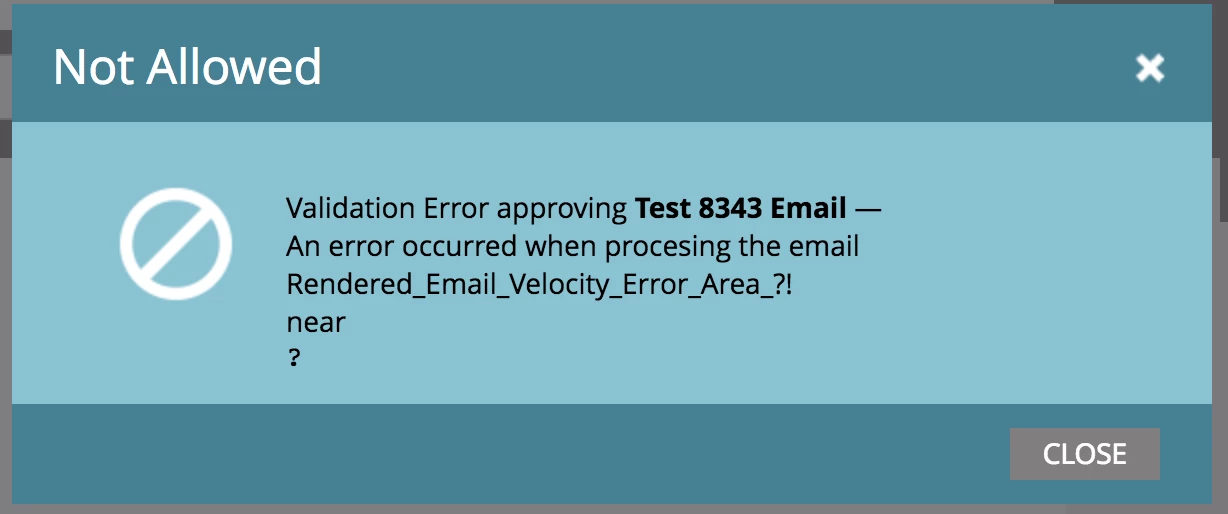
I can't figure out for the life of me how to solve this.

I saw on another thread that there could be an error with a "#" or "?" but I'm not sure where to look exactly.

Any suggestions? @Sanford Whiteman​

This post is no longer active and is closed to new replies. Need help? Start a new post to ask your question.
Best answer by SanfordWhiteman

Bet this is actually happening on the Text side.

If you have a mktoVariable defined that you're using as an <a href>, that causes a break on the text side since variables don't work in the text version. (Normally variables don't cause an error, they just are blank, but links are an exception.)

Solve it by adding this to your <head>:

<!--

#set( $link = "${link}" )

-->

where link is the mktoVariable name.

1 reply

SanfordWhiteman
SanfordWhitemanAccepted solution
New Participant
April 12, 2018

Bet this is actually happening on the Text side.

If you have a mktoVariable defined that you're using as an <a href>, that causes a break on the text side since variables don't work in the text version. (Normally variables don't cause an error, they just are blank, but links are an exception.)

Solve it by adding this to your <head>:

<!--

#set( $link = "${link}" )

-->

where link is the mktoVariable name.

Jared_Kimball2
New Participant
April 12, 2018

That worked perfectly. Thank you!!!