Renewal reminder - Smart List Logic | Community
Skip to main content
New Participant
August 11, 2020
Solved

Renewal reminder - Smart List Logic

  • August 11, 2020
  • 2 replies
  • 4764 views

We want to send 7 / 30 day renewal reminder emails through Marketo and have built and successfully tested the emails using Velocity but I’m having trouble building the smart lists. (We thought this would be the easy part).


Our customers may have multiple products that expire on different days, as I see it from different discussions, there are 2 accepted methods of building a list for a renewal email. Using the 7 day example, they are as follows:


Method 1: (In future 7 days) and (in future after 6 days)
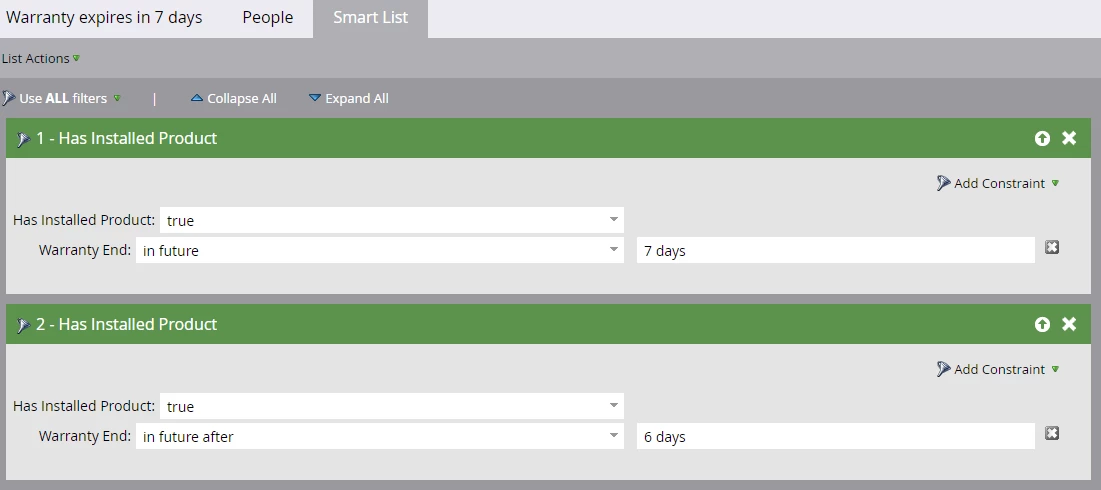
 

Method 2: In future 7 days but not in future 6 day list.
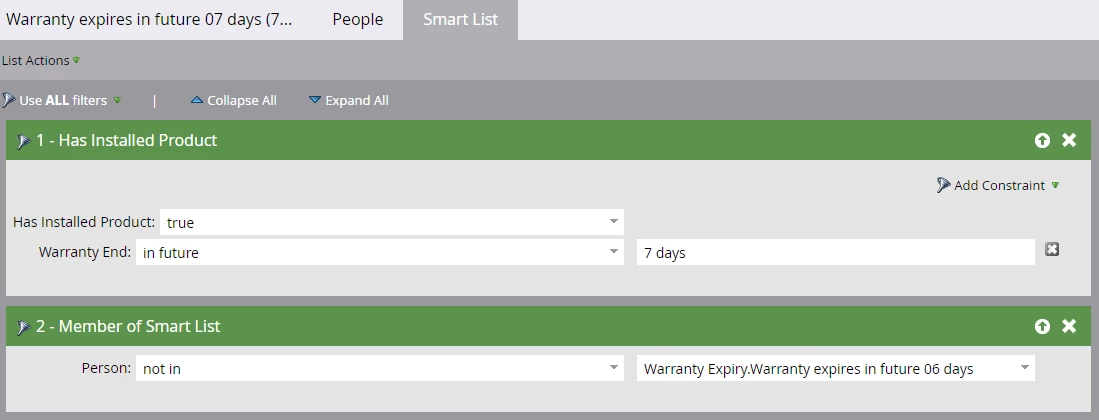
 

Method  1 fails when a customer has 2 (or more) products, one expires in 5 days and one expires in 9 days the customer makes the list even though they don’t have a product expiring on the 7th day.


Method 2 fails when a customer has a product expiring on the 7th day but also has another product expiring in the next 6 days. This customer doesn’t make the list because they are a member of the 'future 06 day' list that we exclude.


Has anyone come across simiilar situations or can anyone suggest a Marketo based solution to this problem?


Alternatively, if has anyone implemented a CRM based solution e.g. creating a 7 day / 30 day flag on the Salesforce object, I'd love to hear about that.

This post is no longer active and is closed to new replies. Need help? Start a new post to ask your question.
Best answer by SanfordWhiteman

Depending on the type of product, yes, the product is added either 1 year, 2 years, or 3 years minus 1 day before the expiration date.

So for your example, the product would have been added on either the 21st December 2019, 21st December 2018, or 21st December 2017.

So it is a predictable date based on the type of product.


Well, that's good! Because that's what you're going to have to use for this.


Trigger on Added to Installed Product. Then use Change Data Value to set a (new) DateTime field like Next Renewal Date to


{{system.date}} + 1 year

{{system.date}} + 2 years


Then use that field as your "pivot point" for reminders.


I think there's still something a little shaky, though: with the above improvement, you can filter to see if they still have a future-expiring Installed Product at the time of the send, but you won't be able (for the same reasons you've already discovered) to know if it's exactly the same one you're about to send them a reminder for!  You may want to consider using Velocity to perform some last-minute checks, then deliberately throw an error (which will Soft Bounce the email, a very useful trick) if everything doesn't match up.

2 replies

SanfordWhiteman
New Participant
August 12, 2020

You can't do this with a batch alone.


Are the Installed Product COs added to the lead a predictable number of days before/after the expiration date?


i.e. if the Installed Product will expire on December 20, 2020, is it added to the lead on any predictable day? Or is that date all over the place?

JI-2Author
New Participant
August 12, 2020

Hi Sandford


Depending on the type of product, yes, the product is added either 1 year, 2 years, or 3 years minus 1 day before the expiration date.

So for your example, the product would have been added on either the 21st December 2019, 21st December 2018, or 21st December 2017.

So it is a predictable date based on the type of product.


SanfordWhiteman
SanfordWhitemanAccepted solution
New Participant
August 12, 2020

Depending on the type of product, yes, the product is added either 1 year, 2 years, or 3 years minus 1 day before the expiration date.

So for your example, the product would have been added on either the 21st December 2019, 21st December 2018, or 21st December 2017.

So it is a predictable date based on the type of product.


Well, that's good! Because that's what you're going to have to use for this.


Trigger on Added to Installed Product. Then use Change Data Value to set a (new) DateTime field like Next Renewal Date to


{{system.date}} + 1 year

{{system.date}} + 2 years


Then use that field as your "pivot point" for reminders.


I think there's still something a little shaky, though: with the above improvement, you can filter to see if they still have a future-expiring Installed Product at the time of the send, but you won't be able (for the same reasons you've already discovered) to know if it's exactly the same one you're about to send them a reminder for!  You may want to consider using Velocity to perform some last-minute checks, then deliberately throw an error (which will Soft Bounce the email, a very useful trick) if everything doesn't match up.

Employee
August 11, 2020

I think you can use advance wait step and achive this in flow step of SC. Below is the reference artical already available in community. 

You just need to change your smart list and add conditions in flow. 


https://nation.marketo.com/t5/Product-Discussions/how-to-send-emails-x-days-before-variable-due-date/td-p/49289

SanfordWhiteman
New Participant
August 12, 2020

Unfortunately, Abhinav, that approach won't work here. These are Custom Object fields, not accessible in an Advanced Wait.