Replacing last 2 letters of name using velocity script | Community
Skip to main content
New Participant
May 6, 2022
Solved

Replacing last 2 letters of name using velocity script

  • May 6, 2022
  • 1 reply
  • 5401 views

Hi Champions,

I want to write a script to replace last two letters of the first name, I have 5 conditions to solve here. 

  1. If name has ending -as, then salutation ends – ai.  Example: Rokas – Rokai, Mindaugas – Mindaugai
  2. if ending -is, then salutation ends -i.  Example: Rytis – Ryti, Kęstutis – Kęstuti
  3. if ending -ys, salutation -y. Example: Balys – Baly, Kazys – Kazy
  4. If ending -us, salutation ends -au. Example: Paulius – Pauliau, Baltrus – Baltrau
  5. If ending -ė, salutation ends -e. Example: Auksė – Aukse, Kamilė – Kamile

I am trying to decode it step by step and written below script to  solve condition 1 (Replace as with ai)


#set( $Name = ${lead.FirstName} )
#set( $FormatName = $Name.trim().replaceAll("(.*)as", "ai") )
${FormatName}


The above script is replacing whole word instead of just "as", any help here is much appreciated. 
 

@sanfordwhiteman 

This post is no longer active and is closed to new replies. Need help? Start a new post to ask your question.
Best answer by Jo_Pitts1

@jo_pitts1 @sanfordwhiteman 


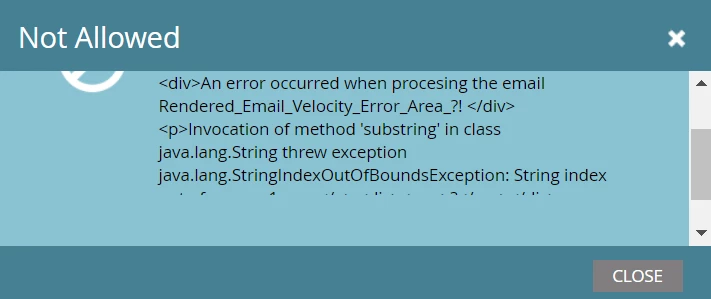
I tried to use the new robust code that Sanford suggested, it's throwing an exception "Innovation of  method substring"


I tried to replace it with Jo code and again it's throwing error the same above error, not sure how it complied (approved) when I did first time. 


@pramodbasavanna 

try this

#set( $nameEnding = { "as" : { "updated":"ai" }, "is" : { "updated":"i" }, "ys" : { "updated":"y" }, "us" : { "updated":"au" }, "ė" : { "updated":"e" } } ) #set( $swapChars="" ) #set( $checkChars=2 ) #if( ! $display.alt($lead.LastName,"").isEmpty() ) #set( $originalLastname = $lead.LastName ) #if ( $originalLastname.substring( $math.sub($originalLastname.length(),1) ).equals("ė")) #set( $checkChars=1 ) #end #set( $lastChars = $originalLastname.substring( $math.sub($originalLastname.length(),$checkChars) )) #if( $nameEnding.containsKey($lastChars) ) #set($outputName = "${originalLastname.substring(0,$math.sub($originalLastname.length(),$checkChars))}${nameEnding[$lastChars].updated}") #else #set($outputName = $originalLastname) #end ${outputName} #end

I added in this line

#if( ! $display.alt($lead.LastName,"").isEmpty() )

to test to see if it has a real lead to work with.  When you test an email, something can work in velocity, but when you approve the email, it'll fail as it has no lead data to actually work with.


Cheers

Jo


1 reply

New Participant
May 6, 2022

Hi,


I tried to solve it with below script and it worked.

#set( $Name = ${lead.FirstName} )
#set( $FormatName = $Name .trim().replaceAll("(?i),?(as\.?)${esc.d}", "ai") )
${FormatName }


Now, I am looking forward for your help to solve below conditions in one script.

  1. If name has ending -as, then salutation ends – ai.  Example: Rokas – Rokai, Mindaugas – Mindaugai
  2. if ending -is, then salutation ends -i.  Example: Rytis – Ryti, Kęstutis – Kęstuti
  3. if ending -ys, salutation -y. Example: Balys – Baly, Kazys – Kazy
  4. If ending -us, salutation ends -au. Example: Paulius – Pauliau, Baltrus – Baltrau
  5. If ending -ė, salutation ends -e. Example: Auksė – Aukse, Kamilė – Kamile

@sanfordwhiteman Please help!

Jo_Pitts1
Community Manager
May 8, 2022

@pramodbasavanna ,

try this.  There is probably a shorter more elegant version.  However, the verbosity of this is in some ways useful


#set( $nameEnding = { "as" : { "updated":"ai" }, "is" : { "updated":"i" }, "ys" : { "updated":"y" }, "us" : { "updated":"au" }, "ė" : { "updated":"e" } } ) #set( $swapChars="" ) #set( $checkChars=2 ) #set( $originalLastname = ${lead.LastName} ) #if ( $originalLastname.substring( $math.sub($originalLastname.length(),1) ).equals("ė")) #set( $checkChars=1 ) #end #set( $lastChars = $originalLastname.substring( $math.sub($originalLastname.length(),$checkChars) )) #set( $swapChars = $nameEnding[$lastChars].updated ) #if(!$swapChars.length().equals(0)) #set($outputName = "$originalLastname.substring(0,$math.sub($originalLastname.length(),$checkChars))$swapChars") #else #set($outputName = $originalLastname) #end ${outputName}


Here's how it all works:

The first section sets up a map that is readily searchable.


Then I set swapChars to be an empty (but defined) string, and the number of characters to look for at the end of the name to 2

I put the leads last name into a local variable, and test to see if it ends in ė.  If it does, I reduce set CheckChars to 1

I get the correct length of ending  into the lastChars variable, and then search the map to and put the output (if any) into swapChars

If there is anything in $swapChars I take all of the last name, minus the length of the swappable section, and add in the replacement chars

and then output it.

Cheers

Jo


New Participant
May 9, 2022

@jo_pitts1 Thanks a ton! Script is working as intended, the you a way explained helps us to learn and improve our coding skills.  


Cheers

Pramod