Report Form fills in campaign - who filled what form | Community
Skip to main content
New Participant
December 12, 2023
Solved

Report Form fills in campaign - who filled what form

  • December 12, 2023
  • 3 replies
  • 4895 views

Hi!
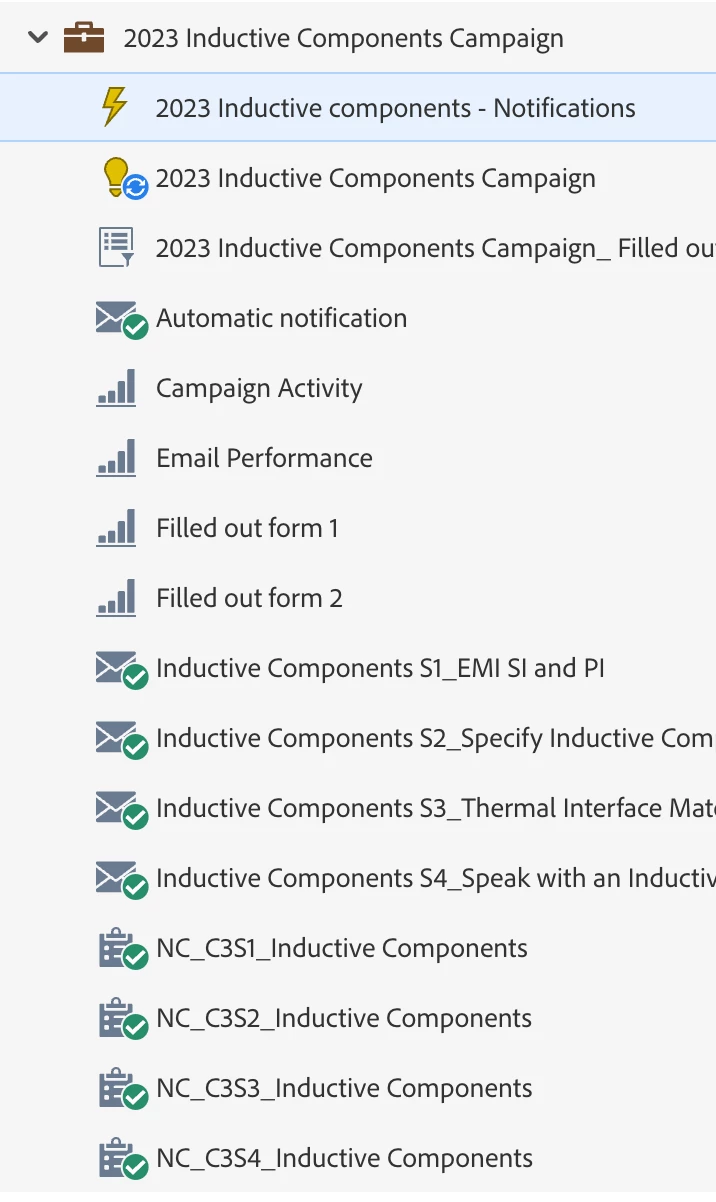
I have a campaign that has multiple emails. Each email takes you to a landing page with a different form to download content.

I want to create a report on all the campaign's form fills so that I can know which forms have been filled out, how many people have done so and their basic information. I feel this is pretty standard in other marketing platform systems, but can only find a way to create one report per form and this makes it very clunky.

Can I create one report that has all the forms in the campaign and how many were filled out?

Attaching an image for reference.

Thanks
This post is no longer active and is closed to new replies. Need help? Start a new post to ask your question.
Best answer by Katja_Keesom

Some very good suggestions with the landing page performance report and the people performance report with custom columns already. I would like to add one best practice to the mix here. Considering the fact that all of your pages are content downloads, it is totally recommended to set up one form for that purpose in Design Studio and use that same form on every page. By setting up your respective trigger campaigns to have filled out the form on different pages by adding the Referrer constraint Marketo will recognize which content to send and it leaves you with only one form to maintain instead of dozens if not hundreds over time.

3 replies

Katja_Keesom
Katja_KeesomAccepted solution
Community Manager
December 20, 2023

Some very good suggestions with the landing page performance report and the people performance report with custom columns already. I would like to add one best practice to the mix here. Considering the fact that all of your pages are content downloads, it is totally recommended to set up one form for that purpose in Design Studio and use that same form on every page. By setting up your respective trigger campaigns to have filled out the form on different pages by adding the Referrer constraint Marketo will recognize which content to send and it leaves you with only one form to maintain instead of dozens if not hundreds over time.

Zoe_Forman
Community Manager
December 29, 2023

We follow @katja_keesom suggestion, using global forms then referrer to  identify the different landing pages. 
@osinskis Mixing with the above suggestions of Smart lists and Campaigns and reports will give you all the data around forms fills you require.
You can also set up smart lists for unique and multiple form fills.
One form per landing page won't be sustainable and before you know it you will have 100's of custom forms to manage.

New Participant
December 12, 2023

I would consider creating a Landing Page Performance Report in your campaign and pulling in every landing page in your campaign. Assuming your naming convention includes the form name, this would be an easy way to monitor conversions (form fills in Marketo). 

SanfordWhiteman
New Participant
December 12, 2023

Yes, although note this doesn’t work for non-Marketo pages nor distinguish between forms on the same page.

Darshil_Shah1
Community Manager
December 12, 2023

Well, you can always create a smart list with the filled-out form <form name> and additional available constraints (e.g., query string, referrer, landing page, etc.) to get a list of people who qualify for the criteria. People who have filled out the respective form at least once would qualify for it. You can use the minimum number of times constraint to see people who have filled out the form multiple times. You can also create a people performance report with this filter with apt configuration added to its smart list.

You can also just export the activity data (regular activities and bulk activities extract APIs) and then analyze it. Hope this helps! Let us know if you have questions.

OsinskiSAuthor
New Participant
December 18, 2023

Hi, thank you for your response.

I have tried this and I get this report.

I'd like to do something similar, but instead of having numbers per month like I have now, have them filtered by the 4 forms in the campaign so I know how many form fills each form got.

Thanks

Jo_Pitts1
Community Manager
December 19, 2023

@osinskis,

This might work for you.


Create four smart lists - one for each form.  Make the smart list be 'member of campaign' and 'filled out form' and set the values correctly.

Then add them as custom fields to the report.  You can find that option in the setup tab.  Then change the grouping to be whatever you need.


Cheers

Jo
