Require a specific number of characters in form field | Community
Skip to main content
Anna_Blanchet1
New Participant
December 9, 2021
Solved

Require a specific number of characters in form field

  • December 9, 2021
  • 1 reply
  • 3335 views

Hi,

I've searched the community threads but cannot find the answer. We need to require 9 digits in a form field to ensure customers enter their account number correctly. Most account numbers begin with a 0. I'm able to set the Max Value to 999999999 but when I try to set the Min Value to 000000001 or variations of that, Marketo defaults back to just 0.  So if a customer enters 8 or less digits, they will be able to submit the form which we do not want to happen.


Any ideas would be appreciated!

This post is no longer active and is closed to new replies. Need help? Start a new post to ask your question.
Best answer by SanfordWhiteman

@jo_pitts1, I think you forgot about Input Masks.


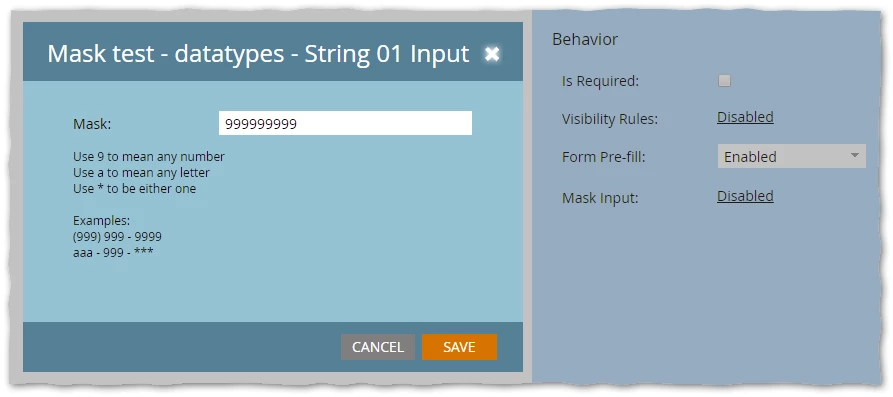
@anna_blanchet1 you should be using a String field, not Number (this is an alphanumeric string you’re dealing with, not an integer) and a mask:


1 reply

Jo_Pitts1
Community Manager
December 9, 2021

@anna_blanchet1 ,

this is a slightly heavy weight approach to your problem, and may need some debugging.

I've cut it down from a solution designed to validate phone numbers across a range of lengths, and allows for multiple error messages and validation checks.  I've gutted it down to one test (length) and one message (the length error message).


Put this on code on the page with your form

<script> MktoForms2.whenReady(function(form) { form.onValidate(function(nativeValid) { if (!nativeValid) return; var fieldName = 'accountNumber', currentValue = form.getValues()[fieldName], elJq = form.getFormElem().find('#' + fieldName), limits = { minDigits: 9, maxDigits: 9 }, messages = { INVALID_ACCOUNT_LENGTH: 'Please enter exactly 9 digits' }; form.submittable(false); if (currentValue.match(/\d/g).length < limits.minDigits || currentValue.match(/\d/g).length > limits.maxDigits) { form.showErrorMessage(messages.INVALID_ACCOUNT_LENGTH, elJq); return false; } form.submittable(true); }); }); </script>


Cheers

Jo

SanfordWhiteman
SanfordWhitemanAccepted solution
New Participant
December 9, 2021

@jo_pitts1, I think you forgot about Input Masks.


@anna_blanchet1 you should be using a String field, not Number (this is an alphanumeric string you’re dealing with, not an integer) and a mask:


Jo_Pitts1
Community Manager
December 9, 2021

@sanfordwhiteman ,

LOL... you'd be 100% correct.

Talk about taking a sledgehammer to a thumbtack 🙂