Review-able alert | Community
Skip to main content
Eric_Salamon1
New Participant
August 2, 2017
Solved

Review-able alert

  • August 2, 2017
  • 1 reply
  • 3730 views

Sales alerts are great because a form is filled and a lead comes in. If the form is a contact us form, this lead is sent internally for review, because unqualified people could be trying to get in touch with us (list providers, sales people trying to encourage their tool, or people looking for work). You could have all the various forms but people will still try to contact you there.

Next an alert is sent to you to review the person. Is it possible to put links in the alert, move to sales, marketing, service, and other, and then base the actions on which link is clicked should happen to a specific individual?

This post is no longer active and is closed to new replies. Need help? Start a new post to ask your question.
Best answer by Dan_Stevens_

How would I set up the URL Parameter in the smart list filter?


This would be the link in the email (you can create a specific routing page per type; or use a central one and just send over another URL parameter so the page will render properly):

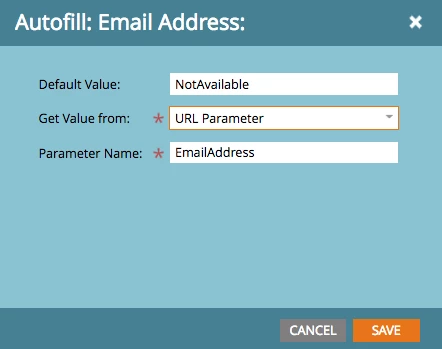
Then on the landing page, you would include a form where all fields are hidden and just displays a submit button.  The form would contain a hidden "Email" field and be populated by the URL parameter:

When the submit button is clicked, the alert will be re-sent to the proper department.

1 reply

Dan_Stevens_
New Participant
August 2, 2017

Our alerts are initially routed based on the "Relationship with Avanade" field (where many of our form submits are job search/career-related).  This helps us do the initial routing before the alert gets sent out to a central mailbox.

And those where "potential customer, current customer, other" are concerned, we route those centrally within each country.  If Marketing qualifies the lead and wants to assign it to Sales, they change the "status reason" in CRM and change the lead owner to the appropriate sales exec.  Marketo listens for this and then sends out a dedicated SALES alert with all of the key information.

Without a process like this, you can still build a trigger based routing model using a single alert.  Simply include those routing paths that you mentioned (sales, marketing, service, etc.) as buttons/links within the alert and - when clicked, drive to a Marketo LP.  Use a trigger/filter to take the necessary action (send out the alert to the appropriate team) based on the link that was clicked (or for even more reliability, the page that was visited).

Eric_Salamon1
New Participant
August 2, 2017

I totally get that, but this is routed to the right person but that person decides that some one manages this further or not, basically after the Email alert has gone out.

Dan_Stevens_
New Participant
August 2, 2017

Right, so use the approach that I provided here:

you can still build a trigger based routing model using a single alert.  Simply include those routing paths that you mentioned (sales, marketing, service, etc.) as buttons/links within the alert and - when clicked, drive to a Marketo LP.  Use a trigger/filter to take the necessary action (send out the alert to the appropriate team) based on the link that was clicked (or for even more reliability, the page that was visited).

All you're doing is sending the alert back out again to the right person.