Safety Rules by folder or campaign?? | Community
Skip to main content
Paul_Johnson
New Participant
February 28, 2017
Solved

Safety Rules by folder or campaign??

  • February 28, 2017
  • 4 replies
  • 2077 views

Hey guys,

Email marketing can cause stress. The fear of forgetting a filter in a campaign that will weed out necessary people is REAL!

My question is if you can create some kind of rules that prohibit you from making some mistakes.

My Marketo instance is broken up by the various verticals we support. SMB team, Higher ed, Current customers, etc.... Is there a way that I can say, any programs that come through this Folder, DO NOT email anyone who meets this criteria?

This post is no longer active and is closed to new replies. Need help? Start a new post to ask your question.
Best answer by Dan_Stevens_

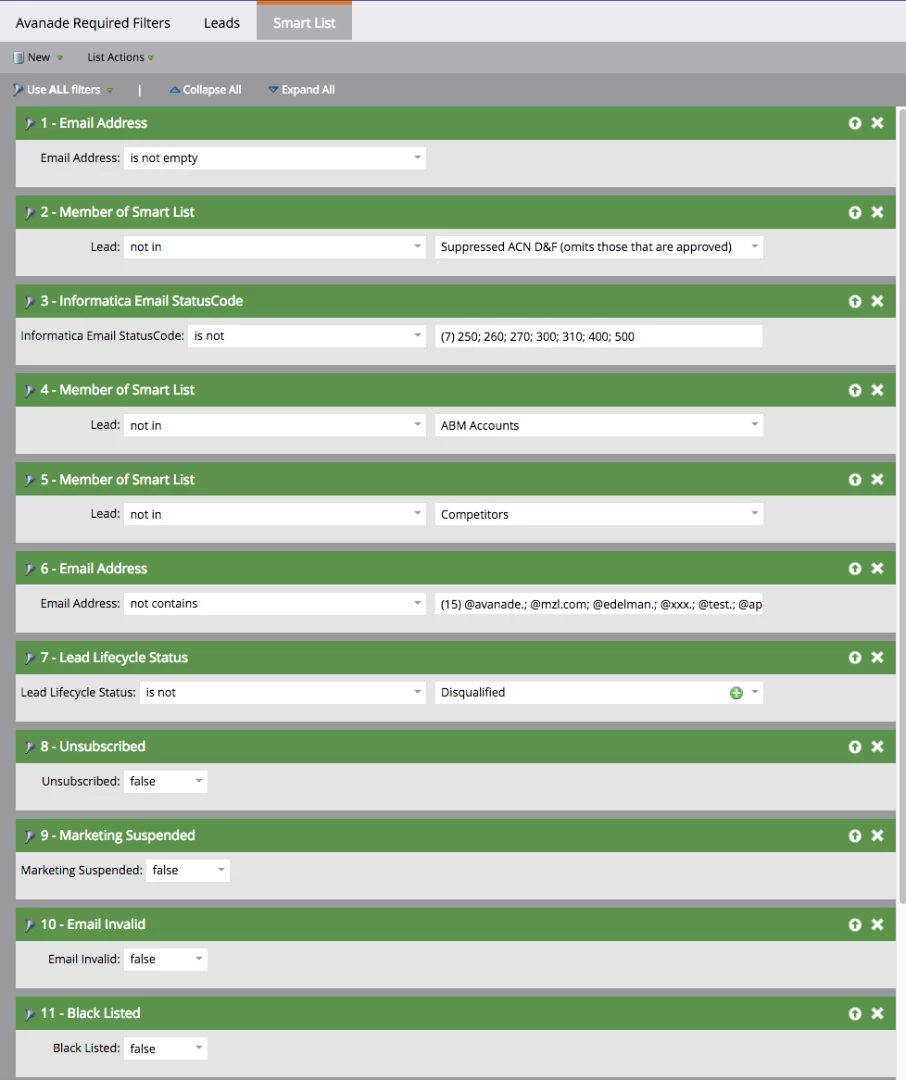
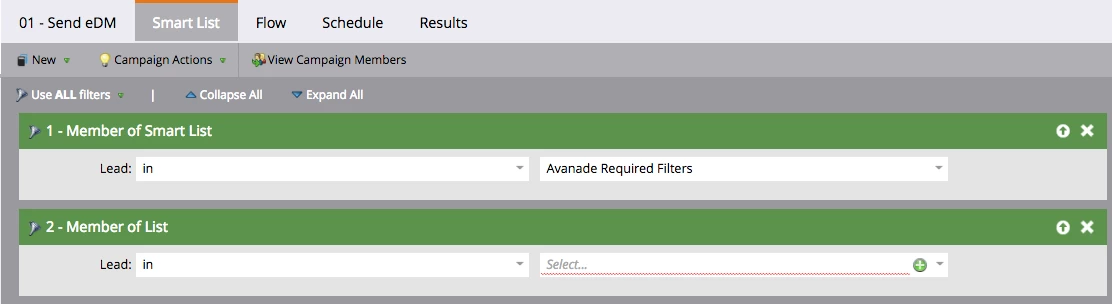
We instruct our users - and even include this in all program templates, so they don't forget - to ensure all email sends include a common smart list (that has a collection of embedded smart lists) that is filtered against the main distribution list:

Here's the makeup of the "Avanade Required Filters" smart list:

Not only does this prevent us from ever sending an email out to someone who shouldn't receive it, but it makes our email sends extremely efficient (e.g., minimal bounces) - especially now that we have deployed Informatica's email verification/validation engine running behind the scenes. 

I realize that this approach can put a strain on our system (using the embedded smart lists), but it's a process that works for us.

4 replies

Dan_Stevens_
Dan_Stevens_Accepted solution
New Participant
February 28, 2017

We instruct our users - and even include this in all program templates, so they don't forget - to ensure all email sends include a common smart list (that has a collection of embedded smart lists) that is filtered against the main distribution list:

Here's the makeup of the "Avanade Required Filters" smart list:

Not only does this prevent us from ever sending an email out to someone who shouldn't receive it, but it makes our email sends extremely efficient (e.g., minimal bounces) - especially now that we have deployed Informatica's email verification/validation engine running behind the scenes. 

I realize that this approach can put a strain on our system (using the embedded smart lists), but it's a process that works for us.

Paul_Johnson
New Participant
February 28, 2017

Thanks to everyone!

Josh_Hill13
New Participant
February 28, 2017

You'd have to build smart lists and program templates and then train people to do this. As Sanford said, it will never be perfect.

SanfordWhiteman
New Participant
February 28, 2017

Automatic, no-matter-what-else-happens suppression lists are a common desire but aren't really possible.  If you want to try something rather insane at the email/template level there's this.

Dan_Stevens_
New Participant
February 28, 2017

What exactly does "any programs that come through this folder" mean?

If the data is there or the behavior is captured, usually you can find a way to filter down to the precise audience to which you intend to send.