Sales insight vs. SFDC Activity History (how to separate?) | Community
Skip to main content
New Participant
May 10, 2018
Solved

Sales insight vs. SFDC Activity History (how to separate?)

  • May 10, 2018
  • 2 replies
  • 3453 views

Hi,

My sales team is getting bogged down by the amount of Marketo activity that is occurring within the Salesforce account and contact activity history. We use Sales Insight too - does anyone know how i can make the activity just show up in Sales Insight and not to the Activity History? Or if that's too specific, does anyone know how I can separate the activity so they can see their own personal activity without Marketos?

Thank you!

Alexis
This post is no longer active and is closed to new replies. Need help? Start a new post to ask your question.
Best answer by Mark_Farnell

Hi Alexis, we had the same issue as well.  Specifically we want the Activity History in SFDC to only show the activity of the Sales team, for example you might want to run reports based on last activity date which would become unclear if it was actually a marketing activity.

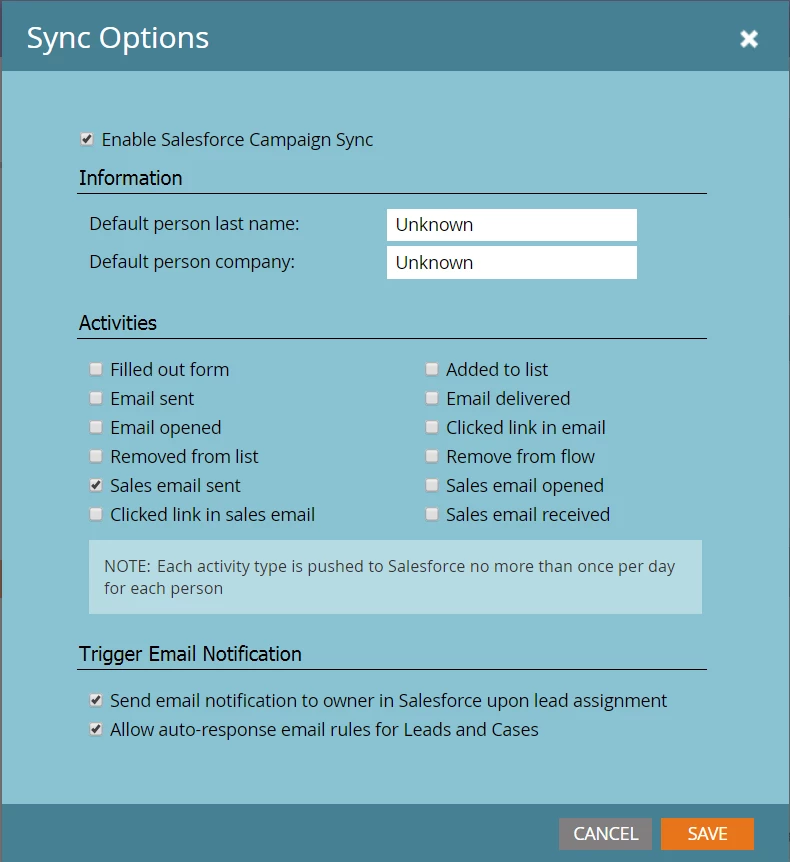
In Admin > Salesforce you can edit the sync options to decide which activities are pushed to SFDC, we only select Sales email sent so as to filter out all the other activity.

2 replies

Grégoire_Miche2
New Participant
May 11, 2018

Please move the question to Products​. Champion Program​ if for questions about the program itself.

Posting activities from Marketo is simply put a bad idea. I will clutter your SFDC instance, it duplicates information that you should post  through Interesting moments in MSI or through SFDC campaign memberships and it makes it impossible for sales use tasks.

-Greg

New Participant
May 11, 2018

Completely agree, there's was too much noise getting into salesforce. Mark's solution fixed it. Thank you

Mark_Farnell
Mark_FarnellAccepted solution
New Participant
May 11, 2018

Hi Alexis, we had the same issue as well.  Specifically we want the Activity History in SFDC to only show the activity of the Sales team, for example you might want to run reports based on last activity date which would become unclear if it was actually a marketing activity.

In Admin > Salesforce you can edit the sync options to decide which activities are pushed to SFDC, we only select Sales email sent so as to filter out all the other activity.

New Participant
May 11, 2018

Thank you - that did the trick!