"Schedule repeats on the second Thursday of every month" turns into "Schedule repeats on the day after the second Thursday of every month" | Community
Skip to main content
New Participant
March 17, 2024
Solved

"Schedule repeats on the second Thursday of every month" turns into "Schedule repeats on the day after the second Thursday of every month"

  • March 17, 2024
  • 2 replies
  • 2869 views

Hi all


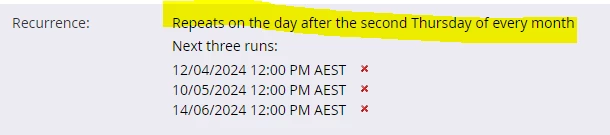
Has anyone else experienced this issue? We have monthly campaigns that are set to repeat on the second Thursday of every month. After a few runs, they then change themselves to "Schedule repeats on the day after the second Thursday of every month" ie the second Friday of the month.


Example from an affected campaign. Here is the recurrence we set starting in December:
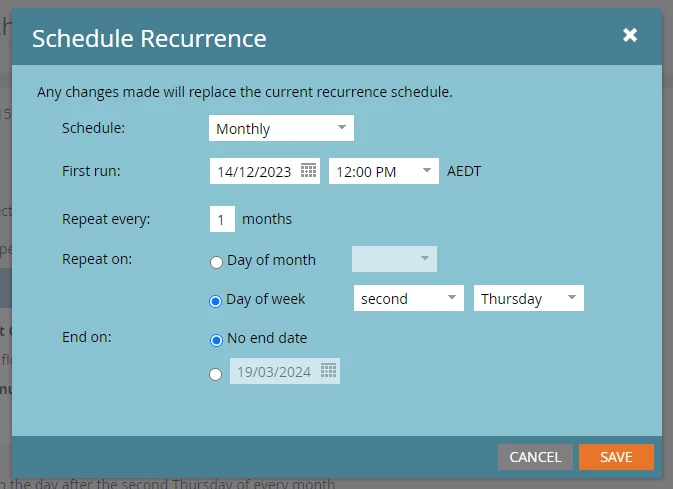


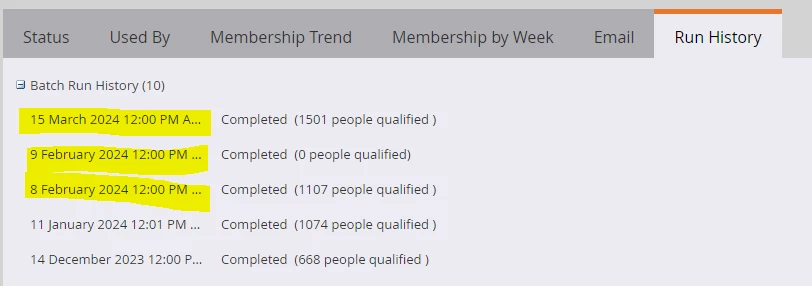
It worked as expected for a few months, then in February it ran twice on both the second Thursday and Friday, then in March it only ran on the Friday:


Now the schedule tab shows as below:
 

Thanks

This post is no longer active and is closed to new replies. Need help? Start a new post to ask your question.
Best answer by Darshil_Shah1

Unless someone modified the Campaign's Schedule outside of your knowledge, this could be a bug, as I haven't noticed this happening with my existing live campaigns, i.e., the Schedule getting changed on its own. Ideally, the Schedule tab should say, "Repeats on the second Thursday of every month" based on the configuration you have shared in the Schedule Recurrence snapshot. You'd want to check the Audit Trail in Marketo Admin. Consider adding the asset type, name, date range, and action (i.e., Modify Campaign Schedule) so you don't have to sift through a lot of items in the log unnecessarily.

2 replies

Darshil_Shah1
Darshil_Shah1Accepted solution
Community Manager
March 18, 2024

Unless someone modified the Campaign's Schedule outside of your knowledge, this could be a bug, as I haven't noticed this happening with my existing live campaigns, i.e., the Schedule getting changed on its own. Ideally, the Schedule tab should say, "Repeats on the second Thursday of every month" based on the configuration you have shared in the Schedule Recurrence snapshot. You'd want to check the Audit Trail in Marketo Admin. Consider adding the asset type, name, date range, and action (i.e., Modify Campaign Schedule) so you don't have to sift through a lot of items in the log unnecessarily.

New Participant
March 18, 2024

Thanks @darshil_shah1 The campaign still shows last modified by me on the date I pushed it live, so I don't have a reason to think someone else made a change. I suspected it might be a bug especially given you can't set the recurrence to say "the day after the second Thursday of every month", it would have to be "the second Friday of every month". I'll log a ticket, thanks.

Darshil_Shah1
Community Manager
March 18, 2024

Glad to be of help, @kevintruong-2! Please let us know what support comes back with; that would be really helpful for the users who come to this thread looking for the same issue. 🙂 

uditmathur
Community Manager
March 18, 2024

Hi,

Try checking on the Audit trail if someone  has changed the cadence of your program.