Scoring Tokens | Community
Skip to main content
New Participant
May 3, 2017
Solved

Scoring Tokens

  • May 3, 2017
  • 2 replies
  • 7015 views

We have global scoring campaigns in place, but have noticed a lot of people use scoring tokens.  I understand the concept of using tokens at the program level, but cannot locate how to set these up from start to finish.  I know how to add them in to the My Tokens tab of the program...but how do I change score value -> would it be adding in a smart campaign?  Any help would be greatly appreciated!
This post is no longer active and is closed to new replies. Need help? Start a new post to ask your question.
Best answer by

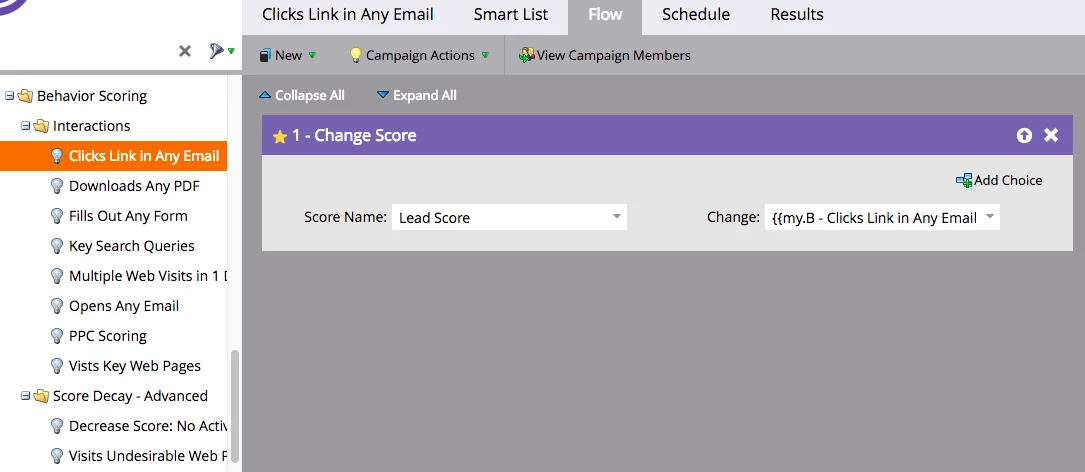
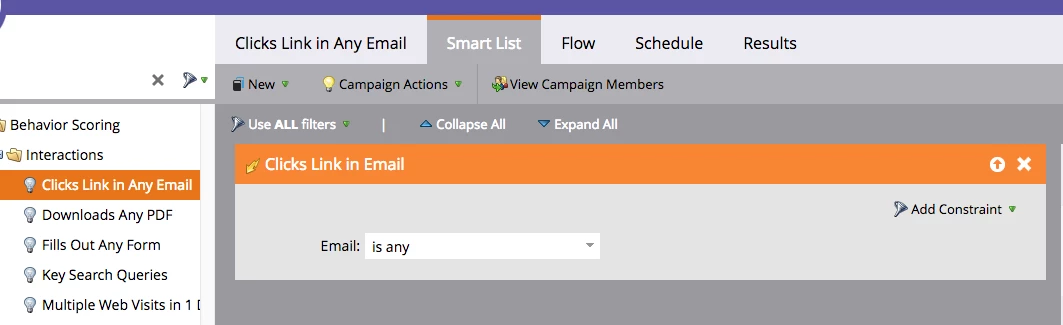
This is the visual to what Devral explained above. 

My prior comment shows My Tokens tab of the Scoring Program. 

Next define the campaigns in your scoring program - like so in the Smart List & trigger action

Then in the flow - change the score and reference the appropriate token. 

2 replies

May 4, 2017

Tokens are not just for program scoring.  Tokens can be extremely valuable if you do a lot of events or webinars.  They also you be useful in general email marketing as well.  It will easily enable you to quickly make updates to Programs for  Event or Webinar invites and reduce the amount of manual editing of emails and landing pages.

And for good measure here is an example of program scoring using Tokens.

SanfordWhiteman
New Participant
May 4, 2017

OP gets tokens in general, it would seem ("I understand the concept of using tokens...").

Accepted solution
May 4, 2017

This is the visual to what Devral explained above. 

My prior comment shows My Tokens tab of the Scoring Program. 

Next define the campaigns in your scoring program - like so in the Smart List & trigger action

Then in the flow - change the score and reference the appropriate token. 

Devraj_Grewal
New Participant
May 3, 2017

Karen,

You first create the tokens in the operational program (ex. Registered for webinar). When you create the scoring smart campaign, the flow will look like: "change score: lead score: {{my.Registered for webinar}}". The flow will then adjust the score to whatever is the token value (ex. +10).

KARENBLAuthor
New Participant
May 3, 2017

Thank you!  I am just trying to make sense of using scoring tokens vs. what I currently have.  Seems like the only benefit of tokens is you have one place to go for all scores, correct?

Devraj_Grewal
New Participant
May 3, 2017

But I would consider that a huge benefit. It provides one view so you can adjust all scores accordingly in reference to each other.