
Script token with an integer field not working | Community
Skip to main content
Kassia_Wilhelm
New Participant
August 26, 2014
Solved

Script token with an integer field not working

  • August 26, 2014
  • 5 replies
  • 3329 views
I have a script token that checks to see if one of our integer fields is over 9; if it is over 9, I want the html in the token to display, if it's less than 9 I want no html to display in that area. I wrote the velocity script correctly syntax-wise, but the "#if FIELD > 9" comparison is not working.

I created an integer variable and added a parseInt function and it works, but then the email that it's used in won't Approve - it throws up this error message:
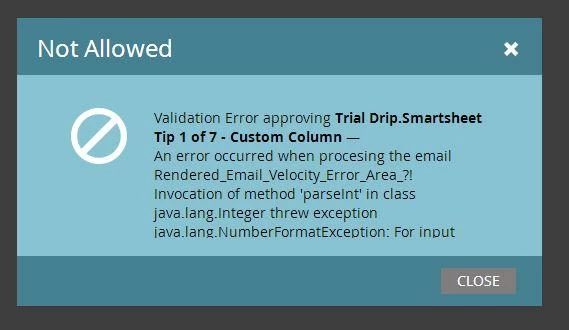


Does anyone have any idea how I can get the token to satisfy Marketo? Is there another function that can be used rather than parseInt to make the comparison valid?

Here is the token code:

#set($Integer = 0)
#if (($Integer.parseInt(${lead.Domain_Use_in_Past_Year__c})) > 9)
<table align="center" border="0" cellspacing="0" cellpadding="0">
<tr>
<td height="40">
</td>
</tr>
<tr>
<td align="center" style="font-size:18px; color: #A5A9AC; font-weight:100;">
${lead.Domain_Use_in_Past_Year__c}
</td>
</tr>
</table>
#end

Any help is appreciated!
This post is no longer active and is closed to new replies. Need help? Start a new post to ask your question.
Best answer by Kassia_Wilhelm
Wanted to update this post in case anyone experiences a similar issue.

This is what eventually worked for me to use a parseInt-type function:

<tools>
   <toolbox scope="application">
     <tool class="org.apache.velocity.tools.generic.ConversionTool" dateFormat="yyyy-MM-dd"/>
   </toolbox>
 </tools>
 
 #set( $DomainCount = $math.toInteger(${lead.Domain_Use_in_Past_Year__c}) )
#if( $DomainCount > 9 )
<table align="center" border="0" cellspacing="0" cellpadding="0">
<tr>
<td height="40">
</td>
</tr>
<tr>
<td align="center" style="font-size:18px; color: #A5A9AC; font-weight:100;">
${lead.Domain_Use_in_Past_Year__c}
</td>
</tr>
</table>
#end

5 replies

Diane_Condon1
New Participant
August 25, 2016

Thanks Kassia! This was really helpful.

Diane
SanfordWhiteman
New Participant
August 25, 2016

@Diane Condon​ you'd likely enjoy this complementary post on my blog.

Note you don't need to include $convert -- it is already in the context.

February 5, 2015
This saved me a bunch of time! Thank you for posting your solution.
Kassia_Wilhelm
Kassia_WilhelmAuthorAccepted solution
New Participant
October 9, 2014
Wanted to update this post in case anyone experiences a similar issue.

This is what eventually worked for me to use a parseInt-type function:

<tools>
   <toolbox scope="application">
     <tool class="org.apache.velocity.tools.generic.ConversionTool" dateFormat="yyyy-MM-dd"/>
   </toolbox>
 </tools>
 
 #set( $DomainCount = $math.toInteger(${lead.Domain_Use_in_Past_Year__c}) )
#if( $DomainCount > 9 )
<table align="center" border="0" cellspacing="0" cellpadding="0">
<tr>
<td height="40">
</td>
</tr>
<tr>
<td align="center" style="font-size:18px; color: #A5A9AC; font-weight:100;">
${lead.Domain_Use_in_Past_Year__c}
</td>
</tr>
</table>
#end
Kassia_Wilhelm
New Participant
August 26, 2014
Yes! I've made that mistake in the past, not this time!
August 26, 2014
Do you have the checkbox on the right enabled for your "Domain Use in Past Year" field?