Scripting & Reverse Geocoding Question | Community
Skip to main content
New Participant
May 27, 2021
Solved

Scripting & Reverse Geocoding Question

  • May 27, 2021
  • 2 replies
  • 2051 views

Hi there, 


We are receiving data in a string field that includes longitude and latitude information similar to the example below. As I'm new to scripting, I'm looking to understand how would I be able to pull out the x and y data to separate fields.


Additionally, the next step after would be to create a webhook with the Google Maps Geocoding API (or Reverse Geocoding) to spit out the Country of these coordinates: https://developers.marketo.com/webhooks/examples/


Field Name: Lead Data

Field Value:

{"company":"TEST" ,"description":"TEST DESCRIPTION" ,"x":-83.223971,"y":44.9009925,"Industry_Name":"Electronics","experiments":[]}


If anyone has advice on either the scripting or the geocoding webhook portion, I'd greatly appreciate it!
This post is no longer active and is closed to new replies. Need help? Start a new post to ask your question.
Best answer by SanfordWhiteman

Like Jay says, you must parse that JSON to extract the lat/lng before sending it to Google.


But you're in luck: because that value is a full valid JSON string, you don't need a custom service to parse it.


(Note for the future: it's never a good idea to store JSON unless you know what you're doing with it.)


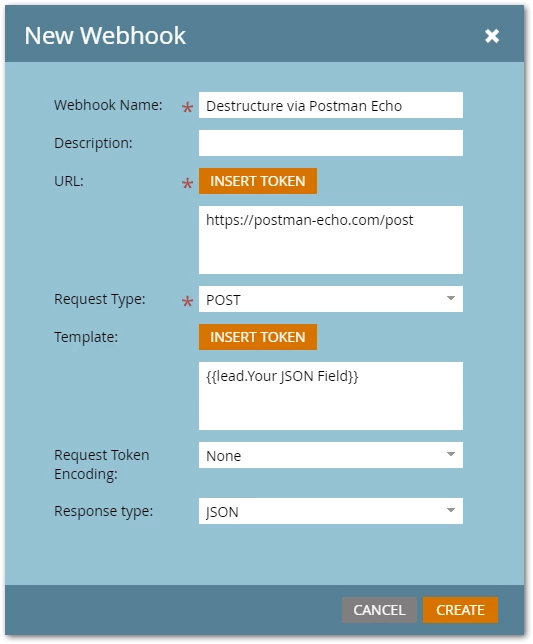
Because it's a JSON string, you can pass it to a free echo service to get the individual fields. Postman Echo is such a service.

Note the Request Token Encoding is None, not JSON.


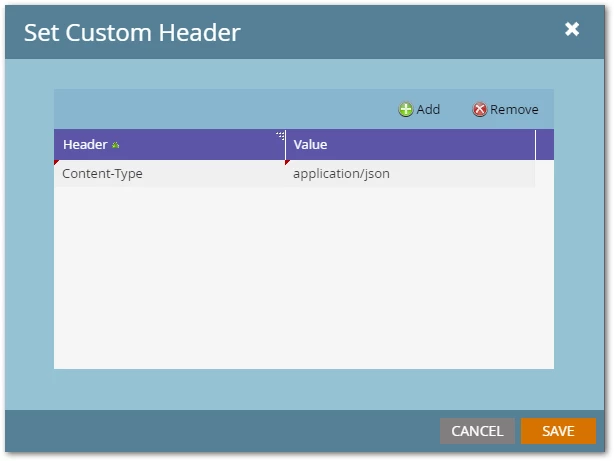
You must set a Custom Header because of this non-traditional setup:


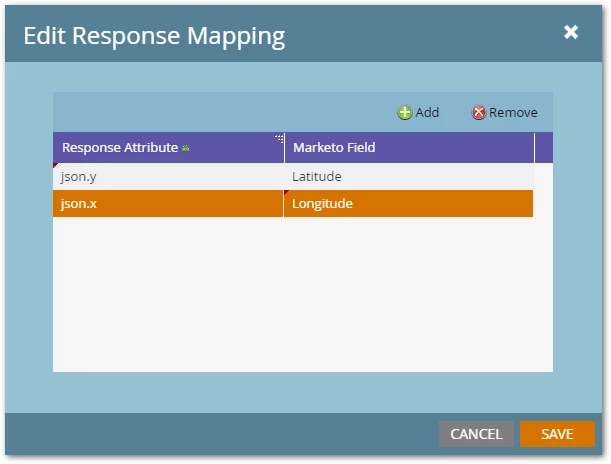
Then you can use Response Mappings.


Now, you have the individual fields and can send them to Maps in a separate webhook.


2 replies

SanfordWhiteman
SanfordWhitemanAccepted solution
New Participant
May 27, 2021

Like Jay says, you must parse that JSON to extract the lat/lng before sending it to Google.


But you're in luck: because that value is a full valid JSON string, you don't need a custom service to parse it.


(Note for the future: it's never a good idea to store JSON unless you know what you're doing with it.)


Because it's a JSON string, you can pass it to a free echo service to get the individual fields. Postman Echo is such a service.

Note the Request Token Encoding is None, not JSON.


You must set a Custom Header because of this non-traditional setup:


Then you can use Response Mappings.


Now, you have the individual fields and can send them to Maps in a separate webhook.


Jay_Jiang
New Participant
May 27, 2021

Firstly, I'm not sure what kind of scripting you're referring to. But since you mentioned webhooks, if you don't mind using your own server to host a handler script, you can send the full json payload to your script which can then:

1. parse the json

2. extract the x and y co-ordinates

3. send the x and y co-ordinates to the google maps service and receive the response

4. handle the response as needed for marketo to writeback value/s


Use your favourite language to write your handler script, php is an easy start!