Second Send to Non-Opens | Community
Skip to main content
New Participant
November 22, 2019
Solved

Second Send to Non-Opens

  • November 22, 2019
  • 2 replies
  • 5496 views

I am trying to create a Smart List send to anyone who didn't open the first send, and I'm having trouble finding info on how to set it up in docs.Marketo or here (although I could be missing it).

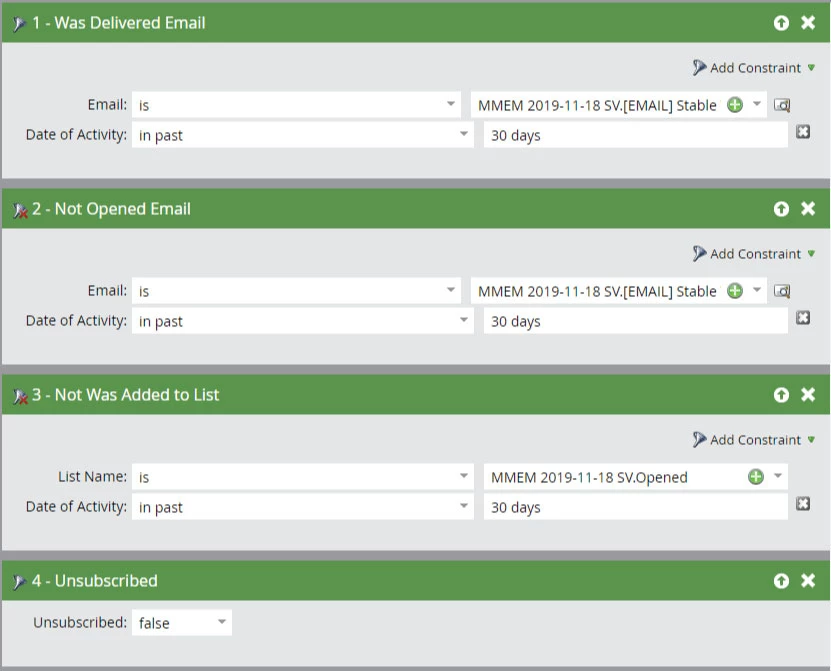
Attached is a screenshot of what I have created, it plays off the first send, which had a Flow step that added anyone who opened the email to the list (MMEM 2019-11-18 SV.Opened) referenced in step 3. 

So my question is, will the Smart List screenshot function as I hope it will? Is there a more efficient way I could be doing this?

Thanks! 
This post is no longer active and is closed to new replies. Need help? Start a new post to ask your question.
Best answer by Michael_Florin-2

Thanks for the heads up on the age-out functionality (that is really good to know), I actually found a cool resource here: https://nation.marketo.com/docs/DOC-5765-marketo-activities-data-retention-policy-under-the-hood#jive_content_id_Activit… after searching online for those timelines (it appears they are 90 days and 25 months, depending on the activities).

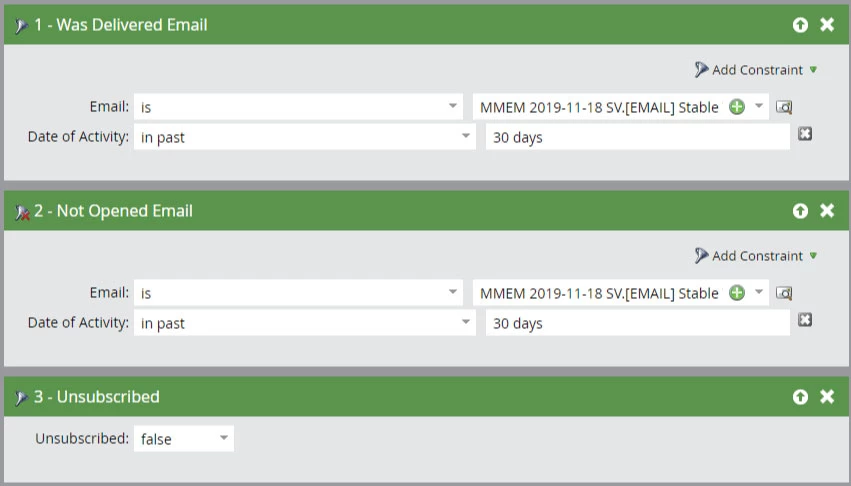
So between the two choices below (please see inline images), am I correct in understanding that you suggest pursuing a route like option A. instead of option B. as a general best practice? If that is correct, what further non-ActLog filters should be added to insure that the entire customer database doesn't get sent the second send (which in the current quick config. that I setup below is the case)?

Option A:

Option B: 


I'd say A and B are functionally the same, if - as Sanford already said - you have a trigger campaign that adds openers of your email to this static list. Adding them to the list in a flow step of your email sending batch campaign would not be sufficient as people can potentially open the email days after you sent it.

2 replies

SanfordWhiteman
New Participant
November 22, 2019
  • Why are you checking to see if they were added to the list (which doesn't mean they're still on the list) instead of that they're currently Member of List?
  • How does being on the list (of openers) differ from having an Opened Email? Are these not redundant in your instance?
New Participant
November 22, 2019
  • To be honest, I was just trying that out to see if it worked, if currently Member of List is the more efficient way (or just the more logical way) I can definitely switch to that. 
  • Good question: to my knowledge, if it would be redundant in a normal instance, than the same would be true for our instance, so I can make that update as well. To confirm, you are suggesting in a normal instance, removing step 3 (Not Was Added to List) and that it should function with just Not Opened Email? I think I was trying to over-engineer it, to ensure no one that opened the first send received the second send. 
SanfordWhiteman
New Participant
November 22, 2019

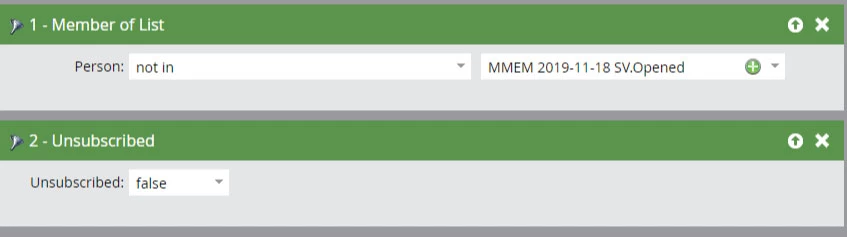
I'm saying that if you're already adding them to a static list based on triggered activity (i.e. they opened the email) then you should directly check membership in that list.

Not only is it vastly more efficient to check Member of List than constantly looking back into the Activity Log, the ActLog ages some activities out; if they're in the list, they stay there forever. (In your 30 day window nothing will actually age out, but you always have to consider this possibility when building filters.)

SanfordWhiteman
New Participant
November 22, 2019

Pls remove the attachment and paste the image inline in the editor. Not all Community users can see attachments.