Setting Up an Interesting Moment Notification when someone clicks a specific link | Community
Skip to main content
Nick_Leonard
New Participant
February 12, 2018
Solved

Setting Up an Interesting Moment Notification when someone clicks a specific link

  • February 12, 2018
  • 2 replies
  • 3331 views

Okay, so let me try and explain this as best as possible...

I want to set up an Interesting Moment smart campaign, which, when triggered, will create an interesting moment that captures the clicked link detail.

Currently, my Smart List is set up with the trigger "Clicks Link on Web Page", with Link Name contains: "/resource/example".

The flow step is as follows:

1. Interesting Moment: Type: Web : Description: {{trigger.Link}}

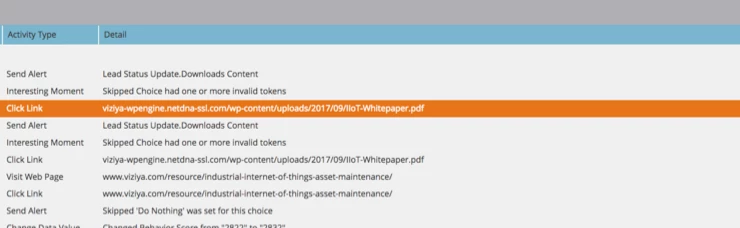
However, when I hover over the trigger, it is telling me "Token key not found".  I use this same trigger for link clicks within an email and it provides the detail of the link clicked, but in this case, it just comes back with an error (Skipped Choice seen below)

When I run a test and I click the link I am trying to get the details for, it shows up in my activity history under "activity type" and "detail" (See below).  How do I get that detail to trigger in my smart campaign?
Thanks,

Nick

This post is no longer active and is closed to new replies. Need help? Start a new post to ask your question.
Best answer by Jim_Thao7

I believe what you're looking for is {{trigger.Name}}.  This should draw in the actual asset that triggered the campaign.  Since the click link is the asset that triggers it, it will bring out the URL.

2 replies

Jim_Thao7
Jim_Thao7Accepted solution
New Participant
February 13, 2018

I believe what you're looking for is {{trigger.Name}}.  This should draw in the actual asset that triggered the campaign.  Since the click link is the asset that triggers it, it will bring out the URL.

Nick_Leonard
New Participant
February 13, 2018

Thanks Jim!  This seems to be working now.

Gerard_Donnell4
New Participant
February 12, 2018

Thats weird,

Does the trigger link only work for email links maybe?

I would have guessed

Clicked Link in Webpage: {{trigger.Web Page}} | Link: {{trigger.link}}