Setting up Twilio and Marketo webhook | Community
Skip to main content
Social_Garden6
New Participant
August 30, 2019
Solved

Setting up Twilio and Marketo webhook

  • August 30, 2019
  • 6 replies
  • 12006 views

Hi there 

Sorry I am having issues setting up Twilio and the Marketo webhook.

Should the URL of the webhook be...

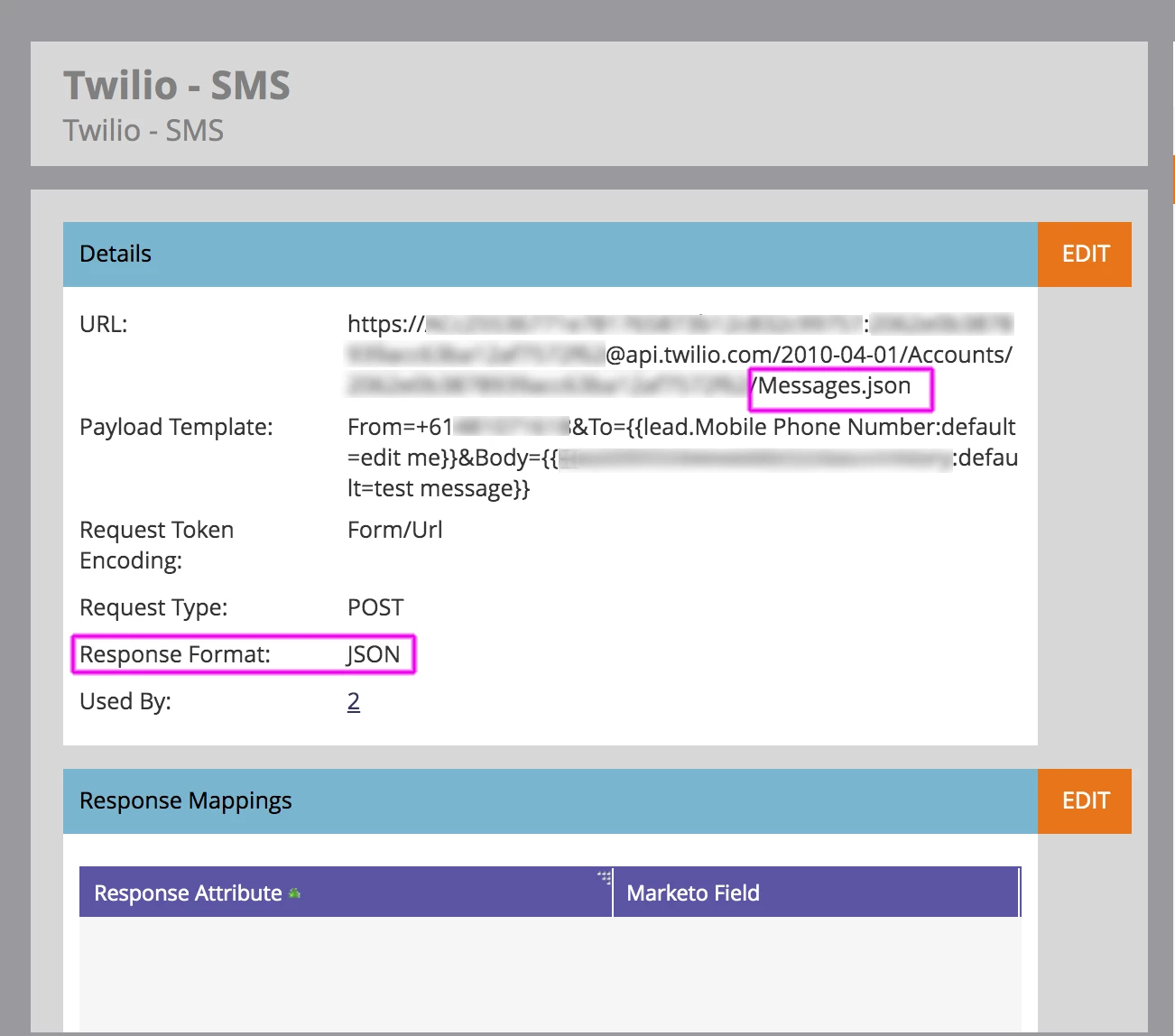
  • https://[ACCOUNT_SID]:[AUTH_TOKEN]@api.twilio.com/2010-04-01/Accounts/[ACCOUNT_SID] /SMS/Messages.xml

    OR

  • https://[ACCOUNT_SID]:[AUTH_TOKEN]@api.twilio.com/2010-04-01/Accounts/[ACCOUNT_SID] /Messages.json

Should the "Response format" be...

  • XML 
    OR 
  • JSON

I am using details from the post that was written in 2015 see below, (see link below) although its is not working.  
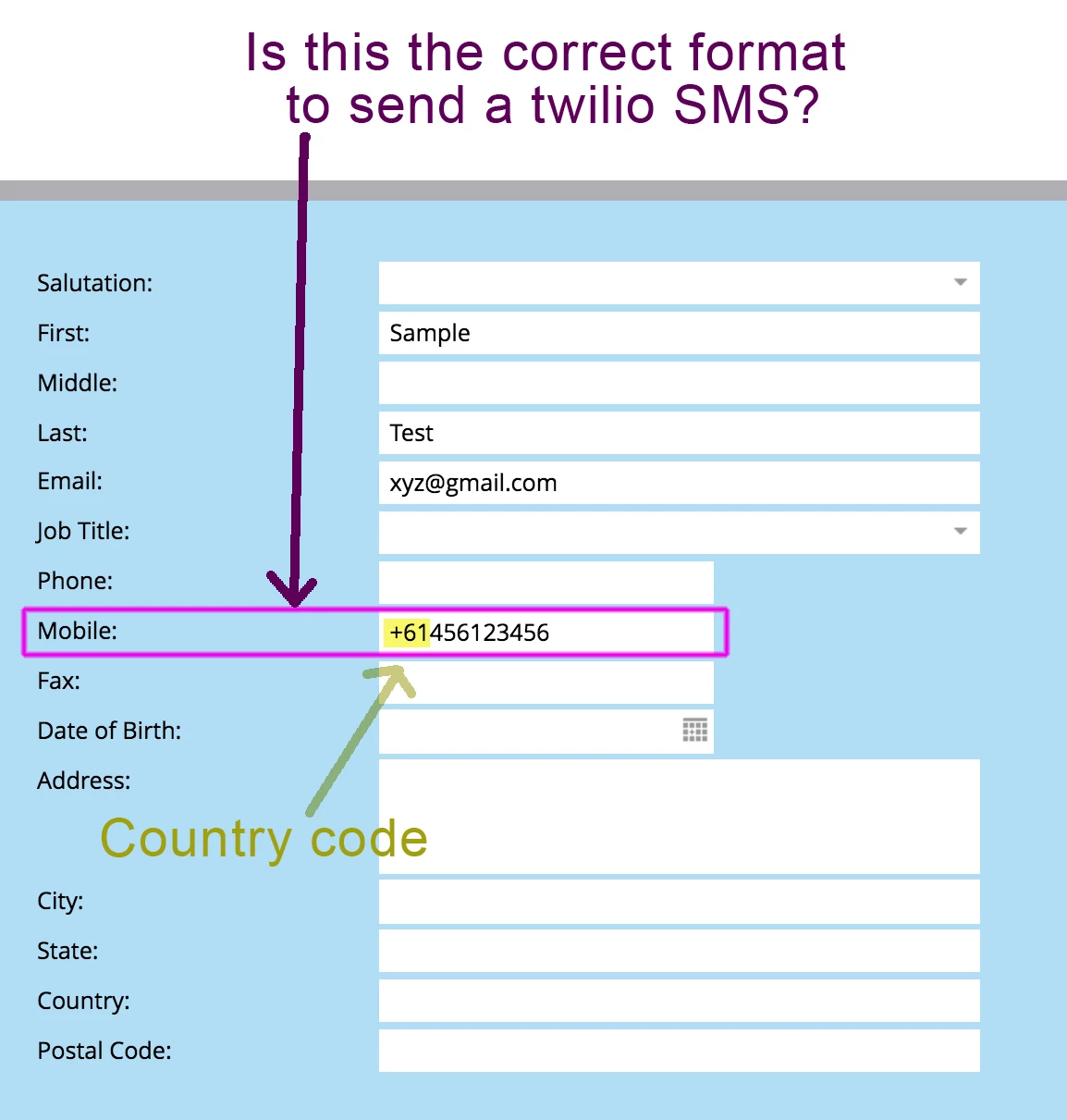
The From number starts with my country number for Australia it is +61.

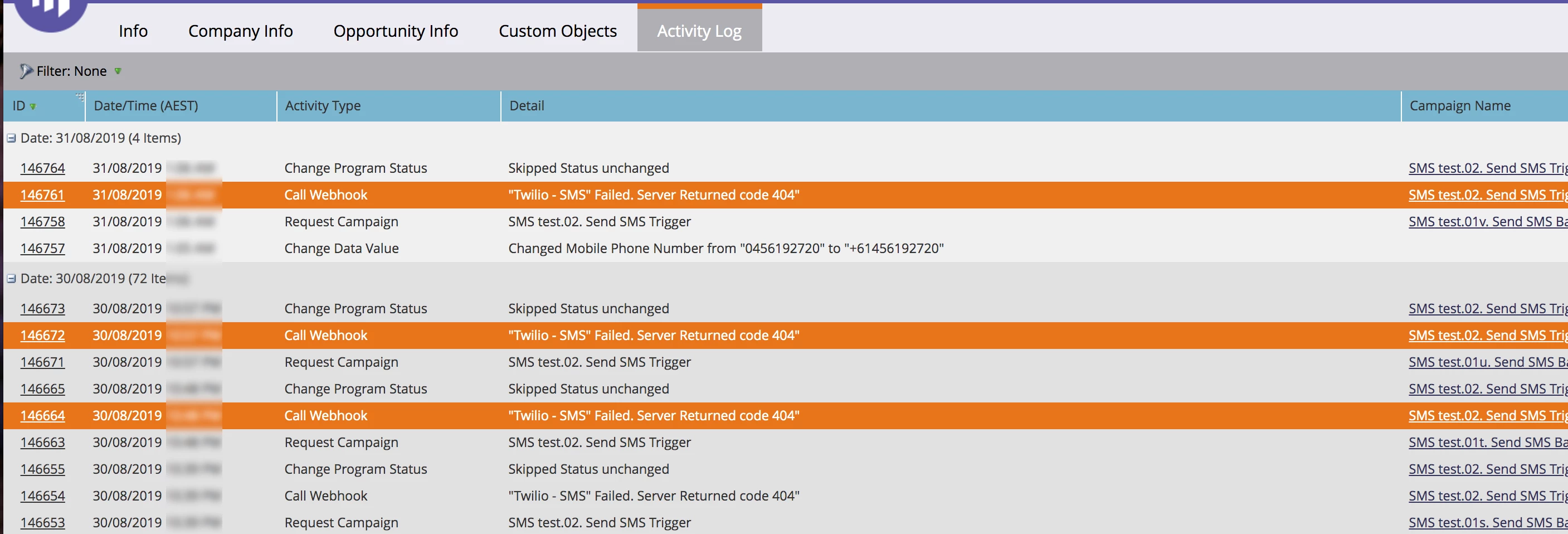
Sorry can you pls advise what I have done incorrectly in the webhook? I cant get it to send an SMS.

I have included a screen grab of the information I have placed into the webhook, if anyone can shed some advice that would be much appreciated.

Thank you so much  

/blogs/marketowhisperer/2015/07/08/sending-an-sms-using-twilio 

fyi @Sanford Whiteman‌, @Josh Perry @Karin Edmondson‌ @johnm

Latest test

Best answer by SanfordWhiteman
https://{SID}:{TOKEN}@api.twilio.com/2010-04-01/Accounts/{SID}/Messages.json

Response type is JSON, as you already have set up.

6 replies

New Participant
May 7, 2021

Just to provide people with another vendor option for SMS I recently published a blog on the Marketo forum that shows how to use webhooks to integrate with the Telnyx SMS API: 


https://theworkflowpro.com/marketo-text-messaging/ 


@victor_herrero I saw your later comments about wanting to do number lookup, response mapping, and use tokens to populate the SMS message.


I hope these posts are helpful. If there are any questions let me know.


Full disclosure I am a Telnyx employee. I have been using Marketo for close to 2 years now and got tired of seeing all these Twilio posts so I wanted to balance the scales and let people know that there are other options out there.

Social_Garden6
New Participant
September 13, 2019

Hi there everyone 

Thanks so much for all your feedback its really appreciated.

Special thanks to @Sanford Whiteman‌ and @Josh Mateer‌   Their answers were correct.

Just incase anyone else gets stuck I've posted the webhook that worked for me.

Thanks  

Victor_Herrero
New Participant
June 5, 2020

Hi @social_garden6 


So in your experience the phone format should be with country code but no '+' (i.e. +44 --> 0044) or with no country code at all? 

I seem to e having a strange problem, where twilio will add '+1' to my 'To' phone number, regardless of which country it belongs to or if it has country code already. 

SanfordWhiteman
New Participant
June 5, 2020

It does need to have a + when sent to Twilio, but that + doesn't need to exist in the field itself if it's hard-coded in the webhook definition (as URL-encoded %2B).

Josh_Mateer2
New Participant
September 5, 2019

Our twilio webhook URL is set up as

  • [ACCOUNT_SID]:[AUTH_TOKEN]@api.twilio.com/2010-04-01/Accounts/[ACCOUNT_SID] /Messages.json
  • With the response format in JSON

. The only thing different in ours is the payload. We added %2B1 in front of the from and to (From=%2B118008008000&To=%2B1{{lead.Phone Number}}) and have gotten succesfull responses back. Not sure if that will help you to troubleshoot!

SanfordWhiteman
New Participant
September 5, 2019

Yeah, JSON is the default response format even if the XML endpoint still works. (For the clear reason that not all client libraries have a native XML parser, NodeJS, for example, doesn't so it would mean more dependencies.)

Prepending the encoded plus sign as you have here is OK if you know the phone number doesn't already have it. Depends on how much normalization you're doing ahead of time, I recommend storing in E.164 in your database (in which case the + is already there).

Joke_Van_Essche
New Participant
September 5, 2019

I've checked our configuration and we use: https://[ACCOUNT_SID]:[AUTH_TOKEN]@api.twilio.com/2010-04-01/Accounts/[ACCOUNT_SID]/Messages.xml (without the SMS in between) and response format XML and it works. 

And yes, the number you showed is the correct format. 

Have you tried testing with just a message in the body instead of the token? 

Social_Garden6
New Participant
September 3, 2019

Hi there I have updated  many thanks Sanford   

SanfordWhiteman
SanfordWhitemanAccepted solution
New Participant
September 3, 2019
https://{SID}:{TOKEN}@api.twilio.com/2010-04-01/Accounts/{SID}/Messages.json

Response type is JSON, as you already have set up.

SanfordWhiteman
New Participant
August 30, 2019

Please remove the attachment (I can't see them, they don't show up for all Community users) and paste the image right in the thread, thanks.