SFDC Sync Log in Admin/Most Recent Sync Completed Timestamp | Community
Skip to main content
New Participant
September 21, 2018
Solved

SFDC Sync Log in Admin/Most Recent Sync Completed Timestamp

  • September 21, 2018
  • 1 reply
  • 3536 views

Under the Admin > Salesforce section, the upper right hand corner will tell you: if a sync if currently in progress or if you catch it at the right time, you can also see when the last sync was.
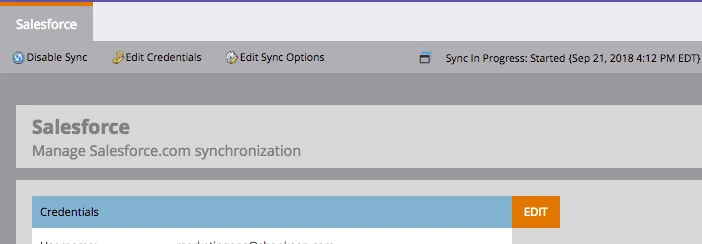
It would also be helpful to list the date/time of the last successful sync that was completed.

We had a few incidents where our Salesforce team deprecated multiple inactive/unused custom fields on the account object in Salesforce, which resulted in multiple alerts from Marketo that said "Salesforce Sync Error: Could not complete your Salesforce sync. The following fields are required..." etc etc. The email alerts and the sync error status persisted for almost an hour in Marketo's admin section, and while it says "Sync in Progress" now, I'd like to know exactly when the last successful sync was completed.

Is there a way to see this? It would seem like a reasonable log to provide to Marketo users.

This post is no longer active and is closed to new replies. Need help? Start a new post to ask your question.
Best answer by Grégoire_Miche2

Hi Liliana,

No, there is none.

Look here, chapter 9 Marketo / salesforce integration needs a serious overhaul, don't you "sync"? : there a few ideas to vote for.

-Greg

1 reply

Grégoire_Miche2
Grégoire_Miche2Accepted solution
New Participant
September 23, 2018

Hi Liliana,

No, there is none.

Look here, chapter 9 Marketo / salesforce integration needs a serious overhaul, don't you "sync"? : there a few ideas to vote for.

-Greg

New Participant
September 26, 2018

Wow thanks for the comprehensive list, @Grégoire Michel​. I upvoted everything in section 9 and asked my team to do the same as well.

Grégoire_Miche2
New Participant
September 26, 2018

Hi Liliana,

Also please mark the question as answered, for future reference.

-Greg