Share assets across workspace | Community
Skip to main content
May 4, 2017
Question

Share assets across workspace

  • May 4, 2017
  • 3 replies
  • 7117 views

Hi

I don't know how I can share assets across workspaces.

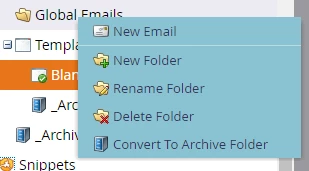
I found that we can share a folder, when I click right on folder, I don't have any feature to make it shareable. screen shot below
This post is no longer active and is closed to new replies. Need help? Start a new post to ask your question.

3 replies

Dan_Stevens_
New Participant
May 5, 2017

As Stephanie mentioned, you can only share some assets - not all. Vote these ideas up:

New Participant
May 5, 2017

You will need to create a folder for each component.

For example, you will need to create a new folder under Template folder, right click and then the Shared folder option will be available then.

Also, you can only share the following:

  • Email templates
  • LP templates
  • Images
  • Snippets
  • Smart lists
  • Segmentations
Kind regardsStephanie
Felipe_Ramirez1
New Participant
August 8, 2017

Thanks Stephanie!

Devraj_Grewal
New Participant
May 4, 2017

Hicham,

"Global Emails" may be a system folder, you will need to create a new folder. Another possible reason is that there needs to be assets in the folder in order to share. You can move the assets to the folder and then share the folder.