Slackbot Hates Server Side Post | Community
Skip to main content
John_M
Employee
November 1, 2016

Slackbot Hates Server Side Post

It's true. Here at Marketo we use Slack, and our Slackbot HATES server side post.. so much so that when you mention it, it chastises you. It's really pretty amusing.
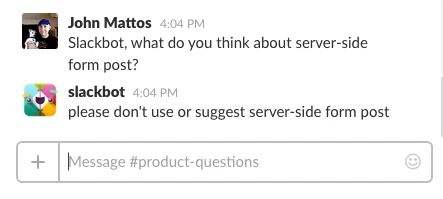
Fine! Jeez.

Really though, Slackbot is completely right. Server side post has effectively been replaced by the following REST endpoint, which is great and scalable.

http://developers.marketo.com/rest-api/lead-database/leads/#push_lead_to_marketo

This, along with my other most recent blog, provide a good blueprint for associating leads in a non marketo form with only one REST call. No fewer than 3 customers have had this very question for me this week alone, so it seems like a hot topic.

This post is no longer active and is closed to new replies. Need help? Start a new post to ask your question.

16 replies

Level 4
May 4, 2017

Regarding this:

Is it possible to associate the _mkto_trk cookie value with a lead using the Push Lead call?

How would I do that?

I see that if you have a _mkt_tok, you can pass it into the push leads API as a mktToken key, but could you use the Push Lead call as a bulk Associate Lead call for a _mkt_tok / Munchkin cookie? This would allow us to associate tracking cookies in bulk (to preserve API calls), and do it by email instead of lead ID.

Translate
SanfordWhiteman
Level 10
May 4, 2017

Yes, the cookie value is one of the possible associators (as it also is with the older syncLead/associateLead methods). It's the mkt_tok that's a newer option.

Translate
Level 4
May 4, 2017

Justin Norris wrote:

If you are trying to simultaneously create a new lead and associate it with a cookie (which is a primary use case for associating non-Marketo form fills), you don't have any Marketo email mkt_tok value to use, because it is a new lead who has never received a Marketo email. All you have is the the ID contained in the _mkto_trk cookie.

So how would Push Lead work in that scenario? Is it possible to associate the _mkto_trk cookie value with a lead using the Push Lead call?

I'm wondering the same thing. Justin, is it possible?

Translate
Jessica_Cross1
Level 4
November 7, 2016

Nice use of Slackbot.

My director of SDRs wanted to know if I could turn our aging MQ report into a slack bot.  Where there is a will there is a way, right?

Translate
John_M
John_MAuthor
Employee
November 2, 2016

Hi @Justin Norris​

Im glad you're finding it useful!

Sanford is a great resource, so im sure you're getting good advice. It all comes down to client or server side, with thee Forms 2 API being on the client, and REST on the server. Just depends on how your pages are designed, both are equally good options.

I wrote another blog to talk through the cookie values, and the confusing stuff there.. ( Associating Leads with Non Marketo Form Fills  ) but keep in mind with munchkin on the page, a hidden field called _mkt_trk will get populated with the cookie value with no extra JS required.

Check that blog out and see if it answers your question here.

As for the program name, that parts I havent used yet, so I cant speak to it.

Translate
Justin_Norris1
Level 10
November 2, 2016

Hey @John Mattos (W)​,

Thanks for writing about this stuff.

I have two questions:

1) Under what circumstances would you want to use Push Leads instead of us Submitting a Hidden Form with the Forms 2 API? A hidden Forms 2 submit is the method I have been using and recommending (admittedly influenced quite a bit by the advice of @Sanford Whiteman​), as this method uses no REST calls at all.

I'm interested in your perspective on the relative merits of the two approaches.

2) I've reviewed the documentation for Push Leads a few times. (I'm not a developer so I read it slowly .) A few things are confusing me:

a.

In addition to synchronization of lead fields, this endpoint allows for lead association based on cookie values which are passed to the endpoint.  This is done by passing the mkt_tok value generated by clicking through a Marketo email...

The mkt_tok value when you click on an email is different than the ID in the _mkto_trk cookie.

If you are trying to simultaneously create a new lead and associate it with a cookie (which is a primary use case for associating non-Marketo form fills), you don't have any Marketo email mkt_tok value to use, because it is a new lead who has never received a Marketo email. All you have is the the ID contained in the _mkto_trk cookie.

So how would Push Lead work in that scenario? Is it possible to associate the _mkto_trk cookie value with a lead using the Push Lead call?

b.

...or by passing a program name in the call.

How does passing a program name in the call allow you to associate a cookie with a lead?

Sorry if I'm missing something here.

Thanks!

Translate