
Sliders on Forms | Community
Skip to main content
Jo_Pitts1
Community Manager
February 20, 2018
Solved

Sliders on Forms

  • February 20, 2018
  • 1 reply
  • 2748 views

All,

Has anyone experimented with placing a slider into a Marketo form (i.e. as per what they have on this page).

How To Create Range Sliders

One example of a use case would be a slider which at one end said 'I love faux colonial houses' and at the other 'I love modern architecture' and could pass a score back to the Marketo DB.

Regards

Jo
This post is no longer active and is closed to new replies. Need help? Start a new post to ask your question.
Best answer by SanfordWhiteman

Yes. Please don't use "W3Schools" as a guide, though. So much on there is wrong, wrong, wrong (it's not curated by actual developers).

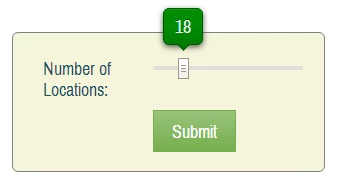
Marketo forms natively support a Slider field type based on the standard HTML5 Range type. Cross-browser, it has more features than the native Range, namely a current value display --

-- but it doesn't bring all the HTML5 features, such hashes, labels, and lists, unless they're natively supported by the browser.

If you want a more bells-and-whistles range slider you should use a standard Text field and then enhance it with a UI library, like noUiSlider.

1 reply

SanfordWhiteman
SanfordWhitemanAccepted solution
New Participant
February 20, 2018

Yes. Please don't use "W3Schools" as a guide, though. So much on there is wrong, wrong, wrong (it's not curated by actual developers).

Marketo forms natively support a Slider field type based on the standard HTML5 Range type. Cross-browser, it has more features than the native Range, namely a current value display --

-- but it doesn't bring all the HTML5 features, such hashes, labels, and lists, unless they're natively supported by the browser.

If you want a more bells-and-whistles range slider you should use a standard Text field and then enhance it with a UI library, like noUiSlider.

Jo_Pitts1
Jo_Pitts1Author
Community Manager
February 20, 2018

Sanford,

sorry - the W3Schools wasn't mean to be a reference or guide - just an example of a slider (to help clarify what I was after).

How dense of me - I didn't even pick up on the slider type!

Those noUiSliders are really nice. 

As always, thank you for the legendary knowledge and support!

Cheers

Jo

SanfordWhiteman
New Participant
February 20, 2018

Right, I was just sounding the general alarm... in addition to using outdated practices (like Element.onclick, etc.) without a disclaimer, they don't seem to care about browser compatibility. So while some of their demos (like this one) can be perfectly fine in the browser you're currently using, they might be very not-fine when you open another (fully modern) browser.

Range is a good example of a feature that someday will be very cool, but is spottily supported to the point that you might as well start from a totally 3rd-party widget (instead of trying to add hashes & labels to a native widget).