Smart Campaign Issue - Click link in email trigger capturing false "clicks" | Community
Skip to main content
Michael_Guanci
New Participant
March 5, 2018
Solved

Smart Campaign Issue - Click link in email trigger capturing false "clicks"

  • March 5, 2018
  • 2 replies
  • 7880 views

Hi Marketo Community,

I have run into an issue twice in the past month around email reporting that I haven't run into in the past 6-7 months since we started using Marketo.  Last week we sent out an email, and normally in a trigger smart campaign I use caused strange error.  Usually I setup the smart campaign as follows:

Filters:

Clicks link in email trigger

add the link variant and choose the link that contains the actual asset.  This way we are only reporting and sending over to SFDC the true campaign responders to the appropriate SFDC campaign. 

Thankfully, for this email I didn't create a trigger campaign due to a time constraint and pulled a filtered version of this same smart campaign.  However, when the data came back it said over 9,000 people clicked on the link in the email.  This number jumped out because we usually have 2-3k responders for most of these asset emails.  When I submitted a ticket to support they came back saying "One thing we see in email reporting is that security or link scanner activity will register as a click in reporting, but does not indicate actual activity from the leads. Generally we can see this by looking at a lead's activity log, where a click will be registered prior to a delivery with no associated open."  I found this to be very alarming and when I followed up they said to ask on the community space as they didn't have a best practice to ensure something like this doesn't happen in the future.  Again, that response I found to be a little alarming that they don't have a workaround or best practice around an issue with their own software.

For this campaign, I did some additional filtering (some that came from support, others I came up with my own to try and narrow it down further):
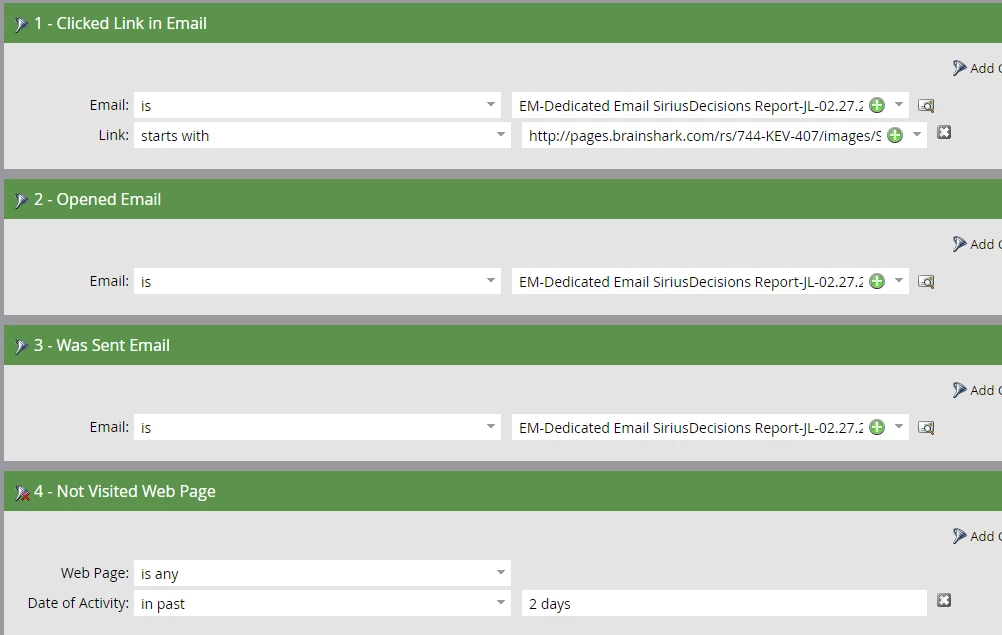
My question to all of you is, have you run into this issue before?  And if so, what additional filters have you added to your smart campaigns in order to feel confident about the "true" click data versus the security scanned "clicks?"

I am mentioning @Sanford Whiteman​ as I have followed your post responses and thought you might be able to shed some light on this issue (if you have run into in the past).  Anybody else that has any insight into this issue, I would love to hear your workarounds for this.

Thank you in advance for your responses.

This post is no longer active and is closed to new replies. Need help? Start a new post to ask your question.
Best answer by Dan_Stevens_

There are many existing discussion threads on this exact topic - check out this most recent one: [Shared Blog]: I Want to Believe, But: Your Email Link Clicks Aren’t Real

2 replies

Michael_Guanci
New Participant
March 28, 2018

I have a random follow up and not sure if anyone would know.  Do the scanner/bot clicks get attributed as a click in Sales Insight?  I would assume it would, but wanted to see if anyone may have insight on this.

This way, I can direct our sales team to either believe or not believe the data that is showing on the Sales Insight tab on their leads/contacts.

@Sanford Whiteman​ @Grégoire Michel

For the time being, I am using Dan's approach of the web visit to distinguish real clicks vs. spam clicks until a better solution comes along.  Thank you all again for the feedback and recommendations on this (I have read way too many posts in the past few weeks and my head is spinning on this issue). 

SanfordWhiteman
New Participant
March 28, 2018

No reason for the click to be filtered in MSI.

Dan_Stevens_
Dan_Stevens_Accepted solution
New Participant
March 5, 2018

There are many existing discussion threads on this exact topic - check out this most recent one: [Shared Blog]: I Want to Believe, But: Your Email Link Clicks Aren’t Real

Michael_Guanci
New Participant
March 5, 2018

Thank you Dan.  One thing I failed to mention in my original thread, the link in these emails have been for pdf files.  Would the visit web page filter that is mentioned in that thread still work in this scenario? 

Sorry for adding another post around this in the community, this is what was suggested by support and CSM.  I will bookmark that discussion for future reference.

SanfordWhiteman
New Participant
March 5, 2018

Thank you Dan. One thing I failed to mention in my original thread, the link in these emails have been for pdf files. Would the visit web page filter that is mentioned in that thread still work in this scenario?

Put simply, no. But you shouldn't be linking directly to downloadable assets anyway, see: http://blog.teknkl.com/stop-using-direct-download-links-unless-you-like-losing-tracking/