
Smart Campaign - Send Email - Flow UI | Community
Skip to main content
Joseph_Long
New Participant
March 2, 2017
Solved

Smart Campaign - Send Email - Flow UI

  • March 2, 2017
  • 2 replies
  • 2848 views

Hey Everyone,

Curious if there is a way to remove emails from the UI when sending an email via smart campagin.

For example:
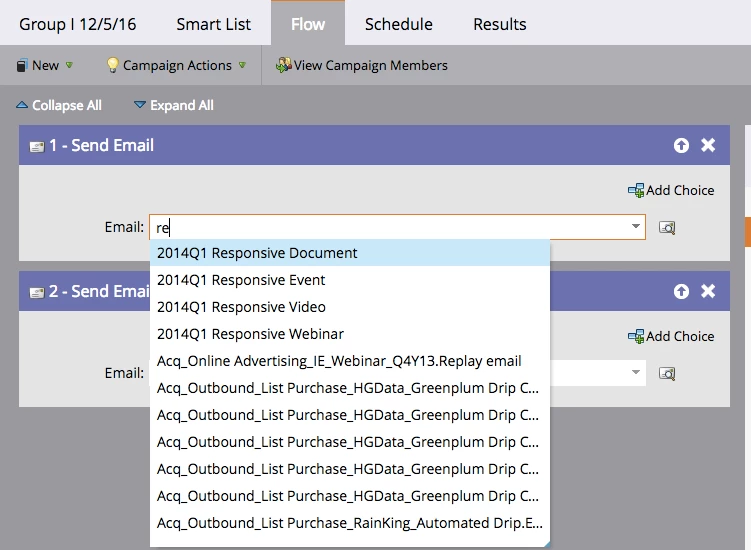
How does one remove the prepopulated list from the UI?


Thank you!

Best answer by Grégoire_Miche2

Hi Joseph,

To archive elements (assets in the design studio or programs in the marketing activities), first create a new folder somewhere in the folder tree.Then right click this folder an make it an archive folder. Then start dragging and dropping whole programs there if you are in the MA and emails, landing pages, forms or templates if you are in the DS.

-Greg

2 replies

Joseph_Long
New Participant
March 2, 2017

Thanks for the response Jim & Josh.

Jim Thao    I looked through the documentation and I do not see how to archive. How does one do that.

@hill The goal is to have the emails not to pop up in the UI once they have already been used.

Grégoire_Miche2
Grégoire_Miche2Accepted solution
New Participant
March 2, 2017

Hi Joseph,

To archive elements (assets in the design studio or programs in the marketing activities), first create a new folder somewhere in the folder tree.Then right click this folder an make it an archive folder. Then start dragging and dropping whole programs there if you are in the MA and emails, landing pages, forms or templates if you are in the DS.

-Greg

Joseph_Long
New Participant
March 2, 2017

That works!

Thanks Grégoire!

Jim_Thao7
New Participant
March 2, 2017

I beleive if you Unapprove and/or Archive the email (or the folder that it sits in), it should go away.

Josh_Hill13
New Participant
March 2, 2017

That's true, however, it may be hard to unapprove a lot of assets in use.

The drop down allows searching as you are doing there on the screenshot. Have a good naming scheme and you'll find it fast.
