
Solved
Snowbunny Template on Outlook
When I send a test to myself on outlook the hero image of snowbunny isn't showing properly. Any suggestions?
When I send a test to myself on outlook the hero image of snowbunny isn't showing properly. Any suggestions?
Hey Talia,
It looks like the background image isn't covering the entire section there, you might want to try and play with the widths of the elements there to get them to match.
I noticed in the code (highlighted in yellow) there are 3 different widths set here: 600, 640 and 700 -- my guess is this has something to do with it. Maybe try playing with the widths to make them all the same and see if that works this out? You could look at the other sections on the template and see what width they're set to and use that one, otherwise i'd try them all at 700 first.
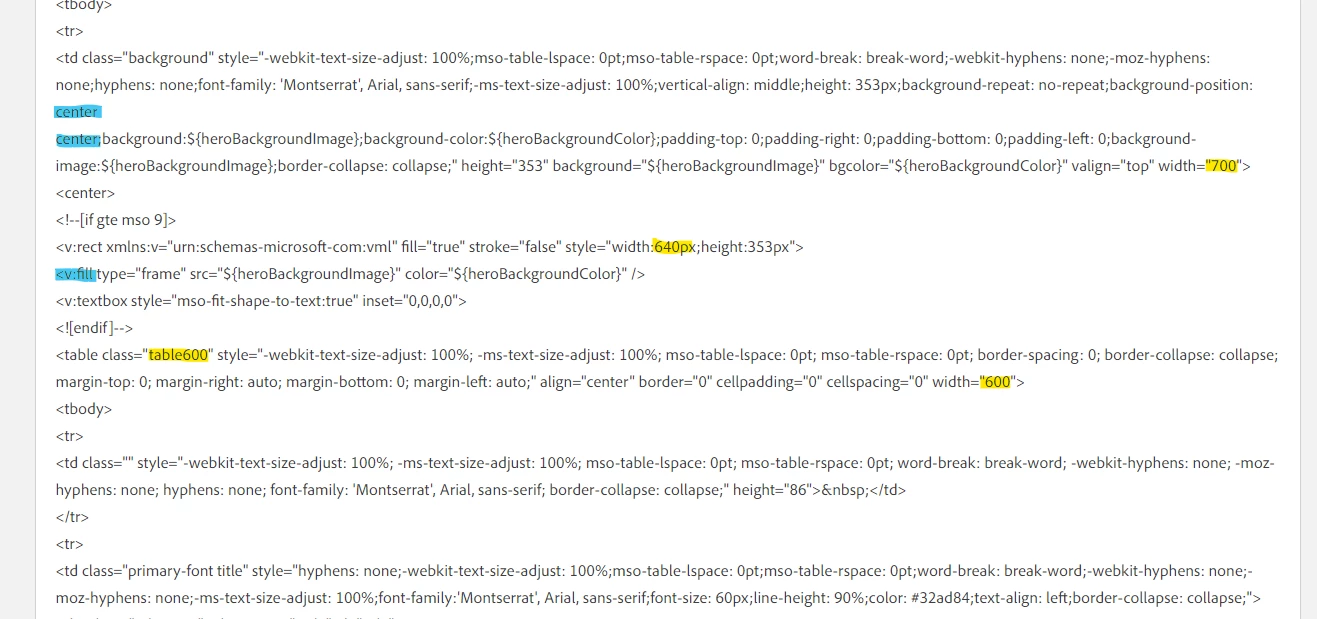
For reference, the blue highlights point out the "position" bits for the background image - the "center center" means the bg-image is centered top-to-bottom and left-to-right (like it was pinned to the center of the block and clipped at the edges) which is also the default setting for the v:fill setting in the Microsoft-only (MSO) VML code there.
Let me know if setting the widths there makes a difference in how the email renders in your Outlook, it might take a few sends to test and compare, but I think some combination of these width settings might the root of the issue here.
Enter your E-mail address. We'll send you an e-mail with instructions to reset your password.