Spaces in Filters | Community
Skip to main content
Mariesa_Milan
New Participant
March 8, 2016
Solved

Spaces in Filters

  • March 8, 2016
  • 2 replies
  • 8542 views

I'm creating a Smart List for scoring purposes and I want to include titles with IT. Examples: Director of IT, IT Manager, IT Security, etc.  Since there are many title variations that will include "IT", I do not want to use an exact match. Is there a way to locate titles that include "IT" but also exclude words with "it" in them? Examples of words with "it" in them that we would want to exclude are architect, unit, critical, etc. There is a way to build a filter formula in SFDC that will include spaces - example: CONTAINS( LOWER( Title ) , " it")  -- Notice the space before the " it".  Is there a way to do something similar in Marketo?

This post is no longer active and is closed to new replies. Need help? Start a new post to ask your question.
Best answer by SanfordWhiteman

Hi Tammy,

To add spaces around a filter value, adapt my approach from Creating a line break token for history fields

The changes from the history field method are:

  • You're looking for the POST to /editSmartListSubmit, not /updateTokenData
  • You're changing your placeholder value (three dashes) --- to %20 in the replay

The deal is otherwise the same: Marketo doesn't actually have a problem with special characters on the back end, it's that the front end filters them out unless you get creative.

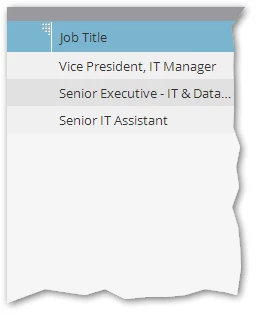
Then you can get just what you want:

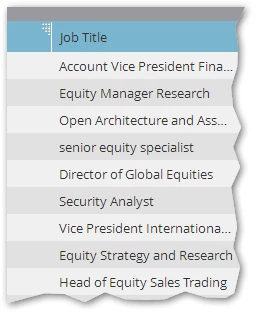
Instead of the overly broad [contains] results:

2 replies

SanfordWhiteman
New Participant
March 8, 2016

It is possible to create a filter that includes leading and trailing spaces, but you can't do it using the UI directly.  Same reason you can't directly enter a line break in a flow textbox: the Marketo back end does fully support these characters, but the front end "helpfully" strips them out.

To store this filter on the back end, you can use the same hack I developed to create a line break token.  You can contact me if you're interested.

Tammy_Chan
New Participant
January 25, 2018

Hi Sanford,

I'm running into the same issue here, would you be able to tell me how you addressed this? I basically want to bucket all "IT" contained titles into a segment but i'm getting things like "digital" etc.

Thanks!

SanfordWhiteman
SanfordWhitemanAccepted solution
New Participant
January 25, 2018

Hi Tammy,

To add spaces around a filter value, adapt my approach from Creating a line break token for history fields

The changes from the history field method are:

  • You're looking for the POST to /editSmartListSubmit, not /updateTokenData
  • You're changing your placeholder value (three dashes) --- to %20 in the replay

The deal is otherwise the same: Marketo doesn't actually have a problem with special characters on the back end, it's that the front end filters them out unless you get creative.

Then you can get just what you want:

Instead of the overly broad [contains] results:

Josh_Hill13
New Participant
March 8, 2016

Spaces aren't recognized in most situations.

I wrote about this in my guide, but you need to make several smart lists:

  • Job Title CONTAINS
  • Job Title STARTS WITH
  • Job Title IS
  • Job Title IS NOT [list of bad values that could come up from "it" or "intern*"

(1 or 2 or 3) and 4

it might work better to have 2 or 3 and then cross them.