SPAM | Community
Skip to main content
Karin_Edmondson
New Participant
November 6, 2014
Duplicate

SPAM

  • November 6, 2014
  • 12 replies
  • 6320 views
It would be nice if Marketo would report which emails are marked as spam.  I found this report from a different company that shows the # of "marked as spam" in a campaign.
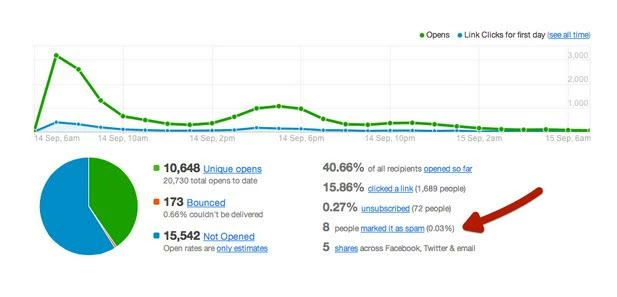
Marketo could but it in the email stats:
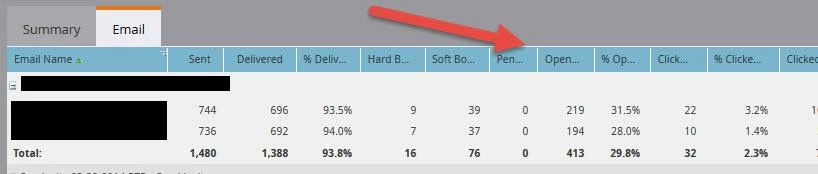
Please consider this because it would give more insight into what is happening with campaigns.
Thanks,
Karin

12 replies

New Participant
February 7, 2020
No text available
November 21, 2014
Thanks for the tips! 
Karin_Edmondson
New Participant
November 13, 2014
Justin:
Thank you for clarifying this.
Awesome Information,
Karin
Justin_Cooperm2
New Participant
November 12, 2014

The list you setup will give you leads who had an email bounce because of a spam blocker.

The list I setup will give you leads that marked an email as spam via their email client (and consequently reported to Marketo through an FBL).

Karin_Edmondson
New Participant
November 12, 2014
Thanks Justin,
but shouldn't the email suspended = "true" and a cause contains "spam" or code "554" be included in this?

Let me know if I am missing something here.  Your smart list produced only 77 in my database - the above produced much more.
Thanks,
Karin
Justin_Cooperm2
New Participant
November 11, 2014
https://community.marketo.com/MarketoResource?id=kA650000000GtqCCAS
You can use this for the time being.

Remember that this number won't be entirely accurate because for services like Gmail there is no way to report this at the lead level (their feedback loop does not identify the address that marked the message as spam).

Justin
October 28, 2015

Hi Justin, this link no longer points to the right place - can you please re-post as I'm interested in getting this information. Thanks!

Justin_Cooperm2
New Participant
November 2, 2015

Here is the information that was at that location previously:

Leads are auto unsubscribed due to default Feedback Loop setup with the following ISPs:

     AOL
     BlueTie
     Comcast
     Cox
     Hotmail
     OpenSRS
     Rackspace
     RoadRunner
     Synacor
     Yahoo (Optional/Additional Setup Requirements)

You can use the following filters to find leads that have clicked the SPAM button in your emails.

Filter 1: Data Value Changed
Attribute: Unsubscribe
New Value: True
Reason: Contains, Customer Complaint Received from ISP.

(Optional to Specify what Email Domain)
Filter 2: Email Address
Contains @domain.

November 10, 2014
This is a fantastic idea!
November 10, 2014
It would be very helpful to be able to view spam complaints by email or program.  I have used other systems that were able to provide this information, and it was very helpful to be able to view how many Leads/Contacts were lost due to a specific email-unsubscribes only tell half of the "stop emailing me" story.
Michelle_Tizian
New Participant
November 7, 2014
I used Emailabs a long long time ago and they had a similar dashboard that shows the unique opens, and those who marked the email spam.  
Dan_Stevens_
New Participant
November 7, 2014
We used to use Campaign Monitor (which is where this dashboard was produced) - they have some incredible reporting capabilites.  Including the ability to do a deep dive on any metric to see who's behind those numbers.  I'd love to see these capabilities built into Marketo reports/dashboards.