Spam form Fills- Same Value captured in all fields | Community
Skip to main content
Samantha_Baston
New Participant
April 4, 2018
Solved

Spam form Fills- Same Value captured in all fields

  • April 4, 2018
  • 1 reply
  • 2146 views

Hi All,

Apologies if this is not the correct place to be posting, this is my first time.  We recently have had an uptick in spam form fills and have already implemented a honeypot field and a recaptcha on our page, and there are still several coming through. I noticed that all of our "suspect fills" seem to have entered the same data in every field. For example someone would have :

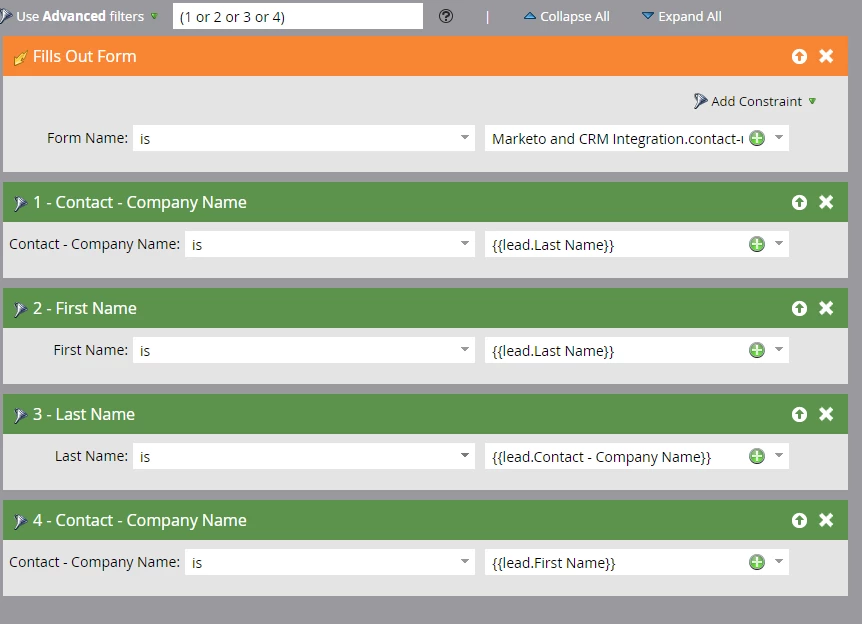
I want to be able to flag people who have entered the same value for a required field multiple times so we can hold them back from our CRM until further qualification. I have set up the below smart campaign, and it does not seem to be working. I tried using tokens as the field values, but I am coming up short. Has anyone else accomplished this in a different way? Screenshot of smart campaign below:
This post is no longer active and is closed to new replies. Need help? Start a new post to ask your question.
Best answer by SanfordWhiteman

Without knowing exactly what you mean by "feeding a Marketo form" I can't really help.

If they're posting a Marketo form using a Forms 2.0 hidden form post -- which is indeed the best way to do this -- you still need to verify the reCAPTCHA in Marketo.  reCAPTCHA isn't a client-side tool, it's a client ​and server ​side matchup.

1 reply

SanfordWhiteman
New Participant
April 4, 2018

You can't perform these comparisons in Marketo flows. You'd have to call a webhook.

You say these posts are passing your reCAPTCHA. Can you show your reCAPTCHA webhook definition and the trigger campaigns you're using to discard/quarantine reCAPTCHA failures?

Samantha_Baston
New Participant
April 4, 2018

Hi Sanford,

Thanks so much for your feedback, I find all of your posts incredibly helpful.  The issue with this particular form is that it's a web form that is feeding a marketo form behind the scenes. Our developer team put in an invisible reCAPTCHA and I am very limited on what I can see from my end.  I have opened a ticket with our site developers to dig into this more,  but it's on their backlog and I would love to be able to somehow put a fix in place until that work can be vetted and completed.

I realize I am not giving you much information here, so any guidance is greatly appreciated.

SanfordWhiteman
SanfordWhitemanAccepted solution
New Participant
April 4, 2018

Without knowing exactly what you mean by "feeding a Marketo form" I can't really help.

If they're posting a Marketo form using a Forms 2.0 hidden form post -- which is indeed the best way to do this -- you still need to verify the reCAPTCHA in Marketo.  reCAPTCHA isn't a client-side tool, it's a client ​and server ​side matchup.