Specifying an Image when sharing a Marketo landing page on Facebook | Community
Skip to main content
February 16, 2017
Solved

Specifying an Image when sharing a Marketo landing page on Facebook

  • February 16, 2017
  • 1 reply
  • 2466 views

I followed the directions found here: http://developers.marketo.com/blog/specify-an-image-when-a-marketo-landing-page-is-shared-on-facebook/

but for some reason, I still do not see it working for the small preview image that shows up. It only shows up if you click the right arrow to display the other option. (See below images). Does anyone have any other advice as to how we can fix this? Thank you.
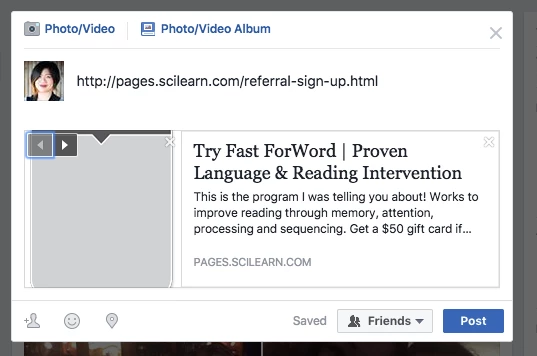
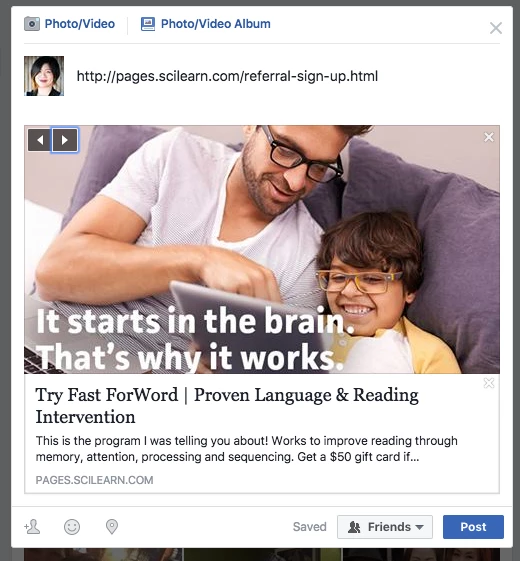
This post is no longer active and is closed to new replies. Need help? Start a new post to ask your question.
Best answer by Frank_Breen2

Social networks cache images usually, Facebook have these instructions on a possible fix: Webmasters - Sharing - Documentation - Facebook for Developers. You may want to follow these instructions to debug: Best Practices - Sharing - Documentation - Facebook for Developers.

1 reply

Frank_Breen2
Frank_Breen2Accepted solution
New Participant
February 22, 2017

Social networks cache images usually, Facebook have these instructions on a possible fix: Webmasters - Sharing - Documentation - Facebook for Developers. You may want to follow these instructions to debug: Best Practices - Sharing - Documentation - Facebook for Developers.

February 22, 2017

Thank you very much for your help, Frank! It seems like I got it to work. That gray image seems to still be cached in the widget we are trying out, but overall is working now. Thank you!