Statistics of AB Testing | Community
Skip to main content
New Participant
October 4, 2023
Solved

Statistics of AB Testing

  • October 4, 2023
  • 1 reply
  • 1595 views

Hello all! 

I have launched an A/B test of the subject line. Where can I view the statistics for each of the emails? In the dashboard, I can see the number of opens and deliveries for each version, but not the percentages. I know I could calculate it manually based on the info in the dashboard... however, I was hoping to be able to see it in a report.

Also,  can I find out which individuals received each of the versions?

Thanks! 🙂 

This post is no longer active and is closed to new replies. Need help? Start a new post to ask your question.
Best answer by Darshil_Shah1

Hello, @silviapumar!

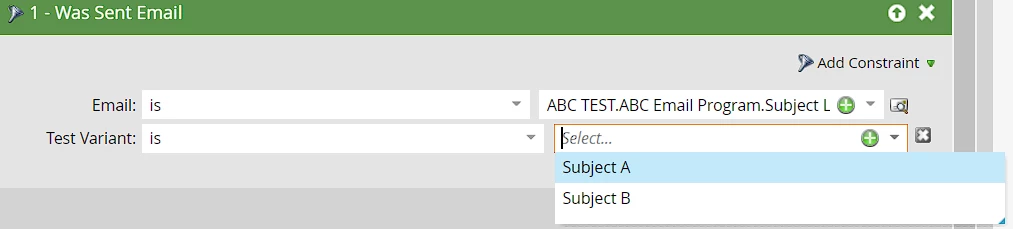
Well, you can create an email performance report with Was Sent Email <Select Email> with the correct Test Variant selected to get all the stats related to the corresponding email version. Similarly, you can also create a stand-alone smart list asset with the same filter: Was Sent Email <Select Email>, Test Varient. See the filter below:

I hope you find this helpful. Please let us know if you have quesitons.

1 reply

Darshil_Shah1
Darshil_Shah1Accepted solution
Community Manager
October 4, 2023

Hello, @silviapumar!

Well, you can create an email performance report with Was Sent Email <Select Email> with the correct Test Variant selected to get all the stats related to the corresponding email version. Similarly, you can also create a stand-alone smart list asset with the same filter: Was Sent Email <Select Email>, Test Varient. See the filter below:

I hope you find this helpful. Please let us know if you have quesitons.

New Participant
October 5, 2023

Thank you @darshil_shah1 !

That was just what I needed 🙂

Cheers!