Stay on page Thank you snippet does not show up on guide landing page | Community
Skip to main content
Eva_Yu
New Participant
May 17, 2018
Solved

Stay on page Thank you snippet does not show up on guide landing page

  • May 17, 2018
  • 1 reply
  • 2657 views

I followed the instructions and created a snippet <div> on the template.

Created a snippet and pasted the code into it:

<script src="// app-ab16.marketo.com/js/forms2/js/forms2.js"></script>

<script>

MktoForms2.whenReady(function (form){

//Add an onSuccess handler

form.onSuccess(function(values, followUpUrl){

   //get the form's jQuery element and hide it

form.getFormElem().hide();

document.getElementById('confirmform').style.visibility = 'visible';

   //return false to prevent the submission handler from taking the lead to the follow up url.

   return false;

});

});

</script>

<div id="confirmform" style="visibility:hidden;"><p><strong>Thank you. Our product expert will be in contact shortly!</strong></p></div>

Then edit the snippet on the landing page to refer to this snippet. http://go.adlinktech.com/DXS-GetQuote_LP_Video.html

But it doesn't work. What did I miss?

This post is no longer active and is closed to new replies. Need help? Start a new post to ask your question.
Best answer by SanfordWhiteman

You have a syntax error in the src of your external script (note the extra space). This causes a reference error, as you can see in the F12 Console:

In fact, you don't need the line

<script src="//app-ab16.marketo.com/js/forms2/js/forms2.js"></script>

at all.

Remove it, and simply move the inline <script> with the forms behaviors to just inside the closing </body> tag. Otherwise you're redundantly loading the forms library.

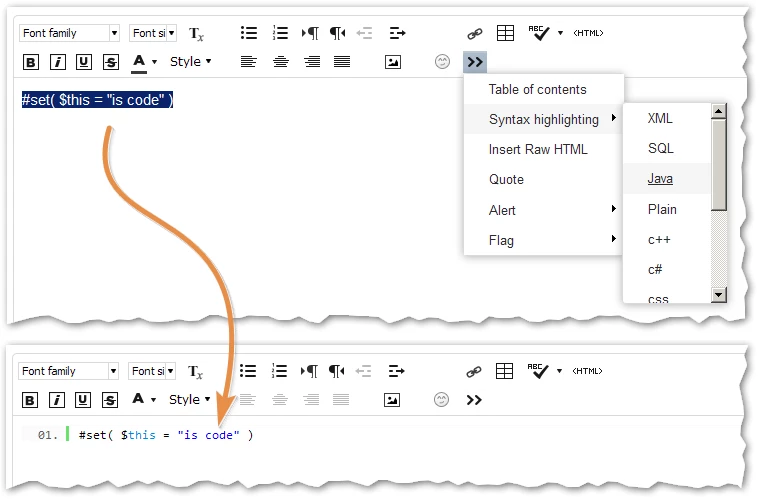
Also, please use the Advanced Editor's syntax highlighter when posting code:

1 reply

SanfordWhiteman
SanfordWhitemanAccepted solution
New Participant
May 17, 2018

You have a syntax error in the src of your external script (note the extra space). This causes a reference error, as you can see in the F12 Console:

In fact, you don't need the line

<script src="//app-ab16.marketo.com/js/forms2/js/forms2.js"></script>

at all.

Remove it, and simply move the inline <script> with the forms behaviors to just inside the closing </body> tag. Otherwise you're redundantly loading the forms library.

Also, please use the Advanced Editor's syntax highlighter when posting code:

Eva_Yu
Eva_YuAuthor
New Participant
May 17, 2018

Thank you very much, it worked!