Subject line personalisation | Community
Skip to main content
Laura_Abbott
New Participant
June 6, 2016
Solved

Subject line personalisation

  • June 6, 2016
  • 4 replies
  • 3686 views

I am trying to personalise the subject line. However, I also need the following sentence to be different depending on whether the name field has a value.

I know the basic option is: {{lead.First Name}}, have your say on the new Evaluate website but without a name I end up with ",have your say on our new website."

What I want:

Personalised: Steve, have your say on our new website -

Non personalised: Have your say on our new website.

I'm sure the answer is simple but I can't find it anywhere!

This post is no longer active and is closed to new replies. Need help? Start a new post to ask your question.
Best answer by Robb_Barrett

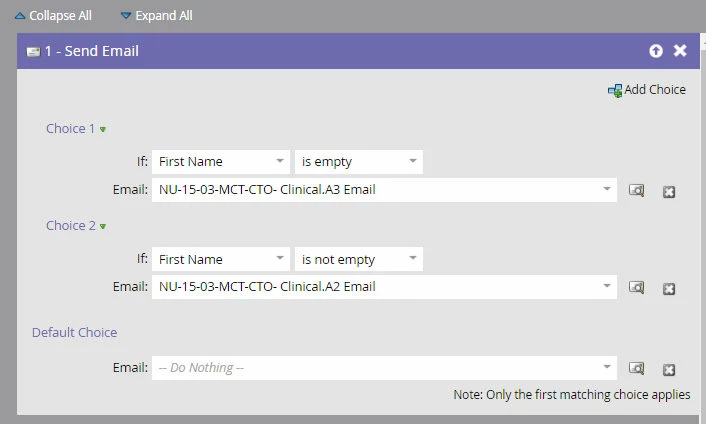
Here's an easy way:

Flow Step: Send Email

Add Choice

If First Name IS NOT EMPTY, Send Email 1

Add Choice

If First Name IS EMPTY, Send Email 2

Email 2 just has a different subject line.

4 replies

Louise_Wright
New Participant
June 7, 2016

Thanks this is useful.

Robb_Barrett
Robb_BarrettAccepted solution
New Participant
June 6, 2016

Here's an easy way:

Flow Step: Send Email

Add Choice

If First Name IS NOT EMPTY, Send Email 1

Add Choice

If First Name IS EMPTY, Send Email 2

Email 2 just has a different subject line.

Robb Barrett
Laura_Abbott
New Participant
June 7, 2016

That makes sense. Thanks Robb

Jenn_DiMaria2
New Participant
June 6, 2016

There are a couple ways you can go about this without email scripting.

I would just create a segment based on whether or not someone has a first name, then make the subject line dynamic.

Jim_Thao7
New Participant
June 6, 2016

You're going to need email scripting since you're looking at tokenizing and using if/else statements.