Subscription Status Reporting | Community
Skip to main content
New Participant
October 3, 2023
Solved

Subscription Status Reporting

  • October 3, 2023
  • 1 reply
  • 1580 views

Hi all, 


Looking for some help "Activating" the status of my subscription report. I can set cadence, recipients and report content but am unable to activate the report. Some insight would be greatly appreciated. First time posting, if this in the wrong queue feel free to delete.

This post is no longer active and is closed to new replies. Need help? Start a new post to ask your question.
Best answer by Darshil_Shah1

Hi @sclarkso! Don't you see the Active checkbox as one of the report columns (pl. see the snapshot below)? Setting it to on/off for the report would enable/disable the report subscription. I hope you find this helpful. Let us know if you have questions. 🙂


1 reply

Darshil_Shah1
Darshil_Shah1Accepted solution
Community Manager
October 3, 2023

Hi @sclarkso! Don't you see the Active checkbox as one of the report columns (pl. see the snapshot below)? Setting it to on/off for the report would enable/disable the report subscription. I hope you find this helpful. Let us know if you have questions. 🙂


sclarksoAuthor
New Participant
October 3, 2023

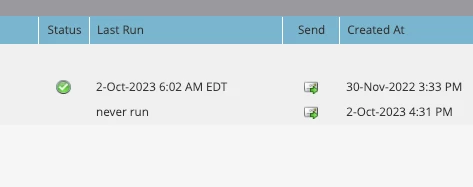
Hi @darshil_shah1, I have the Active checkboxed ticked. My focus is the "status", would you be able to provide insight as to why the top report has an active icon? How would I activate the status and run the reporting? Your insight is appreciated greatly!

Darshil_Shah1
Community Manager
October 3, 2023

Well, AFAICT, that's a system-managed flag. IMO Status = green tick means that the report's previous run was successful. You'd not have a previous run status flag for the report that hasn't run yet.
