
Switching between Production and Sandbox instances | Community
Skip to main content
Boris_Kiperas1
New Participant
May 21, 2017
Solved

Switching between Production and Sandbox instances

  • May 21, 2017
  • 2 replies
  • 4016 views

Hi everyone

Marketo announced a new feature during the Summit 2016 in Vegas, switching between production and sandbox instances without having to go through a login screen each time. Does anyone know why this has not been rolled out yet and when (if) it will be?
This post is no longer active and is closed to new replies. Need help? Start a new post to ask your question.
Best answer by Grégoire_Miche2

Hi Boris,

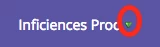
The feature is called Universal ID and is available through a support ticket. They are a few precautions, and the activation of the feature will have to be done by the engineering. Once activated on your 2 instances, a small arrow will show up on the right of your instance name:

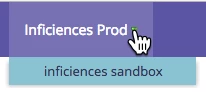
if you click it, you will see a menu with all the instances available to your user:

The whole system also works with SSO, but in fact is useless in this case because you have to reconnect to the second instance.

-Greg

2 replies

Grégoire_Miche2
Grégoire_Miche2Accepted solution
New Participant
May 22, 2017

Hi Boris,

The feature is called Universal ID and is available through a support ticket. They are a few precautions, and the activation of the feature will have to be done by the engineering. Once activated on your 2 instances, a small arrow will show up on the right of your instance name:

if you click it, you will see a menu with all the instances available to your user:

The whole system also works with SSO, but in fact is useless in this case because you have to reconnect to the second instance.

-Greg

Boris_Kiperas1
New Participant
May 26, 2017

Thank you!

Boris Kiperas
Josh_Hill13
New Participant
May 22, 2017

If it's not on docs.marketo.com>Releases, then it's not available.

What they did do was to label the sandbox instance correctly so you aren't confused when you login. You can see it in the upper LEFT corner.