Syncing Custom SFDC Fields | Community
Skip to main content
June 24, 2016
Solved

Syncing Custom SFDC Fields

  • June 24, 2016
  • 1 reply
  • 1457 views

Hello All,

I currently have Marketo Spark Edition and SFDC Enterprise edition.  I'm trying to figure out how to sync custom fields I create for opportunities back to Marketo, so that I can create a campaign based on our custom fields.

Example, my customers may use Adobe software or Avid software.  I want to be able to send an email to customers that meet the criteria: Opportunity=Yes Software=Avid

I have dug into both field management and a few articles and it seems like it is only doable through the API and not something that can be done in the interface. I find that a little hard to believe.  Does anyone have any tips or articles they can point me to?

Thanks!

This post is no longer active and is closed to new replies. Need help? Start a new post to ask your question.
Best answer by Grégoire_Miche2

Hi Nate,

No, it is very simple: make sure the Marketo sync user has access to opportunities and especially to this field. The field will be mapped to Marketo, on the opportunity object, within minutes.

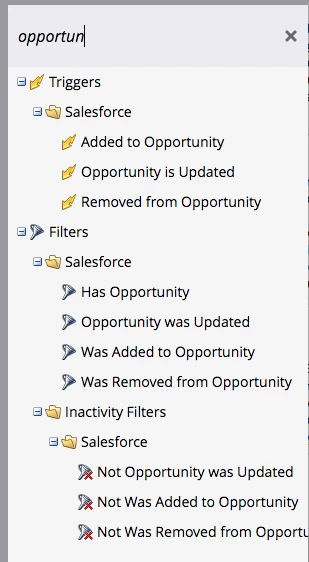
Then, in Marketo, use an opportunity related filter/trigger:

and add a constraint on the "Software" field:

-Greg

1 reply

Grégoire_Miche2
Grégoire_Miche2Accepted solution
New Participant
June 27, 2016

Hi Nate,

No, it is very simple: make sure the Marketo sync user has access to opportunities and especially to this field. The field will be mapped to Marketo, on the opportunity object, within minutes.

Then, in Marketo, use an opportunity related filter/trigger:

and add a constraint on the "Software" field:

-Greg

June 27, 2016

Thanks Gregoire, I was way overthinking that, that works perfectly!

Best,


N