System Unsubscribe Behavior in Smart Campaigns | Community
Skip to main content
July 26, 2018
Solved

System Unsubscribe Behavior in Smart Campaigns

  • July 26, 2018
  • 2 replies
  • 2501 views

I feel like this is Marketo 101, but I can't seem to find an answer anywhere and it was never mentioned in training...

When someone is given the "unsubscribe = true" (system unsubscribe), either manually or through an unsubscribe landing page, are they automatically prevented from being sent any email communications from all programs, or does every smart campaign need to add a filter for persons on the "marketable persons" list only or "unsubscribed = false"?
This post is no longer active and is closed to new replies. Need help? Start a new post to ask your question.
Best answer by Dan_Stevens_

Yes, they are automatically suppressed and no need to include a separate filter.  But just for non-operational emails.  They will still receive operational emails.

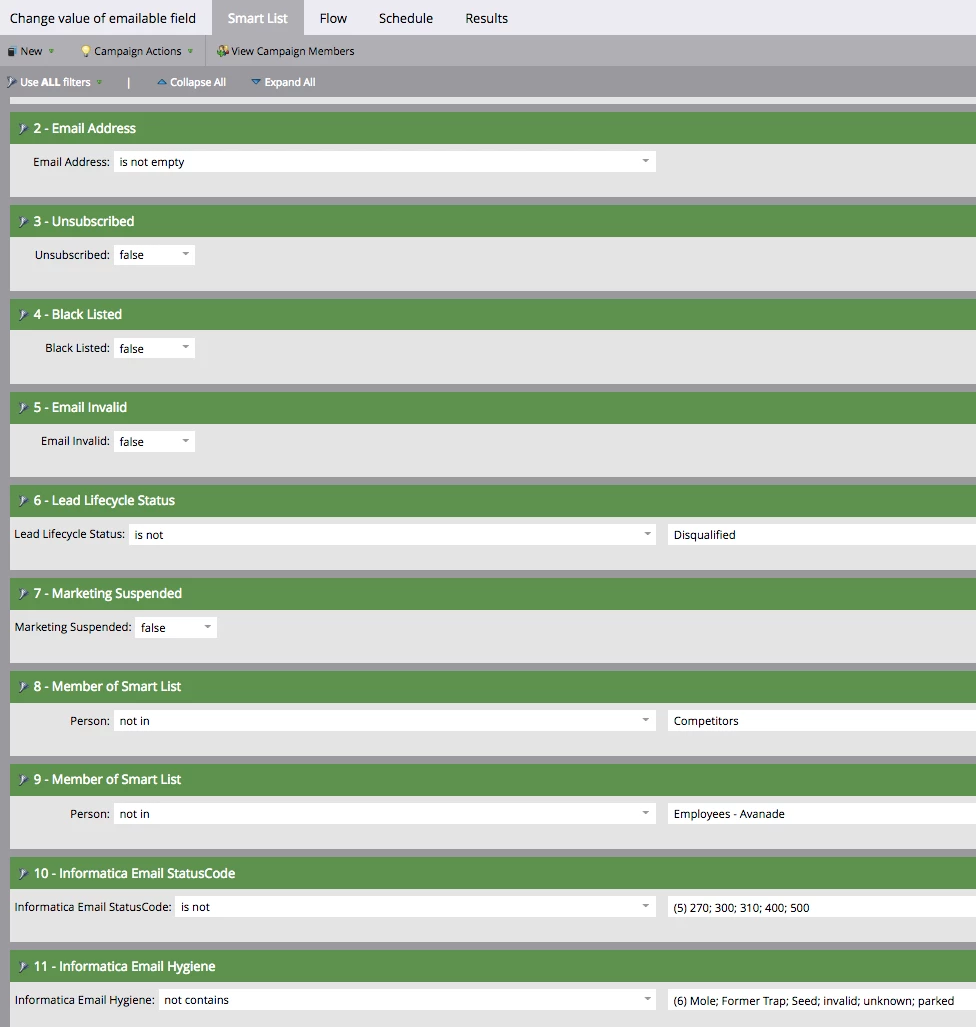
We, on the other hand, do include the filter - along with several other filters that make a person non-marketable (email invalid, blacklisted, hard-bounced > x times, etc.) - just to make our smart campaigns as efficient as possible.  Actually, we have a field called "Emailable" - and that's what we filter on in our smart campaigns.  If all of these are true, "Emailable" is set to TRUE:

2 replies

Dan_Stevens_
Dan_Stevens_Accepted solution
New Participant
July 26, 2018

Yes, they are automatically suppressed and no need to include a separate filter.  But just for non-operational emails.  They will still receive operational emails.

We, on the other hand, do include the filter - along with several other filters that make a person non-marketable (email invalid, blacklisted, hard-bounced > x times, etc.) - just to make our smart campaigns as efficient as possible.  Actually, we have a field called "Emailable" - and that's what we filter on in our smart campaigns.  If all of these are true, "Emailable" is set to TRUE:

July 26, 2018

Thanks for the quick and detailed answer!

Josh_Hill13
New Participant
July 26, 2018

It is in the docs.

Email Invalid=T

Marketing Suspended=T

Unsubscribed=T

Blacklisted=T

will block any non operational email immediately. There is nothing further to do. Only Invalid, Blacklisted block ALL future email sends.

July 26, 2018

Thanks, Josh. The line in the docs "If a person checks this box, or clicks the unsubscribe link in an email, they will no longer receive marketing emails. They will, however, receive operational emails." just seemed very high-level and I wanted to make sure that there was nothing needed on the admin end to make this happen.