T-Online.de Links Issues | Community
Skip to main content
eric_vaillanco1
New Participant
January 25, 2021
Solved

T-Online.de Links Issues

  • January 25, 2021
  • 1 reply
  • 7018 views

Anybody has this issue when sending emails to T-Online.de webmail?

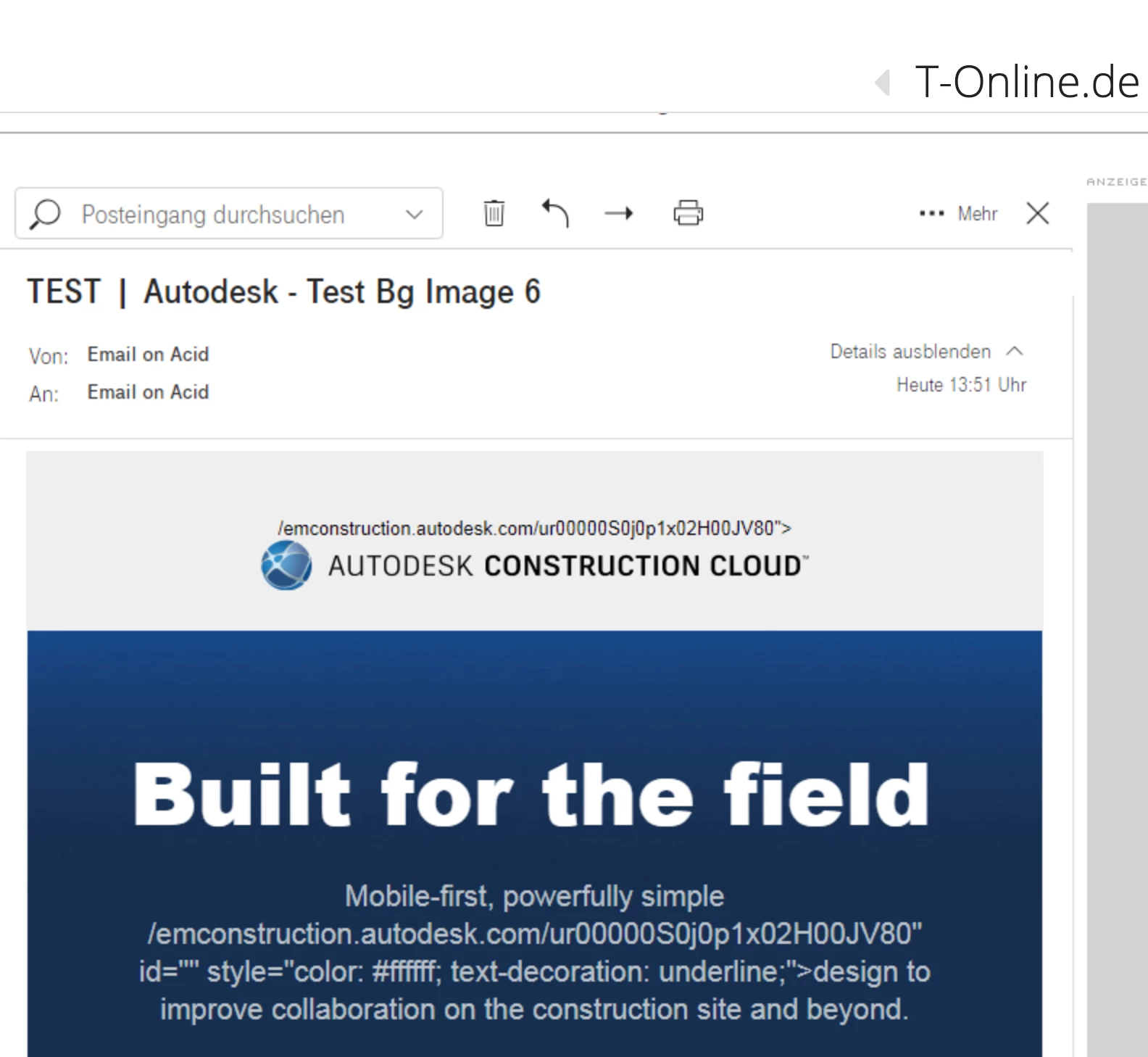
As soon a link is set on an image, in the text, or on an HTML button, part of the link renders as text in the email. It only happens with this email client no matter the way links are added; directly in the template (for example a link to a website on the logo) or via the image editor or text editor when editing the email in Marketo.

And before you ask, links are well formated and working everywhere else. 😉

Here is a screenshot; look at the logo and the text:

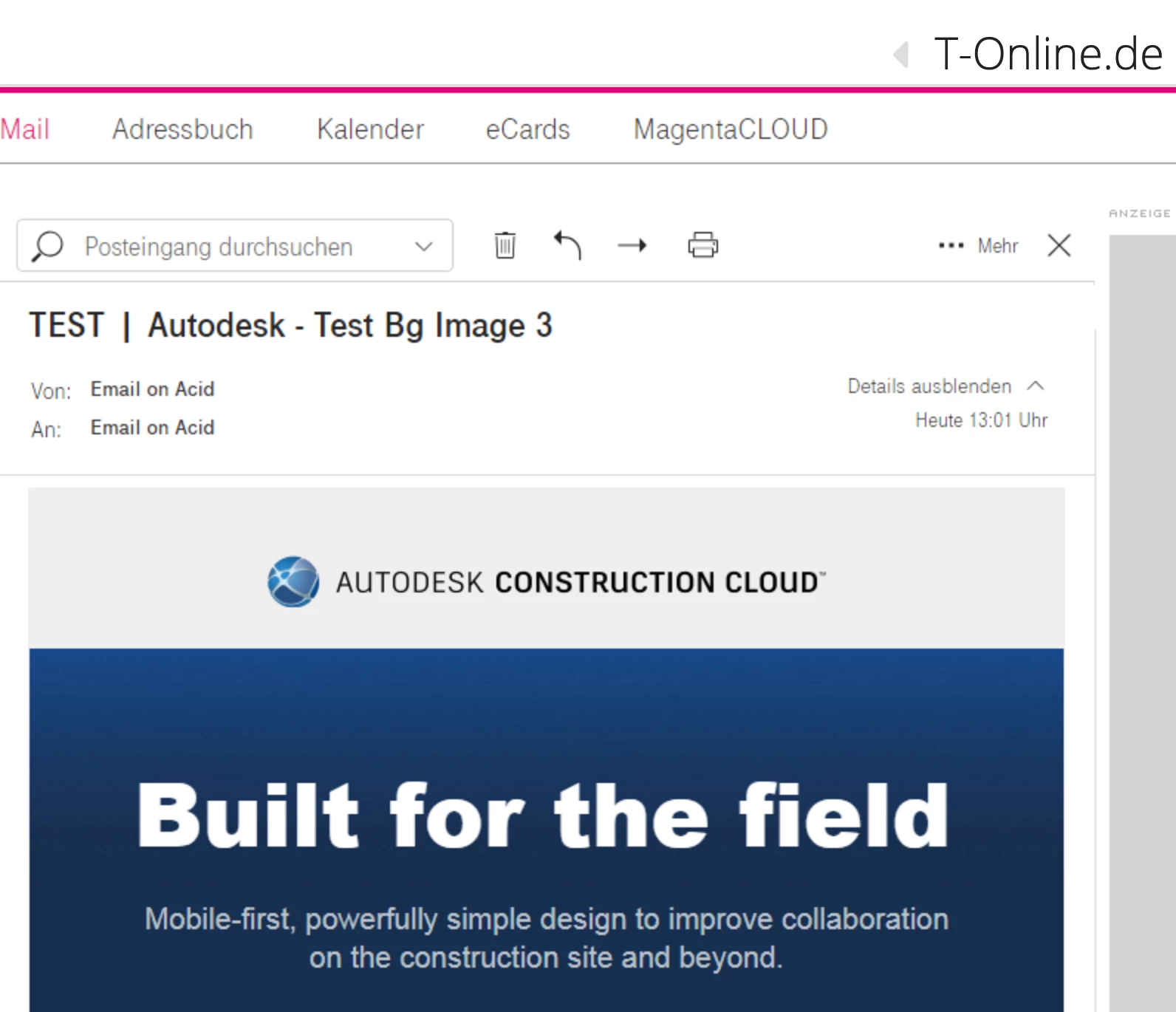
Here is how it look when I remove the links in the template and send the email with no links at all on the logo/text:

And if I add the links back, but this time via the image/text editor, it renders like the first screenshot. 

With Email on Acid, we can see the code that is sent to T-Online.de and I did realize the link is formatted correctly but cut on a few lines (the highlighted part in the following screenshot):


If I grab all the code sent to T-Online.de from EoA and fix the links to make them wrap without any line break, it then works correctly.

My conclusion is that Marketo breaks the code by adding line breaks and T-Online.de doesn't like it.

Any idea? Is it something to check with support? T-Online.de is one of the top email providers in Germany...

Eric

This post is no longer active and is closed to new replies. Need help? Start a new post to ask your question.
Best answer by SanfordWhiteman

Just sent you some credentials. I'm afraid this is something that Marketo (or T-Online) have to fix but maybe you can find some workarounds.


Thanks to Markus, I was able to login to @t-online.de webmail and see the problem firsthand.


And it definitely is a T-Online problem, not a Marketo problem. Marketo is sending totally valid HTML, but the T-Online HTML parser must've been built by someone who didn't read the HTML standard (which hasn't changed in this regard since at least HTML 3.2!) carefully. And no one ever reported the bug and it's been sitting there for who-knows-how-long.


Unfortunately, I have no single answer for you. It's going to come down to how important these leads are. We discussed this very case in our MUG office hours today and here are the strategies to choose from (more than one might be used simultaneously):


  • Send Text-Only versions emails to T-Online users.
  • Using Velocity, include a more exaggerated pointer to the Web View for the T-Online crowd. You might mention specifically that you know they'll have trouble because they use T-Online, or let leave that unsaid but feature the Web View much more prominently for them.
  • Create a Segmentation like Known Broken Links that separates out T-Online and any other known problematic domains. Segment any part of the email that has links and don't have them be true hrefs, i.e. just include the link at the end of a sentence, like Go to <https://www.example.com> now.  Email clients will render that as a link.
  • Send emails to T-Online users via a SMTP gateway that changes the HTML on-the-fly before forwarding to the end user. This way they'll see the links like everybody else. (This requires a skilled sysadmin-slash-developer but it's not a towering task if someone is familiar with this type of thing.)
  • Communicate to Sales that you have this problematic cohort — maybe they can cajole people into supplying different addresses, or subtly communicate that there may be some problems due to old webmail and to not hesitate to reach out.
  • Review the t-online.de leads based on other characteristics to see projected value (though this can understandably be extremely difficult).


Finally, I thought this was a pretty funny tip on T-Online's site:


1 reply

SanfordWhiteman
New Participant
January 25, 2021

Please show the part of the template where the link originally appears.

eric_vaillanco1
New Participant
January 26, 2021


Hi Sandford, here is the entire logo module. But it happens on any links; images, texts, and HTML buttons. And only with T-Online.de

<!-- Start of Single Line Logo (Width:378px - Max-width:564px) --> <table role="presentation" bgcolor="${LightGrayBgColor}" width="100%" align="center" cellpadding="0" cellspacing="0" border="0" class="mktoModule tableCollapse" id="LogoModule02" mktoName="Single Line Logo (Width:378px - Max-width:564px)" mktoAddByDefault="true" mktoActive="true" style="margin:0px auto; width:100%!important; min-width:100%!important;"> <tr> <td class="w40" align="${ImgAlignCenter}" valign="top" style="padding-top:${Top16pxSpacer}px; padding-bottom:${Bot28pxSpacer}px; padding-left:68px; padding-right:68px;"> <div class="mktoImg ${MobImgYes2}" id="Logo02" mktoName="Image - W:378px" mktoLockImgSize="false" mktoImgLinkTarget="_blank" mktoLockImgStyle="false" mktoImgWidth="378" style="display:inline-block;"> <a href="https://construction.autodesk.com/" target="_blank"> <img width="378" border="0" alt="Autodesk Construction Cloud Logo" src="http://constructioncloud.autodesk.com/rs/572-JSV-775/images/logo-autodesk-construction-cloud-378x35-2x.png" style="width:378px; height:auto!important; display:inline-block; border:none; outline:none; text-decoration:none; vertical-align:middle;" /> </a> </div> </td> </tr> </table> <!-- End of Single Line Logo (Width:378px - Max-width:564px) -->


Juliana_Burghar
New Participant
April 6, 2021

Hi Eric,

Have you found any solution for that issue? We have the same issue for the T-Online Webclient.


The <img > tag isn't broken across 2 lines initially, which suggests that the T-Online client does the line break by itself.

A line break in Marketo code is suspected to cause a portion of a link to be exposed in the T-online e-mail webclient, when this image/text has a link. 


KR, Juliana