Tel link tokens not working in Gmail iOS app, working in Android | Community
Skip to main content
New Participant
March 2, 2023
Solved

Tel link tokens not working in Gmail iOS app, working in Android

  • March 2, 2023
  • 2 replies
  • 7630 views

Hi Community,


I recently found that the tokens we use for tel links are not clickable in the Gmail iOS app.


The format we typically use is either tel:{{Lead.Brand Phone}} or {{Lead.Brand CallTo}}, which looks like this: tel:18885550000.


I have tried both unchecking the Include_mkt_tok box AND the Track Link box, but the links are still unclickable. 😥
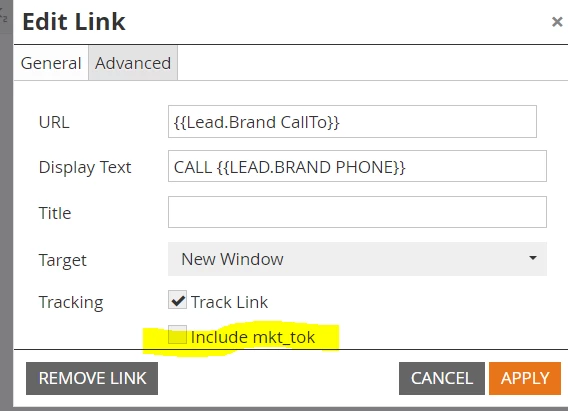


I'm aware of another issue with the Gmail for Android app and tried the same workaround above for this, but it didn't work either.

Any idea what the issue might be and if there are any other workarounds?

Our company relies heavily upon phone calls to drive business (we have a full-service call center) and Gmail is a massive user base for our marketing audience.


This is a huge hindrance in our marketing capabilities.


Thanks,

LK


This post is no longer active and is closed to new replies. Need help? Start a new post to ask your question.
Best answer by SanfordWhiteman

This standard format (called the “global” format) works for me in Gmail for Android (latest 2023 release):


<a href="tel:+1-212-555-0101">+1-212-555-0101</a>


You must turn off all tracking.

2 replies

Darshil_Shah1
Community Manager
March 3, 2023

Untracked TEL links work fine for me in the Gmail Android application. However, they aren't working in the Gmail iOS application (at least not for me).


New Participant
March 10, 2023

Hi Darshil,


To confirm, you sent an email with tel links embedded in tokens, correct? That's how we currently do it because we have so many brands we use tokens.


Thanks,

Laura

Darshil_Shah1
Community Manager
March 10, 2023

Yes, @guitarrista82 ! I tested it both ways, hard-coding the tel links and adding it via tokens. I see the same results in both cases (i.e., the link works in Gmail Android but not Gmail iOS).


SanfordWhiteman
SanfordWhitemanAccepted solution
New Participant
March 2, 2023

This standard format (called the “global” format) works for me in Gmail for Android (latest 2023 release):


<a href="tel:+1-212-555-0101">+1-212-555-0101</a>


You must turn off all tracking.

New Participant
March 7, 2023

Hi Sanford,


For most of our brands, we typically use lead tokens for our call links. However, for a specific group of brands, we use My Tokens.

The configuration is the same in both cases. We typically set the tel link as tel:18885550000 and we haven't had any problems with it until recently.


However, when we insert the actual number as a link using the usual tel format we use (tel:18885550000) and not a My Token or Lead Token, the number is clickable in the Gmail app for iPhone.


In the my token, I tried the "global" format you recommended, but I'm still running into the same issue--the link not being clickable. 


Not sure if this has anything to do with the link not being clickable in Gmail mobile app, but I did an inspect element in Gmail desktop and see that https://mail.google.com/mail/u/0/ appears to be appended to the tel link. 


Kind of at a loss as to any solutions--besides not using tokens for tel links anymore. That would be near impossible because we market to a lot of brands and rely heavily on tokens to streamline our email creation/qa process.


SanfordWhiteman
New Participant
March 7, 2023

Do you have SSL on your branding domain?